5. RabbitMQ 消息队列中 Exchanges(交换机) 的详细说明
- 作者: 五速梦信息网
- 时间: 2026年06月19日 04:38
bindingKeyEntry : bindingKeyMap.entrySet()) {
        String routingKey = bindingKeyEntry.getKey();
        String message = bindingKeyEntry.getValue();
        channel.basicPublish(EXCHANGE_NAME, routingKey, null, message.getBytes("UTF-8"));
        System.out.println("生产者发出消息: " + message);
}
}
}
**编写一个消费者,仅仅读取:`Routing key 为 *.orange.*` 匹配的队列的消息**
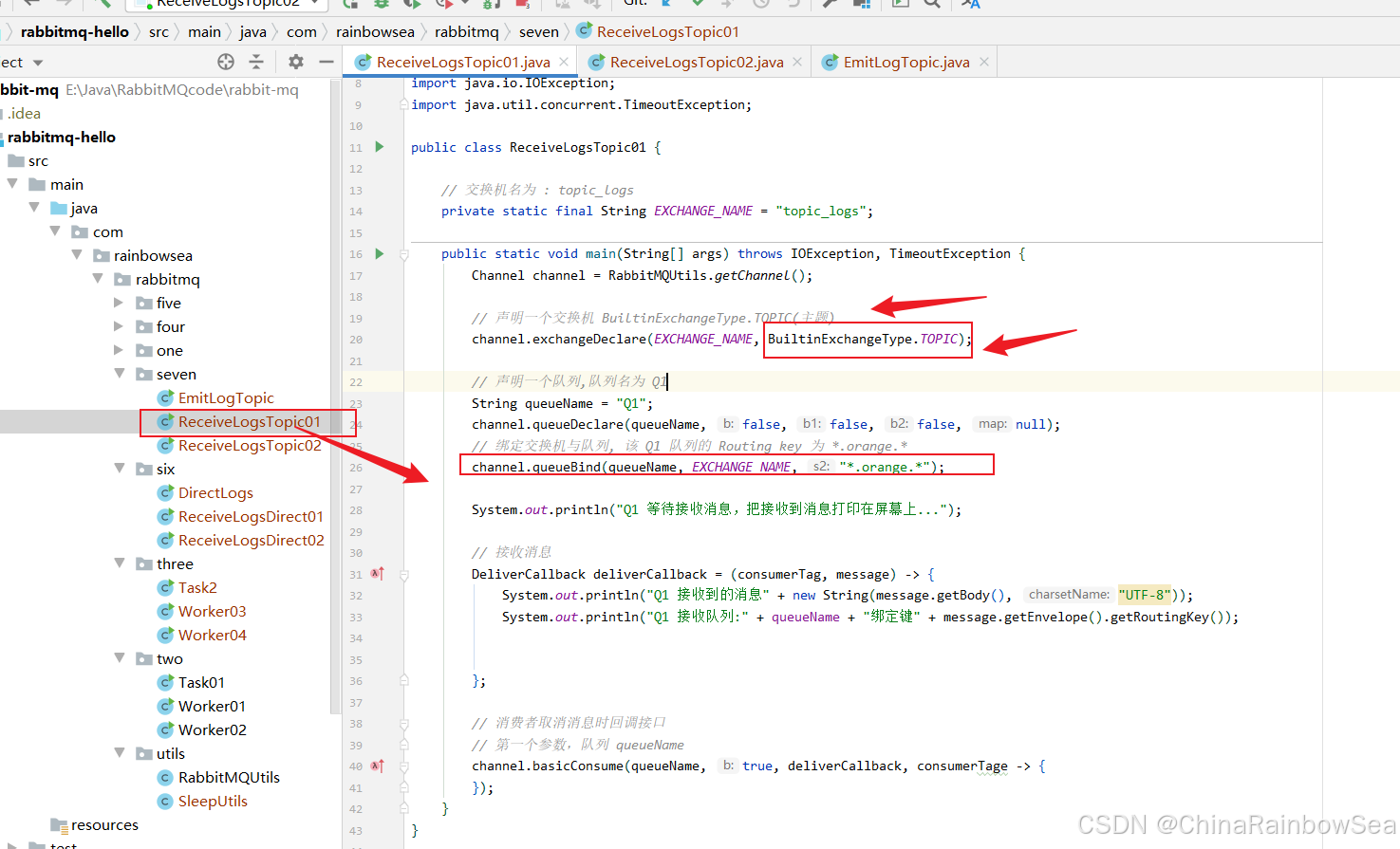
```csharp
package com.rainbowsea.rabbitmq.seven;
import com.rabbitmq.client.BuiltinExchangeType;
import com.rabbitmq.client.Channel;
import com.rabbitmq.client.DeliverCallback;
import com.rainbowsea.rabbitmq.utils.RabbitMQUtils;
import java.io.IOException;
import java.util.concurrent.TimeoutException;
public class ReceiveLogsTopic01 {
// 交换机名为 : topic_logs
private static final String EXCHANGE_NAME = "topic_logs";
public static void main(String[] args) throws IOException, TimeoutException {
Channel channel = RabbitMQUtils.getChannel();
// 声明一个交换机 BuiltinExchangeType.TOPIC(主题)
channel.exchangeDeclare(EXCHANGE_NAME, BuiltinExchangeType.TOPIC);
// 声明一个队列,队列名为 Q1
String queueName = "Q1";
channel.queueDeclare(queueName, false, false, false, null);
// 绑定交换机与队列, 该 Q1 队列的 Routing key 为 *.orange.*
channel.queueBind(queueName, EXCHANGE_NAME, "*.orange.*");
System.out.println("Q1 等待接收消息,把接收到消息打印在屏幕上...");
// 接收消息
DeliverCallback deliverCallback = (consumerTag, message) -> {
System.out.println("Q1 接收到的消息" + new String(message.getBody(), "UTF-8"));
System.out.println("Q1 接收队列:" + queueName + "绑定键" + message.getEnvelope().getRoutingKey());
};
// 消费者取消消息时回调接口
// 第一个参数,队列 queueName
channel.basicConsume(queueName, true, deliverCallback, consumerTage -> {
});
}
}
编写一个消费者,仅仅读取:Routing key 为 *.orange.* 和 "lazy.#" 匹配的队列的消息
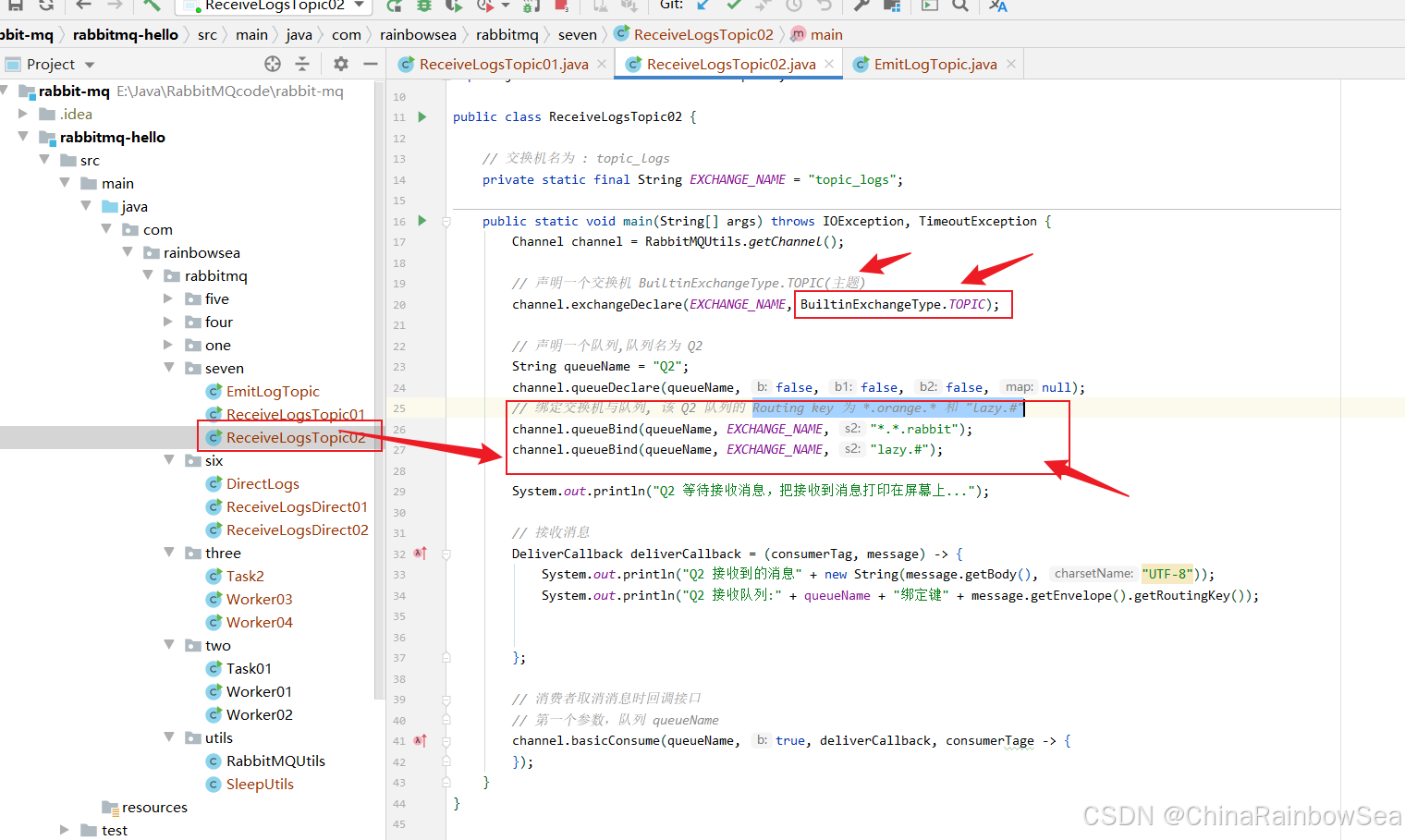
package com.rainbowsea.rabbitmq.seven;
import com.rabbitmq.client.BuiltinExchangeType;
import com.rabbitmq.client.Channel;
import com.rabbitmq.client.DeliverCallback;
import com.rainbowsea.rabbitmq.utils.RabbitMQUtils;
import java.io.IOException;
import java.util.concurrent.TimeoutException;
public class ReceiveLogsTopic02 {
// 交换机名为 : topic_logs
    private static final String EXCHANGE_NAME = "topic_logs";
public static void main(String[] args) throws IOException, TimeoutException {
        Channel channel = RabbitMQUtils.getChannel();
// 声明一个交换机 BuiltinExchangeType.TOPIC(主题)
        channel.exchangeDeclare(EXCHANGE_NAME, BuiltinExchangeType.TOPIC);
// 声明一个队列,队列名为 Q2
        String queueName = "Q2";
        channel.queueDeclare(queueName, false, false, false, null);
        // 绑定交换机与队列, 该 Q2 队列的 Routing key 为 *.orange.* 和 "lazy.#"
        channel.queueBind(queueName, EXCHANGE_NAME, "*.*.rabbit");
        channel.queueBind(queueName, EXCHANGE_NAME, "lazy.#");
System.out.println("Q2 等待接收消息,把接收到消息打印在屏幕上...");
// 接收消息
        DeliverCallback deliverCallback = (consumerTag, message) -> {
            System.out.println("Q2 接收到的消息" + new String(message.getBody(), "UTF-8"));
            System.out.println("Q2 接收队列:" + queueName + "绑定键" + message.getEnvelope().getRoutingKey());
};
// 消费者取消消息时回调接口
        // 第一个参数,队列 queueName
        channel.basicConsume(queueName, true, deliverCallback, consumerTage -> {
        });
    }
}
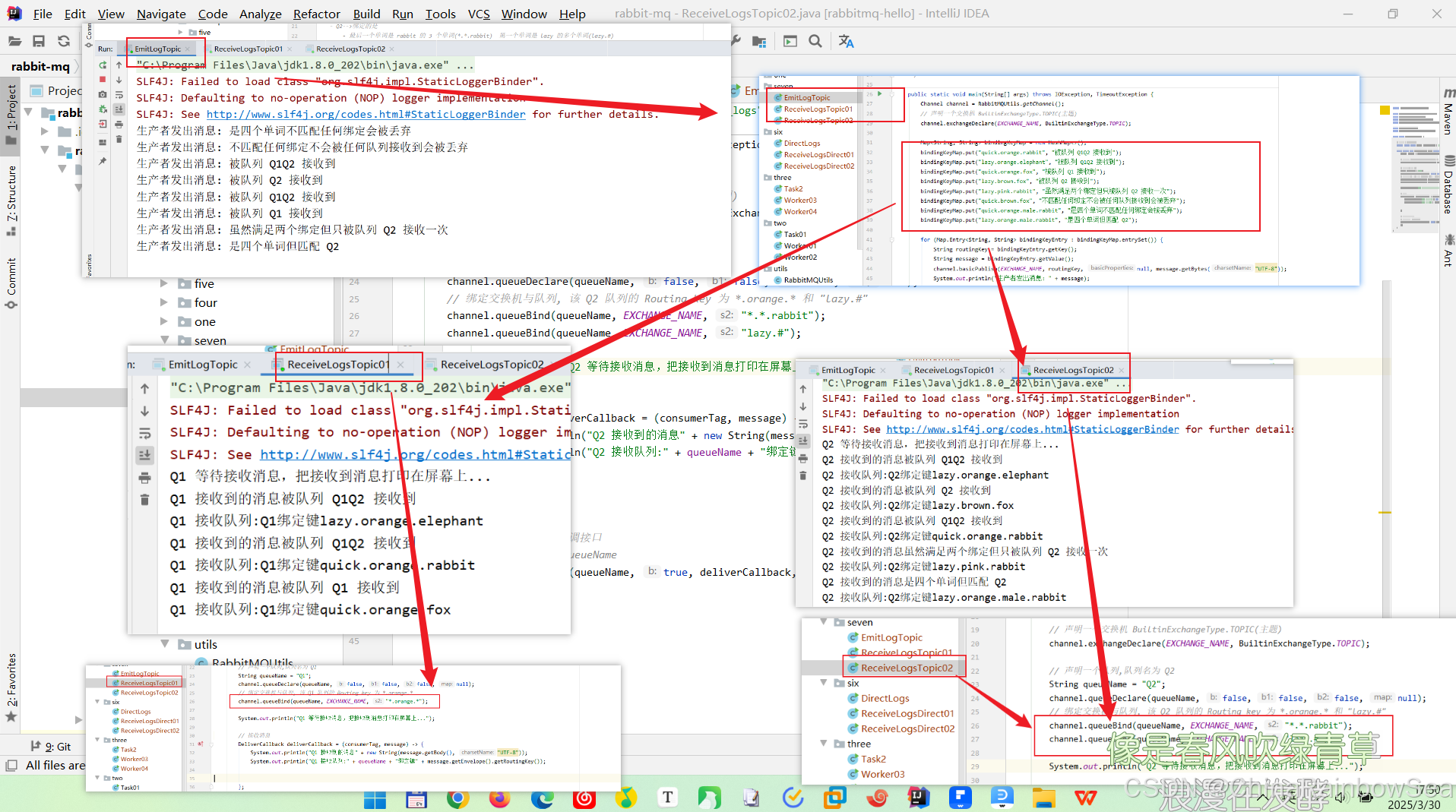
运行执行效果:
 >
>
> 从运行结果上看,我们可以明显的看到,消费者根据对应的
>
>
> 从运行结果上看,我们可以明显的看到,消费者根据对应的 Routing key 匹配而读取,对应的消息队列上的消息内容。
>
相关文章
-
5 种排行榜实现方案:从简单到复杂的实现方案!
5 种排行榜实现方案:从简单到复杂的实现方案!
- 互联网
- 2026年06月19日
-

3款基于.NET开源且免费的远程桌面工具分享
3款基于.NET开源且免费的远程桌面工具分享
- 互联网
- 2026年06月19日
-
3斤是多少两 生活常识(3斤4两等于多少克)
3斤是多少两 生活常识(3斤4两等于多少克)
- 互联网
- 2026年06月19日
-
5s怎么设置铃声(教你如何制作设置iPhone5铃声)
5s怎么设置铃声(教你如何制作设置iPhone5铃声)
- 互联网
- 2026年06月19日
-
8月是夏天还是秋天(9月是夏天还是秋天)
8月是夏天还是秋天(9月是夏天还是秋天)
- 互联网
- 2026年06月19日
-
9英寸披萨是多大(9英寸披萨是多大)
9英寸披萨是多大(9英寸披萨是多大)
- 互联网
- 2026年06月19日