
[修正] iOS 10 使用相机及相簿闪退的问题修正
- 作者: 五速梦信息网
- 时间: 2026年07月03日 14:02
iOS 10 新规定,在取用相机,相簿,联络资讯,麦克风需要在 Version Info 加入指定的 key,否则闪退:
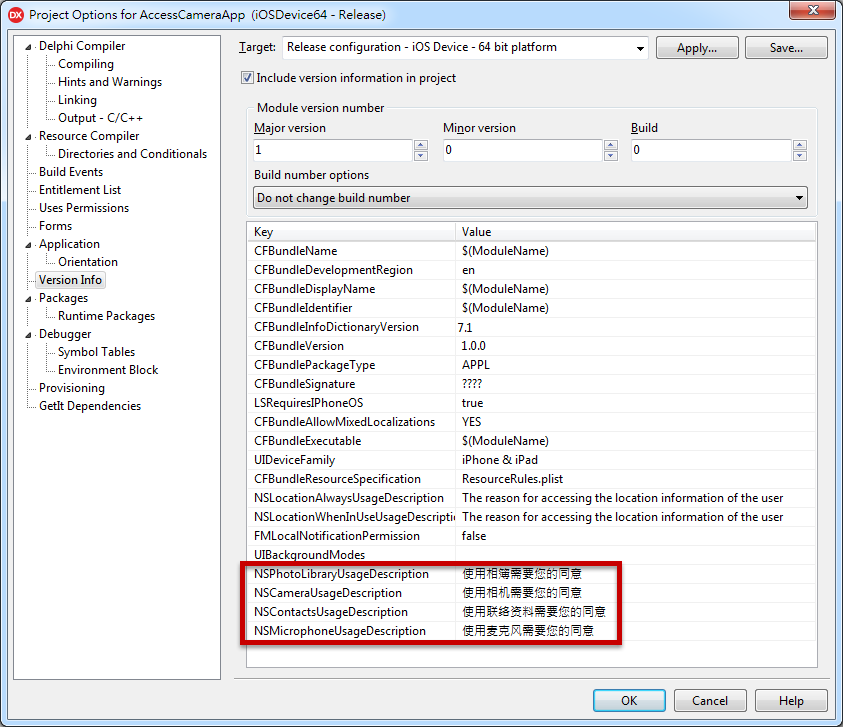
注:将下面的 Key 复制到工程 Option -> Version Info 里(按鼠标右键可以新增 Key)
常用 Key
<key>NSPhotoLibraryUsageDescription</key>

<string>使用相簿需要您的同意</string>
<key>NSCameraUsageDescription</key>

<string>使用相机需要您的同意</string>
<key>NSContactsUsageDescription</key>

<string>使用联络资料需要您的同意</string>
<key>NSMicrophoneUsageDescription</key>

<string>使用麦克风需要您的同意</string>
2018.01.08 新增:iOS 11.x 必需要加入下列,否則閃退
<key>NSPhotoLibraryAddUsageDescription</key>

<string>使用相簿需要您的同意</string>
完整列表:
Apple Music:
<key>NSAppleMusicUsageDescription</key>

<string>My description about why I need this capability</string>
Bluetooth:
<key>NSBluetoothPeripheralUsageDescription</key>

<string>My description about why I need this capability</string>
Calendar:
<key>NSCalendarsUsageDescription</key>

<string>My description about why I need this capability</string>
Camera:
<key>NSCameraUsageDescription</key>

<string>My description about why I need this capability</string>

Contacts:
<key>NSContactsUsageDescription</key>

<string>My description about why I need this capability</string>
Health Share:
<key>NSHealthShareUsageDescription</key>

<string>My description about why I need this capability</string>
Health Update:
<key>NSHealthUpdateUsageDescription</key>

<string>My description about why I need this capability</string>
Home Kit:
<key>NSHomeKitUsageDescription</key>

<string>My description about why I need this capability</string>
Location:
<key>NSLocationUsageDescription</key>

<string>My description about why I need this capability</string>
Location (Always):
<key>NSLocationAlwaysUsageDescription</key>

<string>My description about why I need this capability</string>
Location (When in use):
<key>NSLocationWhenInUseUsageDescription</key>

<string>My description about why I need this capability</string>
Microphone:
<key>NSMicrophoneUsageDescription</key>

<string>My description about why I need this capability</string>
Motion (Accelerometer):
<key>NSMotionUsageDescription</key>

<string>My description about why I need this capability</string>
Photo Library:
<key>NSPhotoLibraryUsageDescription</key>

<string>My description about why I need this capability</string>
Reminders:
<key>NSRemindersUsageDescription</key>

<string>My description about why I need this capability</string>
Siri:
<key>NSSiriUsageDescription</key>

<string>My description about why I need this capability</string>
Speech Recognition:
<key>NSSpeechRecognitionUsageDescription</key>

<string>My description about why I need this capability</string>
Apple 官方列表:
相关文章
-
[译] 深入理解 JavaScript 事件循环(二)— task and microtask
[译] 深入理解 JavaScript 事件循环(二)— task and microtask
- 互联网
- 2026年07月03日
-
![[译]ABP vNext微服务演示,项目状态和路线图](https://img2018.cnblogs.com/blog/648050/201902/648050-20190226151508859-2130670525.png)
[译]ABP vNext微服务演示,项目状态和路线图
[译]ABP vNext微服务演示,项目状态和路线图
- 互联网
- 2026年07月03日
-
[译]DbContext API中使用SqlQuery和ExecuteSqlCommand获取存储过程的输入输出参数
[译]DbContext API中使用SqlQuery和ExecuteSqlCommand获取存储过程的输入输出参数
- 互联网
- 2026年07月03日
-
[辛酸历程]在Mac中使用Python获取屏幕截图
[辛酸历程]在Mac中使用Python获取屏幕截图
- 互联网
- 2026年07月03日
-
[斜率优化DP]【学习笔记】【更新中】
[斜率优化DP]【学习笔记】【更新中】
- 互联网
- 2026年07月03日
-
[物理学与PDEs]第3章习题2 仅受重力作用的定常不可压流理想流体沿流线的一个守恒量
[物理学与PDEs]第3章习题2 仅受重力作用的定常不可压流理想流体沿流线的一个守恒量
- 互联网
- 2026年07月03日



