
[使用多仓库解决] idea maven 下载源码出现:Cannot download sources Sources not found for: xxx
- 作者: 五速梦信息网
- 时间: 2026年07月03日 14:02
根本原因
依赖托管仓库的库存不足。有的仓库,就是没有团队上传这个依赖。所以多加几个镜像源,总有一个仓库能找到。
解决方案
修改 maven 默认配置文件
"C:\Users\\.m2\settings.xml" 使用无边无际云 + 华为云 + 阿里云 + 妹吻云,四个依赖仓库,多管齐下。
- 只要前一个挂掉,就自动从下一个仓库中找。
- 国内开发者下载超快。
<?xml version="1.0" encoding="UTF-8"?>

<settings xmlns="http://maven.apache.org/SETTINGS/1.0.0"

          xmlns:xsi="http://www.w3.org/2001/XMLSchema-instance"

          xsi:schemaLocation="http://maven.apache.org/SETTINGS/1.0.0 http://maven.apache.org/xsd/settings-1.0.0.xsd">

<profiles>

    <profile>

      <id>boundlessgeo</id>

      <repositories>

        <repository>

          <id>boundlessgeo</id>

          <url>https://repo.boundlessgeo.com/main/</url>

          <releases>

            <enabled>true</enabled>

          </releases>

          <snapshots>

            <enabled>true</enabled>

            <updatePolicy>always</updatePolicy>

          </snapshots>

        </repository>

      </repositories>

    </profile>

		<profile>

      <id>huawei</id>

      <repositories>

        <repository>

          <id>huawei</id>

          <url>https://mirrors.huaweicloud.com/repository/maven/</url>

          <releases>

            <enabled>true</enabled>

          </releases>

          <snapshots>

            <enabled>true</enabled>

            <updatePolicy>always</updatePolicy>

          </snapshots>

        </repository>

      </repositories>

    </profile>

    <profile>

      <id>aliyun</id>

      <repositories>

        <repository>

          <id>aliyun</id>

          <url>http://maven.aliyun.com/nexus/content/groups/public/</url>

          <releases>

            <enabled>true</enabled>

          </releases>

          <snapshots>

            <enabled>true</enabled>

            <updatePolicy>always</updatePolicy>

          </snapshots>

        </repository>

      </repositories>

    </profile>

    <profile>

      <id>maven-central</id>

      <repositories>

        <repository>

          <id>maven-central</id>

          <url>http://central.maven.org/maven2/</url>

          <releases>

            <enabled>true</enabled>

          </releases>

          <snapshots>

            <enabled>true</enabled>

            <updatePolicy>always</updatePolicy>

          </snapshots>

        </repository>

      </repositories>

    </profile>

	</profiles>
<activeProfiles>

    <activeProfile>boundlessgeo</activeProfile>

    <activeProfile>huawei</activeProfile>

    <activeProfile>aliyun</activeProfile>

    <activeProfile>maven-central</activeProfile>

</activeProfiles>

</settings>
Idea 启用(覆盖)自定义的配置 Settings
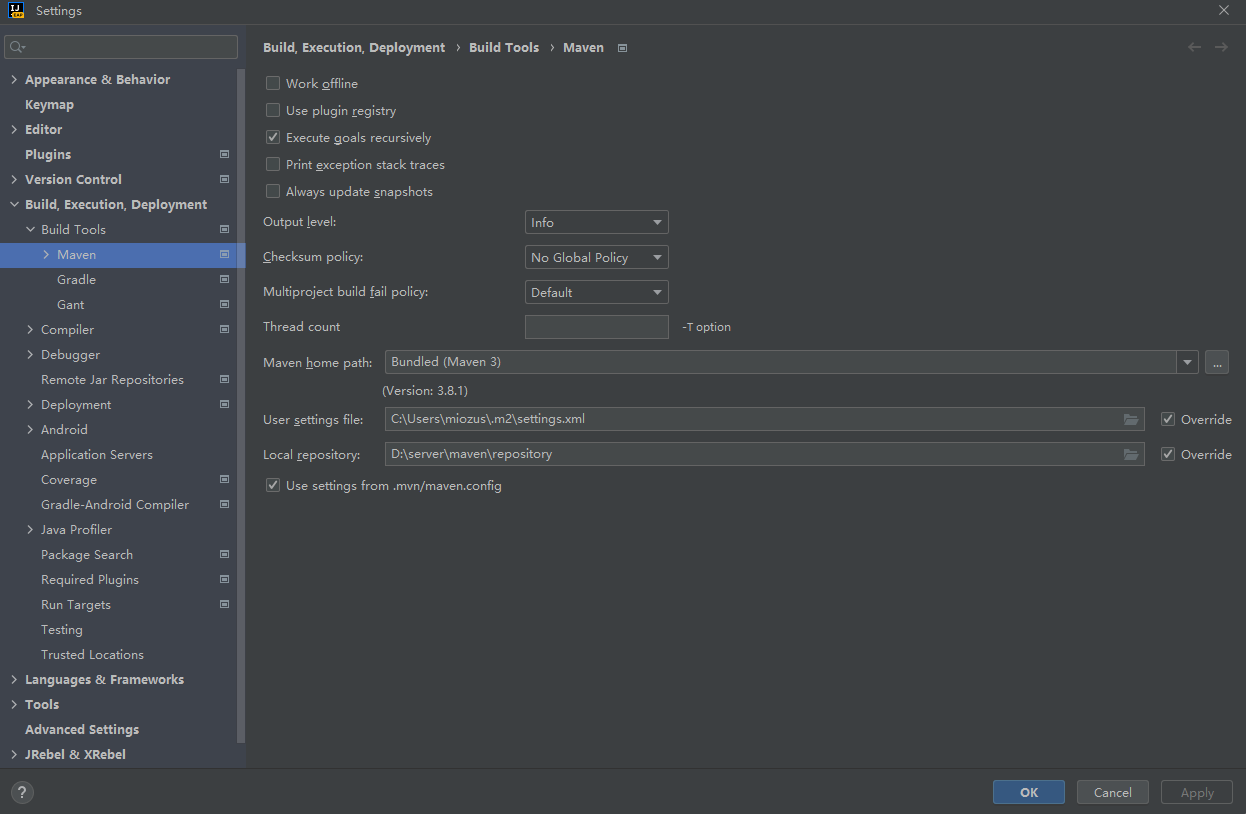
重启 IDE 出现管理包,默认勾选
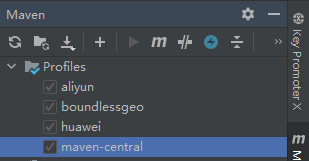
然后点击刷新,或者下载源码,转一下就好了。
下载源码之后,就可以看到命名有意义的代码和注释了。比如
    /**

     * BETWEEN 值1 AND 值2

     *

     * @param condition 执行条件

     * @param column    字段

     * @param val1      值1

     * @param val2      值2

     * @return children

     */

    Children between(boolean condition, R column, Object val1, Object val2);
相关文章
-
![[收藏]NET技术+25台服务器怎样支撑世界第54大网站](http://images.cnitblog.com/news/66372/201407/251206510413381.jpg)
[收藏]NET技术+25台服务器怎样支撑世界第54大网站
[收藏]NET技术+25台服务器怎样支撑世界第54大网站
- 互联网
- 2026年07月03日
-
[书籍翻译] 《JavaScript并发编程》第七章 抽取并发逻辑
[书籍翻译] 《JavaScript并发编程》第七章 抽取并发逻辑
- 互联网
- 2026年07月03日
-
[书籍翻译] 《JavaScript并发编程》第五章 使用Web Workers
[书籍翻译] 《JavaScript并发编程》第五章 使用Web Workers
- 互联网
- 2026年07月03日
-
![[奇思异想]使用RabbitMQ实现定时任务](https://img2018.cnblogs.com/blog/182190/201907/182190-20190715104056955-1469541202.png)
[奇思异想]使用RabbitMQ实现定时任务
[奇思异想]使用RabbitMQ实现定时任务
- 互联网
- 2026年07月03日
-
[每日Linux]Linux下xsell和xftp的使用
[每日Linux]Linux下xsell和xftp的使用
- 互联网
- 2026年07月03日
-
[零] Java 语言运行原理 JVM原理浅析 入门了解简介 Java语言组成部分 javap命令使用
[零] Java 语言运行原理 JVM原理浅析 入门了解简介 Java语言组成部分 javap命令使用
- 互联网
- 2026年07月03日



