[转帖]dd 自动压测与结果解析脚本
- 作者: 五速梦信息网
- 时间: 2026年05月04日 13:59
测试串行、并发、读、写 4类操作,每类操作又可以指定各种bs及count值,循环压测。每种场景一般执行3次,取平均值。
一、 串行写
-
#!/bin/sh
-
-
bs_list=(256k 1024k 10M 20M 50M 100M 1G)
-
cnt_list=(40000 10000 1000 500 200 100 10)
-
-
for i in {0..6}
-
do
-
-
for j in {0..2}
-
do
-
-
logfile=dd_${bs_list[$i]}_cnt${cnt_list[$i]}_${j}.txt
-
-
echo -e "test ${j} started\n" > $logfile
-
echo -e "started time `date`\n" >> $logfile
-
-
dd if=/dev/zero of=testfile1 bs=${bs_list[$i]} count=${cnt_list[$i]} oflag=direct,nonblock 2>> $logfile
-
-
echo -e "\nfinished time `date`" >> $logfile
-
echo -e "\ntest ${j} finished" >> $logfile
-
sleep 5
-
-
done
-
-
sleep 30
-
done
二、 4并发写
-
#!/bin/sh
-
-
# ddtest_write_conc.sh
-
-
bs_list=(256k 1024k 10M 20M 50M 100M 1G)
-
cnt_list=(40000 10000 1000 500 200 100 10)
-
-
for i in {0..6}
-
do
-
-
for j in {0..2}
-
do
-
-
logfile=dd_conc_${bs_list[$i]}_cnt${cnt_list[$i]}_${j}.txt
-
-
echo -e "test ${j} started\n" > $logfile
-
echo -e "started time `date`\n" >> $logfile
-
-
for conc in {0..3}
-
do
-
{
-
dd if=/dev/zero of=testfile1 bs=${bs_list[$i]} count=${cnt_list[$i]} oflag=direct,nonblock 2>> $logfile
-
} &
-
done
-
-
wait
-
-
echo -e "\nfinished time `date`" >> $logfile
-
echo -e "\ntest ${j} finished" >> $logfile
-
sleep 5
-
-
done
-
-
sleep 30
-
done
三、 串行读
-
#!/bin/sh
-
-
# ddtest_read_serial.sh
-
-
bs_list=(256k 1024k 10M 20M 50M 100M 1G)
-
cnt_list=(40000 10000 1000 500 200 100 10)
-
-
for i in {0..6}
-
do
-
-
for j in {0..2}
-
do
-
-
logfile=dd_${bs_list[$i]}_cnt${cnt_list[$i]}_${j}.txt
-
-
echo -e "test ${j} started\n" > $logfile
-
echo -e "started time `date`\n" >> $logfile
-
-
dd if=testfile1 of=/dev/null bs=${bs_list[$i]} count=${cnt_list[$i]} iflag=direct,nonblock 2>> $logfile
-
-
echo -e "\nfinished time `date`" >> $logfile
-
echo -e "\ntest ${j} finished" >> $logfile
-
sleep 5
-
-
done
-
-
sleep 30
-
done
四、 4并发读
-
#!/bin/sh
-
-
bs_list=(256k 1024k 10M 20M 50M 100M 1G)
-
cnt_list=(40000 10000 1000 500 200 100 10)
-
-
for i in {0..6}
-
do
-
-
for j in {0..2}
-
do
-
-
logfile=dd_conc_${bs_list[$i]}_cnt${cnt_list[$i]}_${j}.txt
-
-
echo -e "test ${j} started\n" > $logfile
-
echo -e "started time `date`\n" >> $logfile
-
-
for conc in {0..3}
-
do
-
{
-
dd if=testfile1 of=/dev/null bs=${bs_list[$i]} count=${cnt_list[$i]} iflag=direct,nonblock 2>> $logfile
-
} &
-
done
-
-
wait
-
-
echo -e "\nfinished time `date`" >> $logfile
-
echo -e "\ntest ${j} finished" >> $logfile
-
sleep 5
-
-
done
-
-
sleep 30
-
done
五、 输出解析
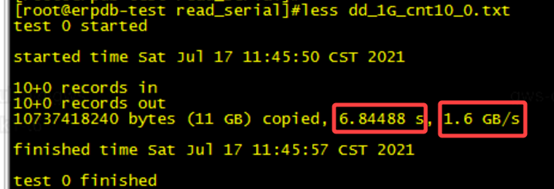
取执行时间
cat dd_* | grep -E 'MB/s|GB/s' | awk '{ print $6 }'
取吞吐量
cat dd_* | grep -E 'MB/s|GB/s' | awk '{ print $8 }'
- 上一篇: [转帖]ESXi主机RAID卡
- 下一篇: [转帖]create table INITRANS参数分析
相关文章
-
[转帖]ESXi主机RAID卡
[转帖]ESXi主机RAID卡
- 互联网
- 2026年05月04日
-
[转帖]FPGA开发工具汇总
[转帖]FPGA开发工具汇总
- 互联网
- 2026年05月04日
-
[转帖]GC日志分析工具——GCViewer案例
[转帖]GC日志分析工具——GCViewer案例
- 互联网
- 2026年05月04日
-
[转帖]create table INITRANS参数分析
[转帖]create table INITRANS参数分析
- 互联网
- 2026年05月04日
-
![[转帖]BF16 与 FP16 在模型上哪个精度更高呢](https://pic4.zhimg.com/80/v2-de3191828763cafdaa92f75035130bbf_720w.webp)
[转帖]BF16 与 FP16 在模型上哪个精度更高呢
[转帖]BF16 与 FP16 在模型上哪个精度更高呢
- 互联网
- 2026年05月04日
-
![[转帖]alertmanager的使用](https://upload-images.jianshu.io/upload_images/9380897-7c488224ce19816b.png?imageMogr2/auto-orient/strip|imageView2/2/w/1200/format/webp)
[转帖]alertmanager的使用
[转帖]alertmanager的使用
- 互联网
- 2026年05月04日