【Azure 应用服务】App Service 在使用GIt本地部署,上传代码的路径为homesiterepository,而不是站点的根目录homesitewwwroot。 这个是因为什么?
- 作者: 五速梦信息网
- 时间: 2026年05月04日 13:57

问题描述
App Service 在使用GIt本地部署,上传代码的路径为/home/site/repository,而不是站点的根目录/home/site/wwwroot。 这个是因为什么? 并且通过Git发布静态文件的时候不成功。出现“Could not detect any platform in the source directory.” 和 "Error: Couldn't detect a version for the platform 'php' in the repo."错误
查看日志
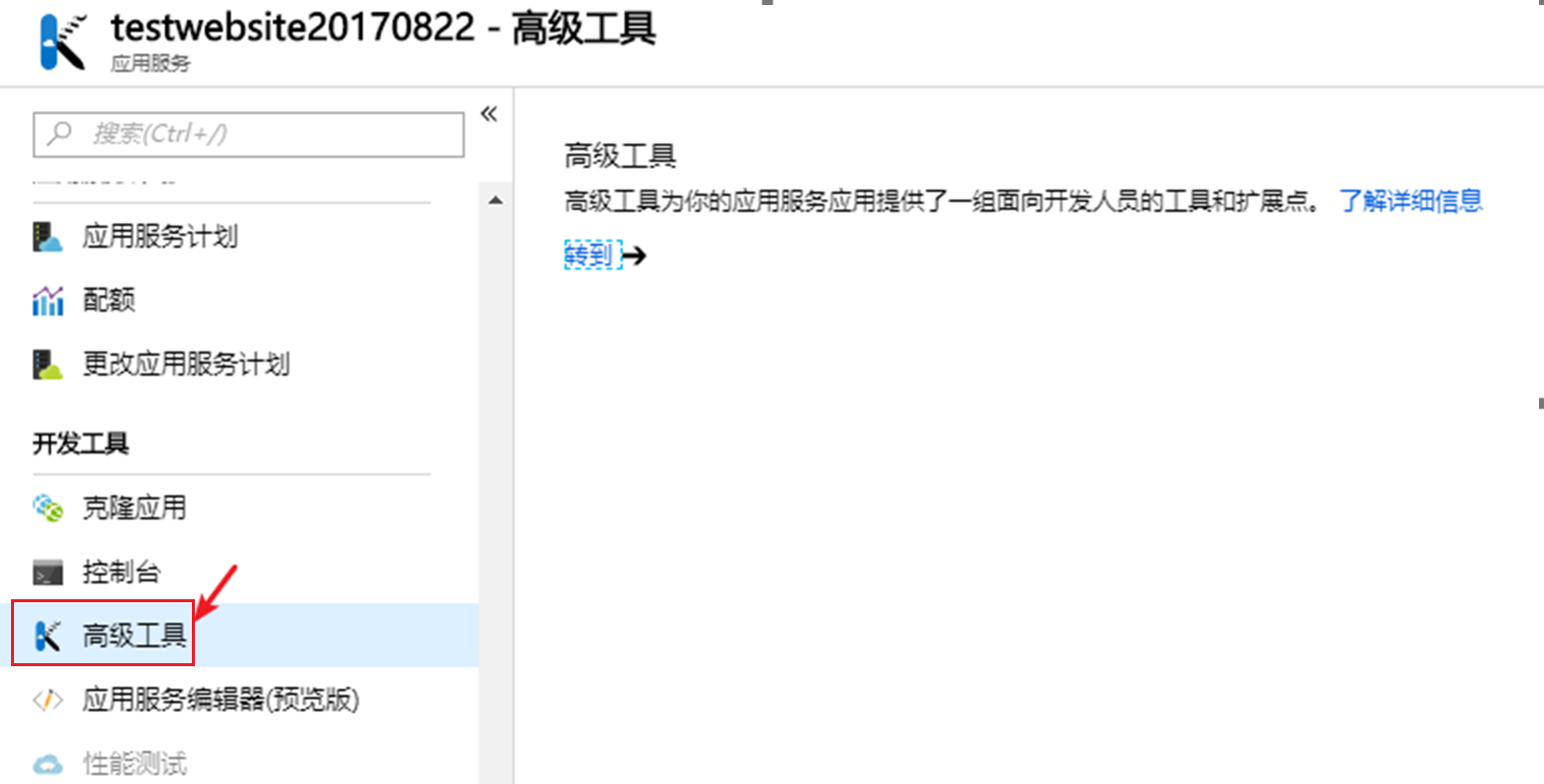
遇见发布时候的错误,除了在发布时候本地可以查看外,还可以在App Service的Kudu中查看。通过下列步骤来查看部署日志:
一:进入Kudu
二:进入发布日志(D:\home\site\deployments\temp-xxxx)
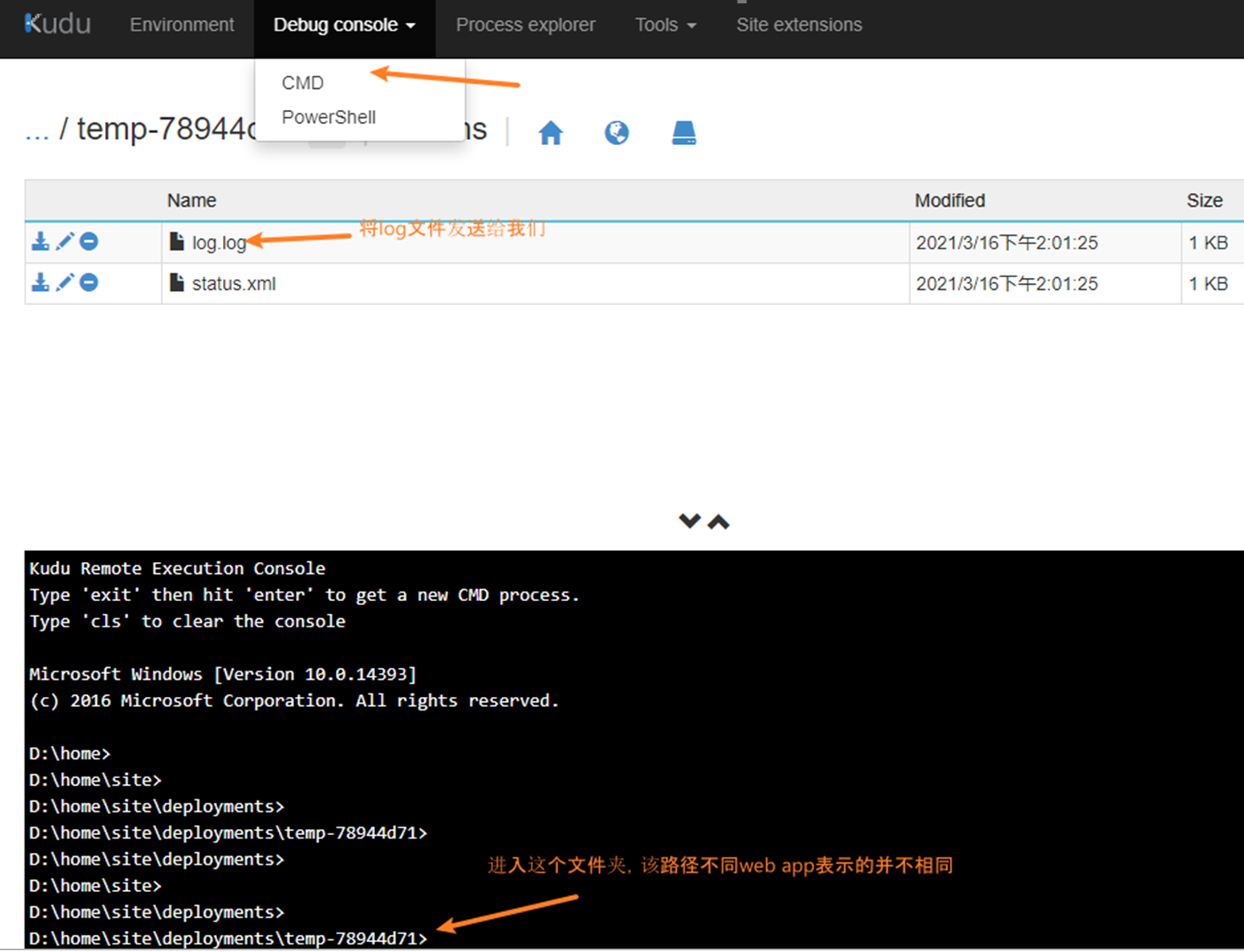
三:查看日志内容
2021-03-16T03:20:50  Updating branch 'master'.

2021-03-16T03:21:00  Updating submodules.

2021-03-16T03:21:00  Preparing deployment for commit id '208129ed8c'.

2021-03-16T03:21:00  Repository path is /home/site/repository

2021-03-16T03:21:00  Running oryx build...

2021-03-16T03:21:00    Command: oryx build /home/site/repository -o /home/site/wwwroot --platform php --platform-version 7.4 -i /tmp/8d8e82a85ff94d0 --log-file /tmp/build-debug.log

2021-03-16T03:21:04    Operation performed by Microsoft Oryx, https://github.com/Microsoft/Oryx

2021-03-16T03:21:04    You can report issues at https://github.com/Microsoft/Oryx/issues

2021-03-16T03:21:04

2021-03-16T03:21:04    Oryx Version: 0.2.20201105.1, Commit: 127d6a3c61a6c0eb67bcfeee0600c3fe71251839, ReleaseTagName: 20201105.1

2021-03-16T03:21:04

2021-03-16T03:21:04    Build Operation ID: |wb65mFzxGQU=.83c35c89_

2021-03-16T03:21:04    Repository Commit : 208129ed8c6e3b88ee890d958000b1cd72b9bacc

2021-03-16T03:21:04

2021-03-16T03:21:04    Detecting platforms...

2021-03-16T03:21:05    Could not detect any platform in the source directory.

2021-03-16T03:21:05    Error: Couldn't detect a version for the platform 'php' in the repo.

2021-03-16T03:21:08    Error: Couldn't detect a version for the platform 'php' in the repo.

/opt/Kudu/KuduConsole/Scripts/starter.sh oryx build /home/site/repository -o /home/site/wwwroot --platform php --platform-version 7.4 -i /tmp/8d8e82a85ff94d0 --log-file /tmp/build-debug.log

2021-03-16T03:21:08
问题分析
根据日志总的错误消息,发现有这样两段日志:
2021-03-16T03:21:00  Repository path is /home/site/repository

2021-03-16T03:21:00  Running oryx build...

2021-03-16T03:21:00    Command: oryx build /home/site/repository -o /home/site/wwwroot --platform php --platform-version 7.4 -i /tmp/8d8e82a85ff94d0 --log-file /tmp/build-debug.log
2021-03-16T03:21:05    Could not detect any platform in the source directory.

2021-03-16T03:21:05    Error: Couldn't detect a version for the platform 'php' in the repo.
错误原因是由于执行命令 oryx build /home/site/repository -o /home/site/wwwroot --platform php xxxxxx 时发现build目录中并没有php相关文件导致的。由于使用local git部署需要使用Orxy进行build,如果成功后才会将repository文件夹中的内容输出到wwwroot下,所以最初的问题为什么wwwroot中没有内容。
由于目前orxy不支持纯静态文件的部署,在Github中也有相对应的Issue存在:https://github.com/microsoft/Oryx/issues/623
解决办法
可以在提交时,保证git仓储里面有一个php文件,这样可以保证orxy正常运行build。如增加一个简单的test.php,里面就放入非常简单的一句代码即可:
<?php

phpinfo();

?>
参考资料
- 上一篇: 【Azure 应用服务】Azure App Service For Linux 上实现 Python Flask Web Socket 项目 HttpHttps
- 下一篇: 【Azure 应用服务】App Service .NET Core项目在Program.cs中自定义添加的logger.LogInformation,部署到App Service上后日志不显示Log Stream中的问题
相关文章
-
【Azure 应用服务】Azure App Service For Linux 上实现 Python Flask Web Socket 项目 HttpHttps
【Azure 应用服务】Azure App Service For Linux 上实现 Python Flask Web Socket 项目 HttpHttps
- 互联网
- 2026年05月04日
-
【Azure 应用服务】PHP应用部署在App Service for Linux环境中,上传文件大于1MB时,遇见了413 Request Entity Too Large 错误的解决方法
【Azure 应用服务】PHP应用部署在App Service for Linux环境中,上传文件大于1MB时,遇见了413 Request Entity Too Large 错误的解决方法
- 互联网
- 2026年05月04日
-

【Azure 应用服务】当在Azure App Service的门户上 Log Stream 日志无输出,需要如何操作让其输出Application Logs呢?
【Azure 应用服务】当在Azure App Service的门户上 Log Stream 日志无输出,需要如何操作让其输出Application Logs呢?
- 互联网
- 2026年05月04日
-
【Azure 应用服务】App Service .NET Core项目在Program.cs中自定义添加的logger.LogInformation,部署到App Service上后日志不显示Log Stream中的问题
【Azure 应用服务】App Service .NET Core项目在Program.cs中自定义添加的logger.LogInformation,部署到App Service上后日志不显示Log Stream中的问题
- 互联网
- 2026年05月04日
-
【Azure App Service For Container】创建ASP.NET Core Blazor项目并打包为Linux镜像发布到Azure应用服务
【Azure App Service For Container】创建ASP.NET Core Blazor项目并打包为Linux镜像发布到Azure应用服务
- 互联网
- 2026年05月04日
-
【Azure API 管理】解决API Management添加AAD Group时遇见的 Failed to query Azure Active Directory graph due to error 错误
【Azure API 管理】解决API Management添加AAD Group时遇见的 Failed to query Azure Active Directory graph due to error 错误
- 互联网
- 2026年05月04日