【原】AFNetworking源码阅读(五)
- 作者: 五速梦信息网
- 时间: 2026年05月04日 13:56
【原】AFNetworking源码阅读(五)
polobymulberry-博客园
1. 前言
上一篇中提及到了Multipart Request的构建方法- [AFHTTPRequestSerializer multipartFormRequestWithMethod:URLString:parameters:constructingBodyWithBlock:error:],不过并没有深入研究,部分函数也只是简单地一笔带过。所以本篇文章从此入手,一方面把Multipart协议问题解决掉,另一方面就此把AFURLRequestSerialization文件遗留问题解决了。
除了AFURLRequestSerialization的分析,这一篇还会介绍AFURLResponseSerialization。
2. 详解AFNetworking中的Multipart协议
前面我们简单介绍了Multipart协议的结构,并举了个例子:
–\({bound} // 该bound表示pdf的文件名<br/> Content-Disposition: form-data; name="Filename" HTTP.pdf<br/> --\){bound} // 该bound表示pdf的文件内容
Content-Disposition: form-data; name=“file000”; filename=“HTTP协议详解.pdf”
Content-Type: application/octet-stream %PDF-1.5
file content
%%EOF –\({bound} // 该bound表示字符串<br/> Content-Disposition: form-data; name="Upload" Submit Query<br/> --\){bound}—// 表示body结束了
我们这次换个思路来学习AFNetworking中处理multipart格式的代码。我们先来解决做什么,再看源码中的怎么做。
首先,不管我们做什么,最终都是为了产生一个request。我们都知道request是由三个部分组成的:①请求行(request-line) ②请求头(headers) ③请求体(request body)。下面我就这三个方面逐一攻破。
2.1 构建multipart请求行
这个没啥好说的,就是POST。
2.2 构建multipart请求头
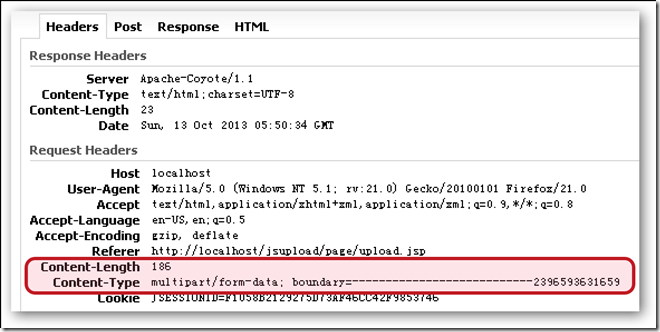
multipart说白了和普通request大部分都很类似,所以普通request请求头的构造方法它也受用。而普通request的请求头构造方式有两个地方:
- - [AFHTTPRequestSerializer init]
- - [AFURLRequestSerialization requestWithMethod:URLString:parameters:error:]前面介绍过了
multipart除了使用普通协议请求头的构建方法。还会在- [AFStreamingMultipartFormData requestByFinalizingMultipartFormData]构建自己独有的请求头。

可以看到上面红框中的代码就是用来构建上上面那张图的红框中的请求头。其中我们注意到这两个变量:
@property (nonatomic, copy) NSString *boundary;    // multipart协议中的分割符

@property (readwrite, nonatomic, strong) AFMultipartBodyStream *bodyStream;    // 代表了消息体
既然已经提到了boundary,此处就把他就地解决吧。至于bodyStream后面介绍消息体时候详解。
boundary的构建方式
boundary是用来分割不同数据内容的,其实就是上面举的那个例子中的${bound}。我们注意到boundary需要处理以下几个情况:
- 创建boundary字符串
此处AFNetworking自定义了个函数创建boundary字符串。
static NSString * AFCreateMultipartFormBoundary() {
// 使用两个十六进制随机数拼接在Boundary后面来表示分隔符<br/>
return [NSString stringWithFormat:@"Boundary+%08X%08X", arc4random(), arc4random()];<br/>
}
- 如果是开头分隔符的,那么只需在分隔符结尾加一个换行符
static inline NSString * AFMultipartFormInitialBoundary(NSString *boundary) {
return [NSString stringWithFormat:@"--%@%@", boundary, kAFMultipartFormCRLF];<br/>
}
- 如果是中间部分分隔符,那么需要分隔符前面和结尾都加换行符
static inline NSString * AFMultipartFormEncapsulationBoundary(NSString *boundary) {
return [NSString stringWithFormat:@"%@--%@%@", kAFMultipartFormCRLF, boundary, kAFMultipartFormCRLF];<br/>
}
- 如果是末尾,还得使用–分隔符–作为请求体的结束标志
static inline NSString * AFMultipartFormFinalBoundary(NSString *boundary) {
return [NSString stringWithFormat:@"%@--%@--%@", kAFMultipartFormCRLF, boundary, kAFMultipartFormCRLF];<br/>
}
讲boundary有什么用呢?除了设置Content-Type外,在设置Content-Length时使用的[self.bodyStream contentLength]中会使用到boundary的这些相关函数:
// AFMultipartBodyStream函数

// 计算上面那个bodyStream的总长度作为Content-Length
- (unsigned long long)contentLength {
unsigned long long length = ;
// 注意bodyStream是由多个AFHTTPBodyPart对象组成的,比如上面那个例子就是有三个对象组成
for (AFHTTPBodyPart *bodyPart in self.HTTPBodyParts) {
length += [bodyPart contentLength];
} return length;
} // AFHTTPBodyPart函数
// 计算上面每个AFHTTPBodyPart对象的长度- (unsigned long long)contentLength {
unsigned long long length = ;
// 需要拼接上分割符
NSData *encapsulationBoundaryData = [([self hasInitialBoundary] ? AFMultipartFormInitialBoundary(self.boundary) : AFMultipartFormEncapsulationBoundary(self.boundary)) dataUsingEncoding:self.stringEncoding];
length += [encapsulationBoundaryData length];
// 每个AFHTTPBodyPart对象中还有Content-Disposition等header-使用stringForHeader获取
NSData *headersData = [[self stringForHeaders] dataUsingEncoding:self.stringEncoding];
length += [headersData length];
// 加上每个AFHTTPBodyPart对象具体的数据(比如文件内容)长度
length += _bodyContentLength;
// 如果是最后一个AFHTTPBodyPart,还需要加上“–分隔符–”的长度
NSData *closingBoundaryData = ([self hasFinalBoundary] ? [AFMultipartFormFinalBoundary(self.boundary) dataUsingEncoding:self.stringEncoding] : [NSData data]);
length += [closingBoundaryData length]; return length;
}2.3 构建multipart请求体(bodyStream)
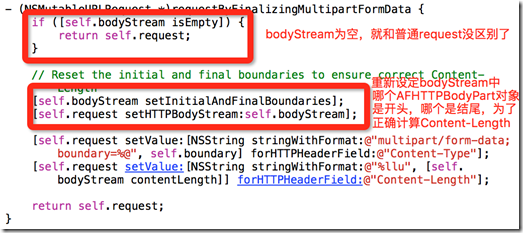
至于setInitialAndFinalBoundaries函数,其实就是为了后面设置Content-Length做下预处理,使用这里不赘述了。我们把目光放在bodyStream的具体构建上。事实上对于bodyStream的构建就是对AFStreamingMultipartFormData对象的处理,比如函数- [AFHTTPRequestSerializer multipartFormRequestWithMethod:URLString:parameters:constructingBodyWithBlock:error:]的那个formData就是一个AFStreamingMultipartFormData对象,下面我简单示意下AFStreamingMultipartFormData的结构:
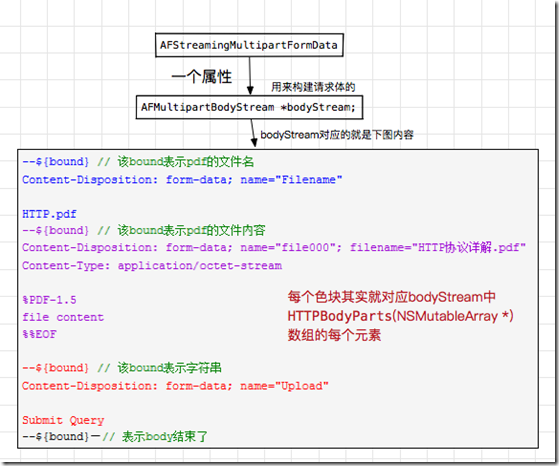
结合上图,我们就可以大胆推测,AFStreamingMultipartFormData类中的appendPart*函数最终落脚点就是给bodyStream中HTTPBodyParts添加一个AFHTTPBodyPart对象(HTTPBodyParts数组中的元素)。
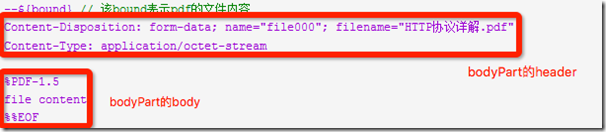
(BOOL) - appendPartWithFileURL:name:error: 根据文件位置构造数据源,使用文件类型名作为mimeType (BOOL) - appendPartWithFileURL:name:fileName:mimeType:error: 根据文件位置构造数据源,需要提供mimeType (void) - appendPartWithInputStream:name:fileName:length:mimeType: 直接使用NSInputStream作为数据源 (void) - appendPartWithFileData:name:fileName:mimeType: 使用NSData作为数据源 (void) - appendPartWithFormData:name: 使用NSData作为数据源,NSData并不是一个文件,可能只是一个字符串 这些函数的实现步骤基本都是一致的,都是新建一个AFHTTPBodyPart对象bodyPart,然后给bodyPart设置各种参数,其中比较重要的参数是headers和body这两个。最后使用appendHTTPBodyPart:方法,将bodyPart添加到bodyStream的HTTPBodyParts上。
这些函数实现没什么难度,大家可以自行研究。提两个稍微要注意的地方:
- appendPartWithFileURL:函数会首先检查fileURL是否可用,使用[fileURL isFileURL]检查文件位置格式是否正确。使用[fileURL checkResourceIsReachableAndReturnError:error]来检查该文件是否存在,是否能获取到。最后使用NSFileManager获取到文件attributes,并判断attributes是否存在。另外注意到此处直接使用的是fileURL作为AFHTTPBodyPart对象的body属性。
- appendPartWithFileData:和appendPartWithFormData:两个函数实现中,最后使用的是appendPartWithHeaders:构建AFHTTPBodyPart对象,详见代码。
2.4 另一种构建multipart request的方法-requestWithMultipartFormRequest:writingStreamContentsToFile:completionHandler:
我们先来看看这个函数的注释:
/**

将原来request中的HTTPBodyStream内容异步写入到指定文件中,随后调用completionHandler处理。最后返回新的request。
@param request multipart形式的request,其中HTTPBodyStream属性不能为nil

@param fileURL multipart request中的HTTPBodyStream内容写入的文件位置

@param handler 用于处理的block
@discussion NSURLSessionTask中有一个bug,当HTTP body的内容是来自NSStream的时候,request无法发送Content-Length到服务器端,此问题在Amazon S3的Web服务中尤为显著。作为一个解决方案,该函数的request参数使用的是multipartFormRequestWithMethod:URLString:parameters:constructingBodyWithBlock:error:构建出的request,或者其他HTTPBodyStream属性不为空的request。接着将HTTPBodyStream的内容先写到指定的文件中,再返回一个原来那个request的拷贝,其中该拷贝的HTTPBodyStream属性值要置为空。至此,可以使用AFURLSessionManager -uploadTaskWithRequest:fromFile:progress:completionHandler:函数构建一个上传任务,或者将文件内容转变为NSData类型,并且指定给新request的HTTPBody属性。
@see https://github.com/AFNetworking/AFNetworking/issues/1398

*/ - (NSMutableURLRequest *)requestWithMultipartFormRequest:(NSURLRequest *)request
writingStreamContentsToFile:(NSURL *)fileURL
completionHandler:(nullable void (^)(NSError * _Nullable error))handler;知道这个函数是做什么之后,那么它的实现就相对容易理解了:
- (NSMutableURLRequest *)requestWithMultipartFormRequest:(NSURLRequest *)request

                         writingStreamContentsToFile:(NSURL *)fileURL

                                   completionHandler:(void (^)(NSError *error))handler

{

NSParameterAssert(request.HTTPBodyStream); // 原先request的HTTPBodyStream不能为空

NSParameterAssert([fileURL isFileURL]); // 文件路径要合法
NSInputStream *inputStream = request.HTTPBodyStream;

// 使用outputStream将HTTPBodyStream的内容写入到路径为fileURL的文件中

NSOutputStream *outputStream = [[NSOutputStream alloc] initWithURL:fileURL append:NO];

__block NSError *error = nil;

// 异步执行写入操作

dispatch_async(dispatch_get_global_queue(DISPATCH_QUEUE_PRIORITY_DEFAULT, ), ^{

    // 指定在当前RunLoop中(currentRunLoop)运行inputStreamm/outputStream,意味着在currentRunLoop中处理流操作

    [inputStream scheduleInRunLoop:[NSRunLoop currentRunLoop] forMode:NSDefaultRunLoopMode];

    [outputStream scheduleInRunLoop:[NSRunLoop currentRunLoop] forMode:NSDefaultRunLoopMode];

    // 打开

    [inputStream open];

    [outputStream open];
while ([inputStream hasBytesAvailable] && [outputStream hasSpaceAvailable]) {

        uint8_t buffer[];

        // 每次从inputStream中读取最多1024bytes大小的数据,放在buffer中,给outputStream写入file

        NSInteger bytesRead = [inputStream read:buffer maxLength:];

        // 出现streamError或者bytesRead小于0都表示读取出错

        if (inputStream.streamError || bytesRead < ) {

            error = inputStream.streamError;

            break;

        }

        // 将上面读取的buffer写入到outputStream中,即写入文件

        NSInteger bytesWritten = [outputStream write:buffer maxLength:(NSUInteger)bytesRead];

        // 出现streamError或者bytesWritten小于0都表示写入出错

        if (outputStream.streamError || bytesWritten < ) {

            error = outputStream.streamError;

            break;

        }

        // 表示读取写入完成

        if (bytesRead ==  && bytesWritten == ) {

            break;

        }

    }
[outputStream close];

    [inputStream close];

    // 回到主进程执行handler

    if (handler) {

        dispatch_async(dispatch_get_main_queue(), ^{

            handler(error);

        });

    }

});

// 获取到新的request,并将新的request的HTTPBodyStream置为空

NSMutableURLRequest *mutableRequest = [request mutableCopy];

mutableRequest.HTTPBodyStream = nil;
return mutableRequest;

}
上面函数中稍微陌生一点的就是- [AFMultipartBodyStream read:maxLength:]和- [NSOutputStream write:maxLength:],由于后者只是简单地将前者读出的数据写到文件中,所以真正的难点还是在- [AFMultipartBodyStream read:maxLength:]函数。
- [AFMultipartBodyStream read:maxLength:]函数深入进去还是很多问题要解决的。不过我们先来看看其实现的方式:
- (NSInteger)read:(uint8_t *)buffer

    maxLength:(NSUInteger)length

{  // 输入流关闭状态,无法读取

if ([self streamStatus] == NSStreamStatusClosed) {

    return ;

}
NSInteger totalNumberOfBytesRead = ;
#pragma clang diagnostic push

#pragma clang diagnostic ignored “-Wgnu”

// 一般来说都是直接读取length长度的数据,但是考虑到最后一次需要读出的数据长度(self.numberOfBytesInPacket)一般是小于length

// 所以此处使用了MIN(length, self.numberOfBytesInPacket)

while ((NSUInteger)totalNumberOfBytesRead < MIN(length, self.numberOfBytesInPacket)) {

    // 类似于我们构建request的逆向过程,我们对于HTTPBodyStream的读取也是分成一个一个AFHTTPBodyPart来的

    // 如果当前AFHTTPBodyPart对象读取完成,那么就使用enumerator读取下一个AFHTTPBodyPart

    if (!self.currentHTTPBodyPart || ![self.currentHTTPBodyPart hasBytesAvailable]) {

        if (!(self.currentHTTPBodyPart = [self.HTTPBodyPartEnumerator nextObject])) {

            break;

        }

    } else {

        // 读取当前AFHTTPBodyPart对象

        NSUInteger maxLength = MIN(length, self.numberOfBytesInPacket) - (NSUInteger)totalNumberOfBytesRead;

        // 使用的是AFHTTPBodyPart的read:maxLength:函数

        NSInteger numberOfBytesRead = [self.currentHTTPBodyPart read:&buffer[totalNumberOfBytesRead] maxLength:maxLength];

        // 读取出错

        if (numberOfBytesRead == -) {

            self.streamError = self.currentHTTPBodyPart.inputStream.streamError;

            break;

        } else {

            // totalNumberOfBytesRead表示目前已经读取的字节数,可以作为读取后的数据放置于buffer的起始位置,如buffer[totalNumberOfBytesRead]

            totalNumberOfBytesRead += numberOfBytesRead;
if (self.delay > 0.0f) {

                [NSThread sleepForTimeInterval:self.delay];

            }

        }

    }

}

#pragma clang diagnostic pop
return totalNumberOfBytesRead;

}
对于单个AFHTTPBodyPart的读取函数- [read:maxLength:]:
- (NSInteger)read:(uint8_t *)buffer

    maxLength:(NSUInteger)length

{

NSInteger totalNumberOfBytesRead = ;

// 使用分隔符将对应bodyPart数据封装起来

if (_phase == AFEncapsulationBoundaryPhase) {

    NSData *encapsulationBoundaryData = [([self hasInitialBoundary] ? AFMultipartFormInitialBoundary(self.boundary) : AFMultipartFormEncapsulationBoundary(self.boundary)) dataUsingEncoding:self.stringEncoding];

    totalNumberOfBytesRead += [self readData:encapsulationBoundaryData intoBuffer:&buffer[totalNumberOfBytesRead] maxLength:(length - (NSUInteger)totalNumberOfBytesRead)];

}

// 如果读取到的是bodyPart对应的header部分,那么使用stringForHeaders获取到对应header,并读取到buffer中

if (_phase == AFHeaderPhase) {

    NSData *headersData = [[self stringForHeaders] dataUsingEncoding:self.stringEncoding];

    totalNumberOfBytesRead += [self readData:headersData intoBuffer:&buffer[totalNumberOfBytesRead] maxLength:(length - (NSUInteger)totalNumberOfBytesRead)];

}

// 如果读取到的是bodyPart的内容主体,即inputStream,那么就直接使用inputStream写入数据到buffer中

if (_phase == AFBodyPhase) {

    NSInteger numberOfBytesRead = ;

    // 使用系统自带的NSInputStream的read:maxLength:函数读取

    numberOfBytesRead = [self.inputStream read:&buffer[totalNumberOfBytesRead] maxLength:(length - (NSUInteger)totalNumberOfBytesRead)];

    if (numberOfBytesRead == -) {

        return -;

    } else {

        totalNumberOfBytesRead += numberOfBytesRead;

        // 如果内容主体都读取完了,那么很有可能下一次读取的就是下一个bodyPart的header

        // 所以此处要调用transitionToNextPhase,调整对应_phase

        if ([self.inputStream streamStatus] >= NSStreamStatusAtEnd) {

            [self transitionToNextPhase];

        }

    }

}

// 如果是最后一个AFHTTPBodyPart对象,那么就需要添加在末尾”–分隔符–“

if (_phase == AFFinalBoundaryPhase) {

    NSData *closingBoundaryData = ([self hasFinalBoundary] ? [AFMultipartFormFinalBoundary(self.boundary) dataUsingEncoding:self.stringEncoding] : [NSData data]);

    totalNumberOfBytesRead += [self readData:closingBoundaryData intoBuffer:&buffer[totalNumberOfBytesRead] maxLength:(length - (NSUInteger)totalNumberOfBytesRead)];

}
return totalNumberOfBytesRead;

}
// 上面那个函数中大量使用了read:intoBuffer:maxLength:函数

// 这里我们将read:intoBuffer:maxLength:理解成一种将NSData类型的data转化为(uint8_t *)类型的buffer的手段,核心是使用了NSData的getBytes:range:函数 - (NSInteger)readData:(NSData *)data
intoBuffer:(uint8_t *)buffer
maxLength:(NSUInteger)length
{
#pragma clang diagnostic push
#pragma clang diagnostic ignored ”-Wgnu“
// 求取range,需要考虑文件末尾比maxLength会小的情况
NSRange range = NSMakeRange((NSUInteger)_phaseReadOffset, MIN([data length] - ((NSUInteger)_phaseReadOffset), length));
// 核心:NSData —->uint8_t
[data getBytes:buffer range:range];
#pragma clang diagnostic pop _phaseReadOffset += range.length;
// 读取完成就更新_phase的状态
if (((NSUInteger)_phaseReadOffset) >= [data length]) {
[self transitionToNextPhase];
} return (NSInteger)range.length;
}另外,具体的_phase状态转换,大家参考transitionToNextPhase函数,不是很难,此处就不赘述了。
3. AFJSONRequestSerializer和AFPropertyListRequestSerializer
这两个类都是继承自AFHTTPRequestSerializer,和父类不同的是:
- AFJSONRequestSerializer给参数(parameters)编码时使用的是系统自带的- [NSJSONSerialization dataWithJSONObject:options:error:]方法,另外Content-Type设定的是”application/json”。json格式我想大家都很熟悉了,就不赘述了。
- AFPropertyListRequestSerializer给参数(parameters)编码时使用的是系统自带的- [NSPropertyListSerialization dataWithPropertyList:format:options:error:]方法,另外Content-Type设定的是”application/x-plist”。此处比AFJSONRequestSerializer多了一个format参数,具体的format形式有以下几种:
- 1. OpenStep
- 2. XML(常用)
- 3. BinaryFormat
4. AFURLResponseSerialization
还记得我们在说AFURLSessionManager的时候,在NSURLSessionTaskDelegate中的- URLSession:task:didCompeleteWithErrror这个代理方法中提到过:
responseObject = [manager.responseSerializer responseObjectForResponse:task.response data:data error:&serializationError];
responseObjectForResponse:函数就是为了将返回的data转化为用户所需的格式,比如如果你的responseSerializer是AFJSONResponseSerializer的对象,那么解析出来的data就是JSON格式。
我们先来看看AFURLResponseSerialization这个文件中类的大概结构:
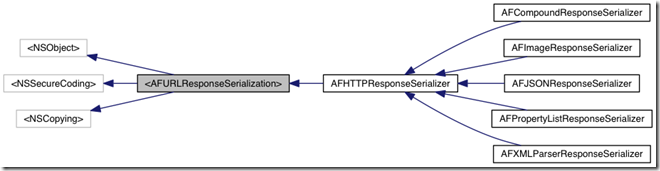
简单讲一下这个结构,比如说我现在想自定义一个ResponseSerializer,名叫AFCustomResponseSerializer,继承自AFHTTPResponseSerializer。
@interface AFCustomResponseSerializer : AFHTTPResponseSerializer
那么AFCustomResponseSerializer需要实现AFURLResponseSerialization协议的responseObjectForResponse:方法。此方法就是将data转化你定义的格式。可能你还需要实现你自己的serializer方法,并在init中定义自己的acceptableContentTypes。我们接下来就先看AFHTTPResponseSerializer这个父类,然后逐个看看AFHTTPResponseSerializer这些个子类。
4.1 AFHTTPResponseSerializer
注意到AFHTTPResponseSerializer实现的responseObjectForResponse:函数,只是简单调用了validateResponse:这个函数,而且validateResponse:中并没有对data做任何改变,也就是说父类AFHTTPResponseSerializer中的responseObjectForResponse:返回的就是最原始的data。对于data的处理,就交给了各个子类具体实现。
这里主要提及的就是validResponse:这个函数,挺重要的,主要是判断返回的response是否可用。有用的话,才会做下一步操作。
- (BOOL)validateResponse:(NSHTTPURLResponse *)response

                data:(NSData *)data

               error:(NSError * autoreleasing *)error

{

// 初始response是可用的,不过下面还需要要过三关斩六将

BOOL responseIsValid = YES;

NSError *validationError = nil;

// 简单的为空判断和类型判断,注意如果response为空或类型不对,反而responseValid为YES

if (response && [response isKindOfClass:[NSHTTPURLResponse class]]) {

    // 如果response对应的mimeType不被这个ResponseSerializer所接受,那么就认为Response不可用

    if (self.acceptableContentTypes && ![self.acceptableContentTypes containsObject:[response MIMEType]]) {

        // 会返回unacceptable content-type的信息,并将错误信息记录在了mutableUserInfo中

        if ([data length] >  && [response URL]) {

            NSMutableDictionary *mutableUserInfo = [@{

                                                      NSLocalizedDescriptionKey: [NSString stringWithFormat:NSLocalizedStringFromTable(@”Request failed: unacceptable content-type: %@“, @”AFNetworking“, nil), [response MIMEType]],

                                                      NSURLErrorFailingURLErrorKey:[response URL],

                                                      AFNetworkingOperationFailingURLResponseErrorKey: response,

                                                    } mutableCopy];

            if (data) {

                mutableUserInfo[AFNetworkingOperationFailingURLResponseDataErrorKey] = data;

            }

            // 利用mutableUserInfo构建一个NSError对象

            validationError = AFErrorWithUnderlyingError([NSError errorWithDomain:AFURLResponseSerializationErrorDomain code:NSURLErrorCannotDecodeContentData userInfo:mutableUserInfo], validationError);

        }
responseIsValid = NO;

    }

    // 判断返回的statusCode是否被允许

    if (self.acceptableStatusCodes && ![self.acceptableStatusCodes containsIndex:(NSUInteger)response.statusCode] && [response URL]) {

        NSMutableDictionary *mutableUserInfo = [@{

                                           NSLocalizedDescriptionKey: [NSString stringWithFormat:NSLocalizedStringFromTable(@”Request failed: %@ (%ld)“, @”AFNetworking“, nil), [NSHTTPURLResponse localizedStringForStatusCode:response.statusCode], (long)response.statusCode],

                                           NSURLErrorFailingURLErrorKey:[response URL],

                                           AFNetworkingOperationFailingURLResponseErrorKey: response,

                                   } mutableCopy];
if (data) {

            mutableUserInfo[AFNetworkingOperationFailingURLResponseDataErrorKey] = data;

        }
validationError = AFErrorWithUnderlyingError([NSError errorWithDomain:AFURLResponseSerializationErrorDomain code:NSURLErrorBadServerResponse userInfo:mutableUserInfo], validationError);
responseIsValid = NO;

    }

}

// 将error设置为validationError

if (error && !responseIsValid) {

    *error = validationError;

}
return responseIsValid;

}
4.2 AFJSONResponseSerializer
AFJSONResponseSerializer接受的content-type有@”application/json“, @”text/json“, @”text/javascript“。
再让我们看看responseObjectForResponse:data:error:的实现:
- (id)responseObjectForResponse:(NSURLResponse *)response

                       data:(NSData *)data

                      error:(NSError *autoreleasing *)error

{

// 判断当前response是否有效

if (![self validateResponse:(NSHTTPURLResponse *)response data:data error:error]) {

    // 还记得validateResponse:中如果content-type不满足,那么产生的validationError就是Domain为AFURLResponseSerializationErrorDomain,code为NSURLErrorCannotDecodeContentData

    if (!error || AFErrorOrUnderlyingErrorHasCodeInDomain(*error, NSURLErrorCannotDecodeContentData, AFURLResponseSerializationErrorDomain)) {

        // 因为不支持这个content-type,所以不用解析了,直接返回nil

        return nil;

    }

}
id responseObject = nil;

NSError *serializationError = nil;

// 对于‘head :ok’,Rails返回的是一个空格 (这是Safari上的一个bug),并且这样的JSON格式不会被NSJSONSerialization解析。

// See https://github.com/rails/rails/issues/1742

// 如果是单个空格,就不解析

BOOL isSpace = [data isEqualToData:[NSData dataWithBytes:” “ length:]];

if (data.length >  && !isSpace) {

    // 使用系统自带的NSJSONSerialization来解析NSData数据

    responseObject = [NSJSONSerialization JSONObjectWithData:data options:self.readingOptions error:&serializationError];

} else {

    return nil;

}

// 如果需要移除JSON数据中对应value为空(nil或NSNull)的key,那么就使用AFJSONObjectByRemovingKeysWithNullValues函数

// AFJSONObjectByRemovingKeysWithNullValues通过递归的方法,把JSON中NSDictionary的数据(不包括NSArray)中的对应value为空的key移除

if (self.removesKeysWithNullValues && responseObject) {

    responseObject = AFJSONObjectByRemovingKeysWithNullValues(responseObject, self.readingOptions);

}
if (error) {

    // 如果serializationError不为空,那么最终的error其实就是serializationError

    *error = AFErrorWithUnderlyingError(serializationError, *error);

}
return responseObject;

}
4.3 AFXMLParserResponseSerializer
AFXMLParserResponseSerializer接受的content-type有@”application/xml“, @”text/xml“。
再让我们看看responseObjectForResponse:data:error:的实现:
- (id)responseObjectForResponse:(NSHTTPURLResponse *)response

                       data:(NSData *)data

                      error:(NSError *autoreleasing *)error

{

if (![self validateResponse:(NSHTTPURLResponse *)response data:data error:error]) {

    // 如果不支持该content-type

    if (!error || AFErrorOrUnderlyingErrorHasCodeInDomain(*error, NSURLErrorCannotDecodeContentData, AFURLResponseSerializationErrorDomain)) {

        return nil;

    }

}

// 使用NSXMLParser解析NSData数据

return [[NSXMLParser alloc] initWithData:data];

}
至于下面的AFXMLDocumentResponseSerializer,那是MAC上所用到的,这里不赘述了。
4.4 AFPropertyListResponseSerializer
AFPropertyListResponseSerializer接受的content-type有@”application/x-plist“。
再让我们看看responseObjectForResponse:data:error:的实现:
- (id)responseObjectForResponse:(NSURLResponse *)response

                       data:(NSData *)data

                      error:(NSError *autoreleasing *)error

{

if (![self validateResponse:(NSHTTPURLResponse *)response data:data error:error]) {

    // 如果不支持该content-type,返回nil

    if (!error || AFErrorOrUnderlyingErrorHasCodeInDomain(*error, NSURLErrorCannotDecodeContentData, AFURLResponseSerializationErrorDomain)) {

        return nil;

    }

}
id responseObject;

NSError *serializationError = nil;

// 使用NSPropertyListSerialization来解析NSData数据

if (data) {

    responseObject = [NSPropertyListSerialization propertyListWithData:data options:self.readOptions format:NULL error:&serializationError];

}

// 如果serializationError不为空,那么最终的error其实就是serializationError

if (error) {

    *error = AFErrorWithUnderlyingError(serializationError, *error);

}
return responseObject;

}
4.5 AFImageResponseSerializer
AFImageResponseSerializer接受的content-type有@”image/tiff“, @”image/jpeg“, @”image/gif“, @”image/png“, @”image/ico“, @”image/x-icon“, @”image/bmp“, @”image/x-bmp“, @”image/x-xbitmap“, @”image/x-win-bitmap“。
再让我们看看responseObjectForResponse:data:error:的实现:
- (id)responseObjectForResponse:(NSURLResponse *)response

                       data:(NSData *)data

                      error:(NSError *autoreleasing *)error

{

if (![self validateResponse:(NSHTTPURLResponse *)response data:data error:error]) {

    // 如果不支持该content-type,返回nil

    if (!error || AFErrorOrUnderlyingErrorHasCodeInDomain(*error, NSURLErrorCannotDecodeContentData, AFURLResponseSerializationErrorDomain)) {

        return nil;

    }

}
#if TARGET_OS_IOS || TARGET_OS_TV || TARGET_OS_WATCH

// iOS和TV平台默认automaticallyInflatesResponseImage为YES

// 下面的NSData转图片的方法,之前SDWebImage分析过,就不赘述了

// 感兴趣的话可以查看【原】SDWebImage源码阅读(四)

if (self.automaticallyInflatesResponseImage) {

    return AFInflatedImageFromResponseWithDataAtScale((NSHTTPURLResponse *)response, data, self.imageScale);

} else {

    return AFImageWithDataAtScale(data, self.imageScale);

}

#else

// 只关心iOS

// Ensure that the image is set to it‘s correct pixel width and height

NSBitmapImageRep *bitimage = [[NSBitmapImageRep alloc] initWithData:data];

NSImage *image = [[NSImage alloc] initWithSize:NSMakeSize([bitimage pixelsWide], [bitimage pixelsHigh])];

[image addRepresentation:bitimage];
return image;

#endif
return nil;

}
4.6 AFCompoundResponseSerializer
该类里面有一个成员属性为
@property (readwrite, nonatomic, copy) NSArray *responseSerializers;
可见AFCompoundResponseSerializer是表示一组Serializer的集合,不信,你可以看它的responseObjectForResponse:data:error:函数实现:
- (id)responseObjectForResponse:(NSURLResponse *)response

                       data:(NSData *)data

                      error:(NSError *autoreleasing *)error

{

// 可能确实不能确定返回的responsed的content-type,此时可以使用AFCompoundResponseSerializer
// 总会找到合适的Serializer
    for (id <AFURLResponseSerialization> serializer in self.responseSerializers) {

    if (![serializer isKindOfClass:[AFHTTPResponseSerializer class]]) {

        continue;

    }
NSError *serializerError = nil;

    id responseObject = [serializer responseObjectForResponse:response data:data error:&serializerError];

    // 终于遍历到合适的Serializer

    if (responseObject) {

        if (error) {

            *error = AFErrorWithUnderlyingError(serializerError, *error);

        }
return responseObject;

    }

}
return [super responseObjectForResponse:response data:data error:error];

}
5. 参考文章
- 上一篇: 【原】FMDB源码阅读(二)
- 下一篇: 【原】AFNetworking源码阅读(二)
相关文章
-
【原】FMDB源码阅读(二)
【原】FMDB源码阅读(二)
- 互联网
- 2026年05月04日
-
【原】FMDB源码阅读(三)
【原】FMDB源码阅读(三)
- 互联网
- 2026年05月04日
-

【原】Github+Hexo+NextT搭建个人博客
【原】Github+Hexo+NextT搭建个人博客
- 互联网
- 2026年05月04日
-
【原】AFNetworking源码阅读(二)
【原】AFNetworking源码阅读(二)
- 互联网
- 2026年05月04日
-

【学习总结】Info.plist和pch文件的作用
【学习总结】Info.plist和pch文件的作用
- 互联网
- 2026年05月04日
-
【学习总结】GirlsInAI ML
【学习总结】GirlsInAI ML
- 互联网
- 2026年05月04日