【转】iOS学习之适配iOS10
- 作者: 五速梦信息网
- 时间: 2026年05月04日 13:56
作为开发者,如何适配iOS10呢?
1.Notification(通知)
NotificationUserNotificationsUserNotifications.framework2.ATS的问题
NSAllowsArbitraryLoadsYESATSATSHTTPSNSExceptionDomainsHTTPNSExceptionDomains方式 设置域。可以简单理解成,把不支持https协议的接口设置成http的接口。
具体方法:
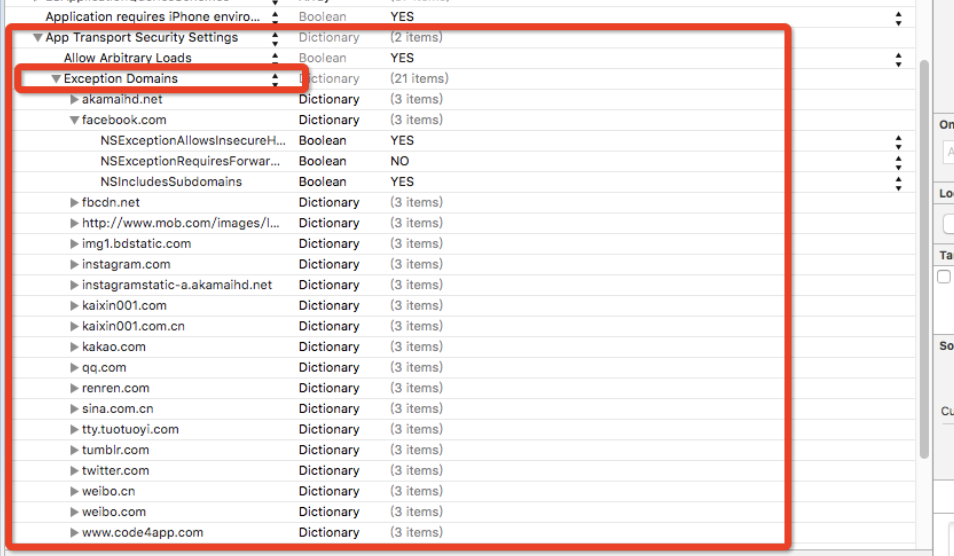
1)在项目的info.plist中添加一个Key:App Transport Security Settings,类型为字典类型。
2)然后给它添加一个Exception Domains,类型为字典类型;
3)把需要的支持的域添加給Exception Domains。其中域作为Key,类型为字典类型。
4)每个域下面需要设置3个属性:NSIncludesSubdomains、NSExceptionRequiresForwardSecrecy、NSExceptionAllowsInsecureHTTPLoads。
如图:
细节提示:在iOS9以后的系统中如果使用到网络图片,也要注意网络图片是否是HTTP的哦,如果是,也要把图片的域设置哦!
3.iOS 10 隐私权限设置
info.plistKeyValue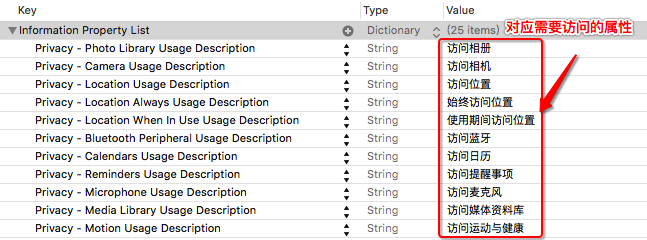
Value4.Xcode 8 运行一堆没用的logs解决办法

Xcode 8OS_ACTIVITY_MODE : disable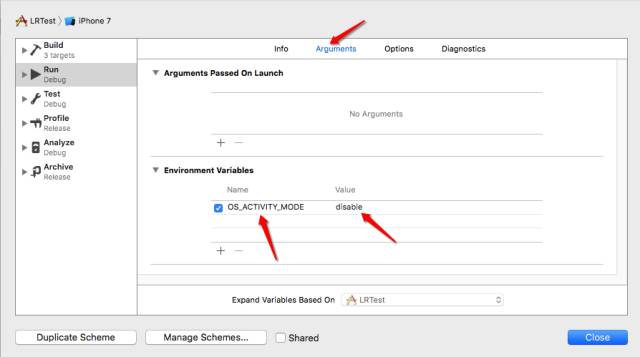
5.iOS 10 UIStatusBar方法过期:
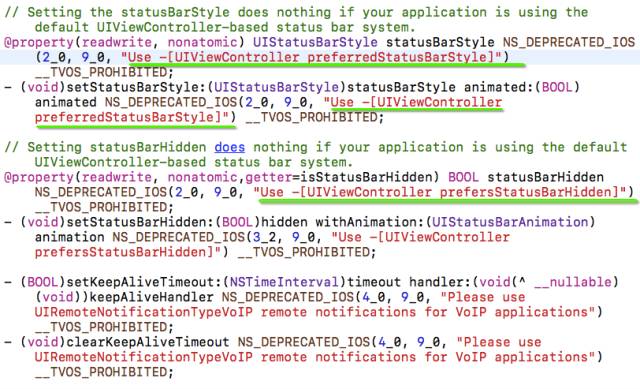
UIStatusBarpreferredStatusBar//iOS 10 - (UIStatusBarStyle)preferredStatusBarStyle { return UIStatusBarStyleDefault;
} 6.iOS 10 UICollectionView 性能优化
UICollectionViewUICollectionView- UICollectionView cell pre-fetching预加载机制
- UICollectionView and UITableView prefetchDataSource 新增的API
- 针对self-sizing cells 的改进
- Interactive reordering
在iOS 10 之前,UICollectionView上面如果有大量cell,当用户活动很快的时候,整个UICollectionView的卡顿会很明显,为什么会造成这样的问题,这里涉及到了iOS 系统的重用机制,当cell准备加载进屏幕的时候,整个cell都已经加载完成,等待在屏幕外面了,也就是整整一行cell都已经加载完毕,这就是造成卡顿的主要原因,专业术语叫做:掉帧.
要想让用户感觉不到卡顿,我们的app必须帧率达到60帧/秒,也就是说每帧16毫秒要刷新一次.
iOS 10 之前UICollectionViewCell的生命周期是这样的:
prepareForReusecellForItemAtIndexPathwillDisplayCellwillDisplayCelldidEndDisplayingCelliOS 10 UICollectionViewCell的生命周期是这样的:
prepareForReusecellForItemAtIndexPathwillDisplayCellwillDisplayCelldidEndDisplayingCellcellForItemAtIndexPathwillDisplayCellUICollectionViewDataSourcePrefetching - (void)collectionView:(UICollectionView *)collectionView prefetchItemsAtIndexPaths:(NSArray<NSIndexPath *> *)indexPaths NS_AVAILABLE_IOS(10_0);
- (void)collectionView:(UICollectionView *)collectionView cancelPrefetchingForItemsAtIndexPaths:(NSArray<NSIndexPath *> *)indexPaths NS_AVAILABLE_IOS(10_0);ColletionView prefetchItemsAt indexPathsindexPaths CollectionView cancelPrefetcingForItemsAt indexPaths7.iOS 10 UIColor 新增方法
以下是官方文档的说明:
Most graphics frameworks throughout the system, including Core Graphics, Core Image, Metal, and AVFoundation, have substantially improved support for extended-range pixel formats and wide-gamut color spaces. By extending this behavior throughout the entire graphics stack, it is easier than ever to support devices with a wide color display. In addition, UIKit standardizes on working in a new extended sRGB color space, making it easy to mix sRGB colors with colors in other, wider color gamuts without a significant performance penalty.
Here are some best practices to adopt as you start working with Wide Color.
In iOS 10, the UIColor class uses the extended sRGB color space and its initializers no longer clamp raw component values to between 0.0 and 1.0. If your app relies on UIKit to clamp component values (whether you’re creating a color or asking a color for its component values), you need to change your app’s behavior when you link against iOS 10.
When performing custom drawing in a UIView on an iPad Pro (9.7 inch), the underlying drawing environment is configured with an extended sRGB color space.
If your app renders custom image objects, use the new UIGraphicsImageRenderer class to control whether the destination bitmap is created using an extended-range or standard-range format.
If you are performing your own image processing on wide-gamut devices using a lower level API, such as Core Graphics or Metal, you should use an extended range color space and a pixel format that supports 16-bit floating-point component values. When clamping of color values is necessary, you should do so explicitly.
Core Graphics, Core Image, and Metal Performance Shaders provide new options for easily converting colors and images between color spaces.
RGBsRGBUIColorsRGBUIColorApi+ (UIColor *)colorWithDisplayP3Red:(CGFloat)displayP3Red green:(CGFloat)green blue:(CGFloat)blue alpha:(CGFloat)alpha NS_AVAILABLE_IOS(10_0);
- (UIColor *)initWithDisplayP3Red:(CGFloat)displayP3Red green:(CGFloat)green blue:(CGFloat)blue alpha:(CGFloat)alpha NS_AVAILABLE_IOS(10_0);
8.iOS 10 UITextContentType
// The textContentType property is to provide the keyboard with extra information about the semantic intent of the text document.@property(nonatomic,copy) UITextContentType textContentType NS_AVAILABLE_IOS(10_0); // default is nilUITextFieldtextContentTypeuitextcontenttypeemailaddress9.iOS 10 字体随着手机系统字体而改变
ApplabeladjustsFontForContentSizeCategory UILabel *myLabel = [UILabel new]; /*
UIFont 的preferredFontForTextStyle: 意思是指定一个样式,并让字体大小符合用户设定的字体大小。
*/
myLabel.font =[UIFont preferredFontForTextStyle: UIFontTextStyleHeadline]; /*
Indicates whether the corresponding element should automatically update its font when the device’s UIContentSizeCategory is changed.
For this property to take effect, the element’s font must be a font vended using +preferredFontForTextStyle: or +preferredFontForTextStyle:compatibleWithTraitCollection: with a valid UIFontTextStyle.
*/
//是否更新字体的变化
myLabel.adjustsFontForContentSizeCategory = YES; 10.iOS 10 UIScrollView新增refreshControl
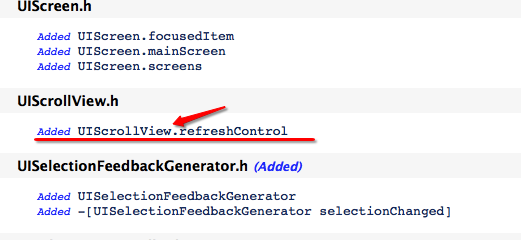
UIScrollView@property (nonatomic, strong, nullable) UIRefreshControl *refreshControl NS_AVAILABLE_IOS(10_0) __TVOS_PROHIBITED;
11.iOS 10 判断系统版本正确姿势
判断系统版本是我们经常用到的,尤其是现在大家都有可能需要适配iOS 10,那么问题就出现了,如下图:

我们得到了答案是:
//值为 1 [[[[UIDevice currentDevice] systemVersion] substringToIndex:1] integerValue]
//值为10.000000 [[UIDevice currentDevice] systemVersion].floatValue,
//值为10.0 [[UIDevice currentDevice] systemVersion]
[[UIDevice currentDevice] systemVersion].floatValue8.38.2[[UIDevice currentDevice] systemVersion]Swift判断如下:
  if #available(iOS 10.0, *) {

            // iOS 10.0

            print("iOS 10.0");

        } else { }
12.Xcode 8 插件不能用的问题
Xcode 8Xcode13.iOS 10开始项目中有的文字显示不全问题
Xcode 8Xcode 7.3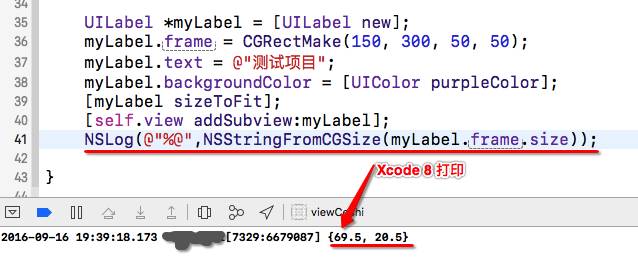
Xcode 8
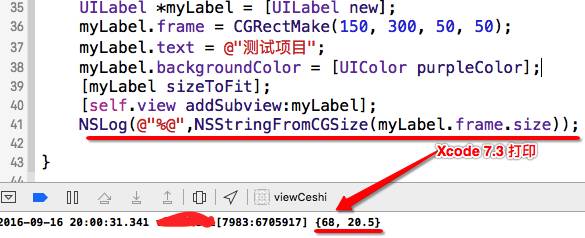 Xcode7
创建一个
Xcode7
创建一个Label然后让它自适应大小,字体大小都是17最后输出的宽度是不一样的,我们再看一下,
下面的数据就知道为什么升级iOS 10 之后App中有的文字显示不全了:
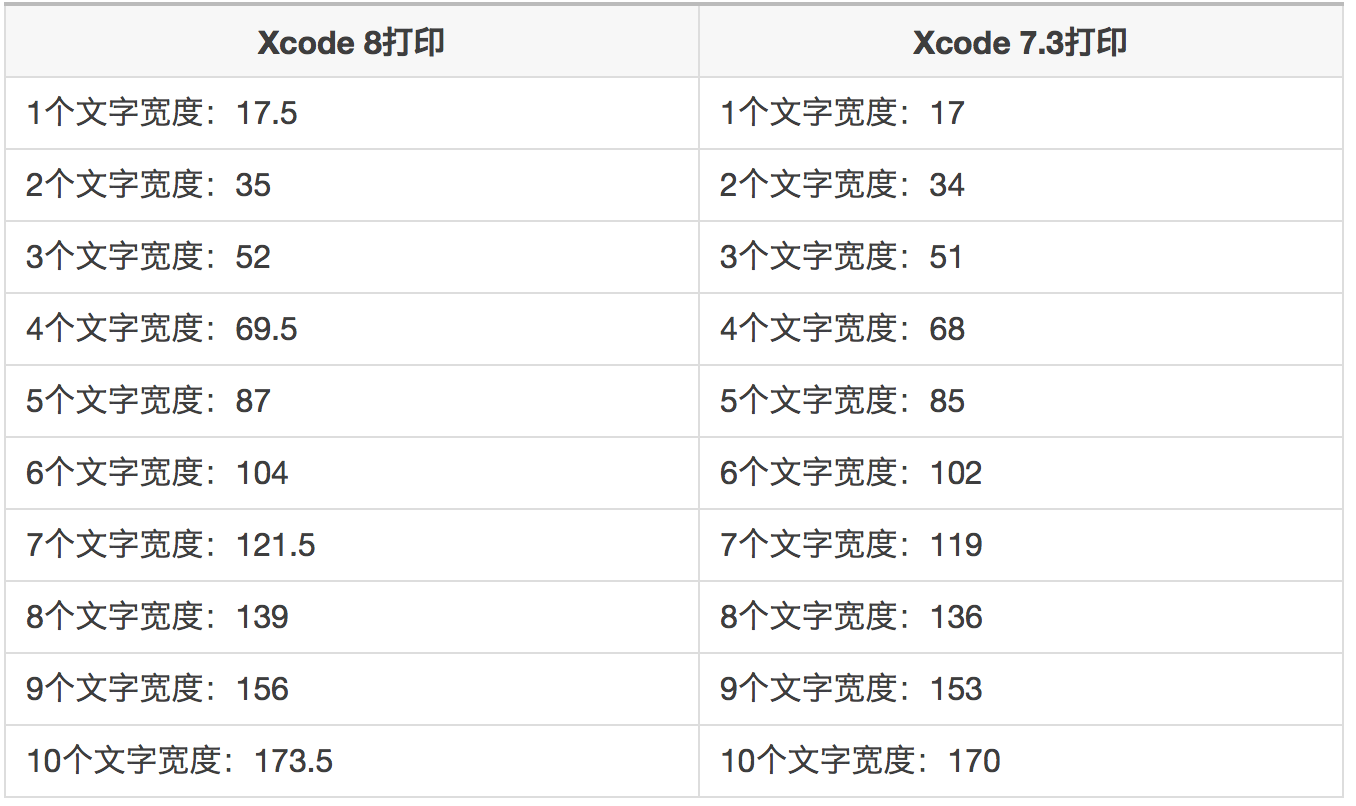 英文字母会不会也有这种问题,我又通过测试,后来发现英文字母没有问题,只有汉字有问题。
目前只有一个一个修改控件解决这个问题,暂时没有其他好办法来解决。
- 上一篇: 【转】Linux 的启动流程
- 下一篇: 【转】google chrome如何设置主页
相关文章
-
【转】Linux 的启动流程
【转】Linux 的启动流程
- 互联网
- 2026年05月04日
-
【转】linux打包压缩命令
【转】linux打包压缩命令
- 互联网
- 2026年05月04日
-
【转】linux下使用sqlplus执行包含语句块的sql文件,运行时会不断显示行号,而在plsqldev中能执行
【转】linux下使用sqlplus执行包含语句块的sql文件,运行时会不断显示行号,而在plsqldev中能执行
- 互联网
- 2026年05月04日
-

【转】google chrome如何设置主页
【转】google chrome如何设置主页
- 互联网
- 2026年05月04日
-
【转】File类应用
【转】File类应用
- 互联网
- 2026年05月04日
-
【转】CS,BS区别
【转】CS,BS区别
- 互联网
- 2026年05月04日