ABP vNext微服务架构详细教程(补充篇)——单层模板
- 作者: 五速梦信息网
- 时间: 2026年05月04日 13:54
- 简介
在之前的《ABP vNext微服务架构详细教程》系列中,我们已经构建了完整的微服务架构实例,但是在开发过程中,我们会发现每个基础服务都包含10个类库,这是给予DDD四层架构下ABP的实现方案,但是实际使用中我们会发现,随着微服务的增多,类库数量的确太过庞大了。而当时受到ABP vNext版本的限制,并没有一个快速生成精简应用框架的方式。
到了ABP vNext 5.3版本之后,官方添加了新的模板——单层应用模板,用于解决微服务架构单个项目类库过多的问题,也给了我们可以快速构建精简的微服务项目的入口。
这一篇,我就基于单层应用模板,对《ABP vNext微服务架构详细教程》系列原有微服务框架基础上进行简化,在ABP vNext单层模板上进一步精简的同时,提出一套在微服务架构下单层应用的最佳实践方案。
在此篇末尾,我会提供给大家一个精简版项目的代码生成器,请一定阅读到最后。
- 架构介绍
在之前的文章编写时ABP vNext版本为5.1.1,只有5.3.0之后版本才支持单页应用,目前最新正式版版本为5.3.4,这里我们单层模板以5.3.4版本为例。
通过ABP CLI命令,我们可以创建一个简单的单层应用模板项目。这里的单层是针对类库来说的,也就是只有一层类库,但是类库内部依旧包含着DDD下所有的元素,只是按文件夹划分并且没有明确的分层界限。
到当前版本为止,ABP通过官方CLI命令创建的项目,是必须包含用户角色权限信息管理和身份认证服务的项目。可以理解为过去应用模板的单层形式,但实际在微服务架构下,我们需要进行进一步的调整。对于整个微服务项目的总体架构和服务分层,我们依旧沿用之前《ABP vNext微服务架构详细教程》中的设计,详见:https://mp.weixin.qq.com/s/uDGwxbEhBv15RdMlflb7LA
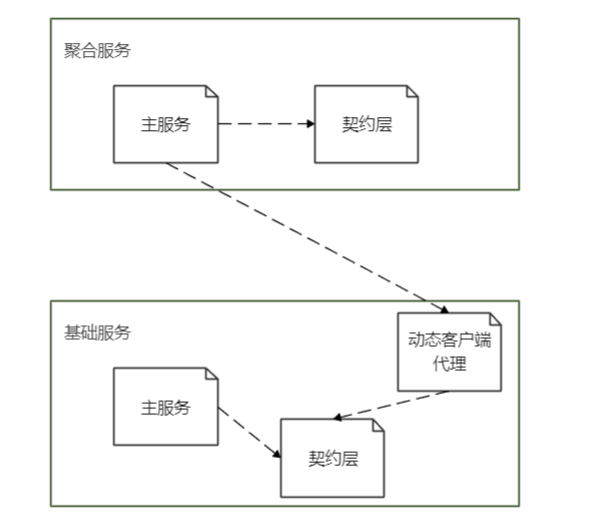
在聚合服务层和基础服务层业务服务中,我们使用单层模板为基础构建我们的服务。包含以下内容:
- 主服务:WebAPI启动项,也是ABP单层模板下生成的项目,包含过去Domain、Application、EntityFramworkCore、HttpApi、HttpApi.Host项目的内容,
- 契约层:当我们在聚合服务层依赖基础服务层时,我们肯定只是希望依赖基础服务中接口声明而非实现,所以将过去项目中的Application.Contracts和Domain.Shared两个类库中的内容从单层模板主项目抽离出来就是一个必须的工作。在这里,我们将其放在契约层中
- 动态客户端代理:在之前的基础服务中,包含一个特殊的类库:HttpApi.Client。它是对基础服务层动态客户端代理的封装和配置,它依赖于Application.Contracts项目,在当前服务中,我们依旧希望把它单独保留下来,以便于聚合服务实现HTTP调用。
这里,基础服务层需要包含以上三个项目,而聚合服务层目前没有提供动态客户端代理的需求,所以可以只包含主服务和契约层。(虽然从技术角度聚合服务中契约层也不是必须单独拿出来,但是从架构一致性和扩展性角度,我依旧推荐将契约单独存放)。
聚合服务层和基础服务层业务服务依赖关系如下图:
在整个微服务架构中,身份管理基础服务比较特殊,由于我们的授权中心依赖身份管理服务的EntityFrameworkCore,如果采用单层架构,则发现EntityFrameworkCore项目必须独立出来,而EntityFrameworkCore依赖于Domain层,则Domain层也需要独立,此时我们发现这个项目已经违背了单层应用的初衷。所以身份管理的基础服务我们依旧采用之前的方式来构建。
另外身份认证服务和网关本身就是单类库项目,也不需要做调整。
- 框架搭建
3.1 基础服务
基础服务我们命名为NotificationManager,通过以下ABP CLI命令,我们可以构建基础服务的主服务,这里我们选择无UI模板,MySQL数据库
abp new Demo.NotificationManager -t app-nolayers -u none -dbms mysql
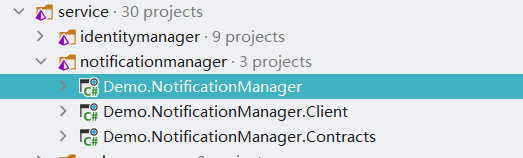
将该服务添加至主解决方案service/notificationmanger解决方案文件夹下,并在同目录下分别创建契约层类库 Demo.NotificationManager.Contracts 和动态客户端代理类库 Demo.NotificationManager.Client 。创建后结果如下图:
由于我们没有使用多语言,所以直接将主项目中Localization文件夹所有内容删除。
这里我打算使用另一种对象映射框架,所以删除主项目中的ObjectMapping文件夹,如果准备继续使用AutoMapper框架则保留该文件夹。
移除主项目中Services文件夹中的Dtos子文件夹,DTO不存放在该项目中而是在契约层。
由于我们这边不涉及前端,所以删除wwwroot文件夹和package.json文件。
删除主服务Data文件夹下的IdentityServerDataSeedContributor.cs文件。
删除后主服务项目结构如下:

编辑主项目的Demo.NotificationManager.csproj文件,删除从 <ItemGroup> <PackageReference Include=“Volo.Abp.Account.Application” Version=“5.3.4” /> 到 <PackageReference Include=“Microsoft.Extensions.FileProviders.Embedded” Version=“6.0.5” /> </ItemGroup> 的所有引用及AutoMapper引用,保留如下内容:
<Project Sdk=“Microsoft.NET.Sdk.Web”>

  <PropertyGroup>
    <TargetFramework>net6.0</TargetFramework>
    <ImplicitUsings>enable</ImplicitUsings>
    <GenerateEmbeddedFilesManifest>true</GenerateEmbeddedFilesManifest>
  </PropertyGroup>

  <ItemGroup>
    <PackageReference Include=“Serilog.AspNetCore” Version=“5.0.0” />
    <PackageReference Include=“Serilog.Sinks.Async” Version=“1.5.0” />
  </ItemGroup>

  <ItemGroup>
    <PackageReference Include=“Volo.Abp.AspNetCore.Mvc” Version=“5.3.4” />
    <PackageReference Include=“Volo.Abp.Autofac” Version=“5.3.4” />
    <PackageReference Include=“Volo.Abp.Swashbuckle” Version=“5.3.4” />
    <PackageReference Include=“Volo.Abp.AspNetCore.Authentication.JwtBearer” Version=“5.3.4” />
    <PackageReference Include=“Volo.Abp.AspNetCore.Serilog” Version=“5.3.4” />
    <PackageReference Include=“Volo.Abp.EntityFrameworkCore.MySQL” Version=“5.3.4” />
  </ItemGroup>

  <ItemGroup>
    <PackageReference Include=“Microsoft.Extensions.FileProviders.Embedded” Version=“6.0.5” />
  </ItemGroup>

  <ItemGroup>
    <PackageReference Include=“Microsoft.EntityFrameworkCore.Tools” Version=“6.0.5”>
      <IncludeAssets>runtime; build; native; contentfiles; analyzers</IncludeAssets>
      <PrivateAssets>compile; contentFiles; build; buildMultitargeting; buildTransitive; analyzers; native</PrivateAssets>
    </PackageReference>
  </ItemGroup>

  <ItemGroup>
    <Compile Remove=“Logs*” />
    <Content Remove=“Logs*” />
    <EmbeddedResource Remove=“Logs*” />
    <None Remove=“Logs*” />
  </ItemGroup>

  <ItemGroup>
    <ProjectReference Include=“......\common\Demo.Abp.Extension\Demo.Abp.Extension.csproj” />
    <ProjectReference Include=“..\Demo.NotificationManager.Contracts\Demo.NotificationManager.Contracts.csproj” />
  </ItemGroup>
</Project>
删除主服务Data文件夹下NotificationManagerDbContext类中所有报错的行,保留如下内容:
using Demo.NotificationManager.Entities.Notifications;

using Microsoft.EntityFrameworkCore;

using Volo.Abp.EntityFrameworkCore;
namespace Demo.NotificationManager.Data;
public class NotificationManagerDbContext : AbpDbContext<NotificationManagerDbContext>

{

public NotificationManagerDbContext(DbContextOptions<NotificationManagerDbContext> options)

    : base(options)

{

}
protected override void OnModelCreating(ModelBuilder builder)

{

    base.OnModelCreating(builder);

}

}
修改Data文件夹下NotificationManagerDbMigrationService类改为以下代码(这里因为我们没使用多租户和初始化数据,所以我移除了相关内容):
using System.Diagnostics;

using System.Runtime.InteropServices;

using Microsoft.Extensions.Logging.Abstractions;

using Volo.Abp.Data;

using Volo.Abp.DependencyInjection;

using Volo.Abp.MultiTenancy;
namespace Demo.NotificationManager.Data;
public class NotificationManagerDbMigrationService : ITransientDependency

{

public ILogger<NotificationManagerDbMigrationService> Logger { get; set; }
private readonly IDataSeeder _dataSeeder;

private readonly NotificationManagerEFCoreDbSchemaMigrator _dbSchemaMigrator;

private readonly ICurrentTenant _currentTenant;
public NotificationManagerDbMigrationService(

    IDataSeeder dataSeeder,

    NotificationManagerEFCoreDbSchemaMigrator dbSchemaMigrator,

    ICurrentTenant currentTenant)

{

    _dataSeeder = dataSeeder;

    _dbSchemaMigrator = dbSchemaMigrator;

    _currentTenant = currentTenant;
Logger = NullLogger<NotificationManagerDbMigrationService>.Instance;

}
public async Task MigrateAsync()

{

    var initialMigrationAdded = AddInitialMigrationIfNotExist();
if (initialMigrationAdded)

    {

        return;

    }
Logger.LogInformation(“Started database migrations…”);
await MigrateDatabaseSchemaAsync();
Logger.LogInformation(“Successfully completed all database migrations.”);

    Logger.LogInformation(“You can safely end this process…”);

}
private async Task MigrateDatabaseSchemaAsync()

{

    await dbSchemaMigrator.MigrateAsync();

}
private bool AddInitialMigrationIfNotExist()

{

    try

    {

        if (!DbMigrationsProjectExists())

        {

            return false;

        }

    }

    catch (Exception)

    {

        return false;

    }
try

    {

        if (!MigrationsFolderExists())

        {

            AddInitialMigration();

            return true;

        }

        else

        {

            return false;

        }

    }

    catch (Exception e)

    {

        Logger.LogWarning(“Couldn‘t determinate if any migrations exist : ” + e.Message);

        return false;

    }

}
private bool DbMigrationsProjectExists()

{

    return Directory.Exists(GetEntityFrameworkCoreProjectFolderPath());

}
private bool MigrationsFolderExists()

{

    var dbMigrationsProjectFolder = GetEntityFrameworkCoreProjectFolderPath();
return Directory.Exists(Path.Combine(dbMigrationsProjectFolder, “Migrations”));

}
private void AddInitialMigration()

{

    Logger.LogInformation(“Creating initial migration…”);
string argumentPrefix;

    string fileName;
if (RuntimeInformation.IsOSPlatform(OSPlatform.OSX) || RuntimeInformation.IsOSPlatform(OSPlatform.Linux))

    {

        argumentPrefix = “-c”;

        fileName = “/bin/bash”;

    }

    else

    {

        argumentPrefix = “/C”;

        fileName = “cmd.exe”;

    }
var procStartInfo = new ProcessStartInfo(fileName,

        $“{argumentPrefix} "abp create-migration-and-run-migrator "{GetEntityFrameworkCoreProjectFolderPath()}" –nolayers"”

    );
try

    {

        Process.Start(procStartInfo);

    }

    catch (Exception)

    {

        throw new Exception(“Couldn’t run ABP CLI…”);

    }

}
private string GetEntityFrameworkCoreProjectFolderPath()

{

    var slnDirectoryPath = GetSolutionDirectoryPath();
if (slnDirectoryPath == null)

    {

        throw new Exception(“Solution folder not found!”);

    }
return Path.Combine(slnDirectoryPath, “Demo.NotificationManager”);

}
private string GetSolutionDirectoryPath()

{

    var currentDirectory = new DirectoryInfo(Directory.GetCurrentDirectory());
while (Directory.GetParent(currentDirectory.FullName) != null)

    {

        currentDirectory = Directory.GetParent(currentDirectory.FullName);
if (Directory.GetFiles(currentDirectory.FullName).FirstOrDefault(f => f.EndsWith(“.sln”)) != null)

        {

            return currentDirectory.FullName;

        }

    }
return null;

}

}
将主服务模块类修改为以下内容:
using Demo.NotificationManager.Contracts;
using Microsoft.OpenApi.Models;
using Demo.NotificationManager.Data;
using Volo.Abp;
using Volo.Abp.AspNetCore.Mvc;
using Volo.Abp.AspNetCore.Serilog;
using Volo.Abp.Autofac;
using Volo.Abp.EntityFrameworkCore;
using Volo.Abp.EntityFrameworkCore.MySQL;
using Volo.Abp.Modularity;
using Volo.Abp.Swashbuckle;

namespace Demo.NotificationManager;

[DependsOn(
    // ABP Framework packages
    typeof(AbpAspNetCoreMvcModule),
    typeof(AbpAutofacModule),
    typeof(AbpEntityFrameworkCoreMySQLModule),
    typeof(AbpSwashbuckleModule),
    typeof(AbpAspNetCoreSerilogModule),
    typeof(NotificationManagerContractsModule)
)]
public class NotificationManagerModule : AbpModule
{
    #region 私有方法

    #region 配置动态webapi
    private void ConfigureAutoApiControllers()
    {
        Configure<AbpAspNetCoreMvcOptions>(options =>
        {
            options.ConventionalControllers.Create(typeof(NotificationManagerModule).Assembly);
        });
    }
    #endregion

    #region 配置swagger
    private void ConfigureSwagger(IServiceCollection services)
    {
        services.AddAbpSwaggerGen(
            options =>
            {
                options.SwaggerDoc(“v1”, new OpenApiInfo { Title = “NotificationManager API”, Version = “v1” });
                options.DocInclusionPredicate((, _) => true);
                options.CustomSchemaIds(type => type.FullName);
            }
        );
    }
    #endregion

    #region 设置EF
    private void ConfigureEfCore(ServiceConfigurationContext context)
    {
        context.Services.AddAbpDbContext<NotificationManagerDbContext>(options =>
        {
            /* You can remove “includeAllEntities: true” to create
             * default repositories only for aggregate roots
             * Documentation: https://docs.abp.io/en/abp/latest/Entity-Framework-Core#add-default-repositories
             /
            options.AddDefaultRepositories(includeAllEntities: true);
        });

        Configure<AbpDbContextOptions>(options =>
        {
            options.Configure(configurationContext =>
            {
                configurationContext.UseMySQL();
            });
        });
    }
    #endregion

    #endregion
    public override void ConfigureServices(ServiceConfigurationContext context)
    {
        ConfigureSwagger(context.Services);
        ConfigureAutoApiControllers();
        ConfigureEfCore(context);
    }

    public override void OnApplicationInitialization(ApplicationInitializationContext context)
    {
        var app = context.GetApplicationBuilder();
        app.UseRouting();
        app.UseUnitOfWork();
        app.UseSwagger();
        app.UseSwaggerUI(options =>
        {
            options.SwaggerEndpoint(“/swagger/v1/swagger.json”, “NotificationManager API”);
        });
        app.UseAbpSerilogEnrichers();
        app.UseConfiguredEndpoints();
    }
}
在主服务中的appsettings.json中删除额外配置项保留如下内容
{

“ConnectionStrings”: {

“Default”: “Server=localhost;Port=3306;Database=NotificationManager;Uid=root;Pwd=123456;”

},

“urls”: “http://:5003”

}
删除契约层中的Class1.cs,并添加模块类NotificationManagerContractsModule如下:
using Volo.Abp.Application;

using Volo.Abp.Modularity;
namespace Demo.NotificationManager.Contracts;
[DependsOn(

typeof(AbpDddApplicationContractsModule)

)]

public class NotificationManagerContractsModule : AbpModule

{
}
在契约层添加NotificationManagerRemoteServiceConsts类如下:
namespace Demo.NotificationManager.Contracts;
public class NotificationManagerRemoteServiceConsts

{

public const string RemoteServiceName = “NitificationManager”;
public const string ModuleName = “nitificationManager”;

}
删除动态客户端代理层的Class1.cs文件,添加模块类NotificationManagerClientModule如下:
using Demo.Abp.Extension;
using Demo.NotificationManager.Contracts;
using Microsoft.Extensions.DependencyInjection;
using Volo.Abp.Http.Client;
using Volo.Abp.Modularity;
using Volo.Abp.Timing;
using Volo.Abp.VirtualFileSystem;

namespace Demo.NotificationManager.Client;

[DependsOn(typeof(NotificationManagerContractsModule),
    typeof(AbpHttpClientModule))]

public class NotificationManagerClientModule : AbpModule
{
    public override void ConfigureServices(ServiceConfigurationContext context)
    {
        context.Services.AddTransient<AddHeaderHandler>();
        context.Services.AddHttpClient(NotificationManagerRemoteServiceConsts.RemoteServiceName)
            .AddHttpMessageHandler<AddHeaderHandler>();

        context.Services.AddHttpClientProxies(
            typeof(NotificationManagerContractsModule).Assembly,
            NotificationManagerRemoteServiceConsts.RemoteServiceName
        );

        Configure<AbpVirtualFileSystemOptions>(options =>
        {
            options.FileSets.AddEmbedded<NotificationManagerClientModule>();
        });
        Configure<AbpClockOptions>(options => { options.Kind = DateTimeKind.Local; });
    }
}完成以上修改后,运行项目并用浏览器访问http://localhost:5005,可出现Swagger页面则基础服务配置成功。
3.2 聚合服务
这里我们将聚合服务命名为Domain.Core
和基础服务层一致,我们先通过命令创建单层模板项目Domain.Core,这里我们删除wwwroot、Data、Entities、Localization、ObjectMapping文件夹及其所有子文件,并删除package.json文件和Services文件夹下的Dtos文件夹
在同级目录添加类库Domain.Core.Constracts并删除其中的Class1.cs文件
这里我们在聚合服务中暂时不需要提供动态客户端代理,暂时不创建.Client项目,如果需要,创建方式和基础服务层相同。
修改Demo.Core.csproj文件如下:
<Project Sdk=“Microsoft.NET.Sdk.Web”>
<PropertyGroup>

<TargetFramework>net6.0</TargetFramework>

<ImplicitUsings>enable</ImplicitUsings>

<GenerateEmbeddedFilesManifest>true</GenerateEmbeddedFilesManifest>

</PropertyGroup>
<ItemGroup>

<PackageReference Include=“Serilog.AspNetCore” Version=“5.0.0” />

<PackageReference Include=“Serilog.Sinks.Async” Version=“1.5.0” />

</ItemGroup>
<ItemGroup>

<PackageReference Include=“Volo.Abp.AspNetCore.Mvc” Version=“5.3.4” />

<PackageReference Include=“Volo.Abp.Autofac” Version=“5.3.4” />

<PackageReference Include=“Volo.Abp.Swashbuckle” Version=“5.3.4” />

<PackageReference Include=“Volo.Abp.AspNetCore.Serilog” Version=“5.3.4” />

</ItemGroup>
<ItemGroup>

<PackageReference Include=“Microsoft.Extensions.FileProviders.Embedded” Version=“6.0.5” />

</ItemGroup>
<ItemGroup>

<Content Remove=“Localization\Core*.json” />

<EmbeddedResource Include=“Localization\Core*.json” />

<EmbeddedResource Remove=“wwwroot*” />

<Content Remove=“wwwroot*” />

<Content Remove=“package.json” />

</ItemGroup>
<ItemGroup>

<Compile Remove=“Logs*” />

<Content Remove=“Logs*” />

<EmbeddedResource Remove=“Logs*” />

<None Remove=“Logs*” />

<Compile Remove=“wwwroot*” />

<None Remove=“wwwroot*” />

</ItemGroup>
<ItemGroup>

<ProjectReference Include=“......\service\notificationmanager\Demo.NotificationManager.Client\Demo.NotificationManager.Client.csproj” />

<ProjectReference Include=“..\Demo.Core.Contracts\Demo.Core.Contracts.csproj” />

</ItemGroup>

</Project>
修改CoreModule.cs类代码如下:
using Demo.Core.Contracts;

using Demo.NotificationManager.Client;

using Microsoft.OpenApi.Models;

using Volo.Abp;

using Volo.Abp.AspNetCore.Mvc;

using Volo.Abp.AspNetCore.Serilog;

using Volo.Abp.Autofac;

using Volo.Abp.Modularity;

using Volo.Abp.Swashbuckle;
namespace Demo.Core;
[DependsOn(

// ABP Framework packages

typeof(AbpAspNetCoreMvcModule),

typeof(AbpAutofacModule),

typeof(AbpSwashbuckleModule),

typeof(AbpAspNetCoreSerilogModule),

typeof(CoreContractsModule),

typeof(NotificationManagerClientModule)

)]

public class CoreModule : AbpModule

{

#region 私有方法
#region 配置动态WebApi

private void ConfigureAutoApiControllers()

{

    Configure<AbpAspNetCoreMvcOptions>(options =>

    {

        options.ConventionalControllers.Create(typeof(CoreModule).Assembly);

    });

}

#endregion
#region 配置swagger

private void ConfigureSwagger(IServiceCollection services)

{

    services.AddAbpSwaggerGen(

        options =>

        {

            options.SwaggerDoc(“v1”, new OpenApiInfo { Title = “Core API”, Version = “v1” });

            options.DocInclusionPredicate((docName, description) => true);

            options.CustomSchemaIds(type => type.FullName);

        }

    );

}

#endregion
#endregion
public override void ConfigureServices(ServiceConfigurationContext context)

{

    ConfigureSwagger(context.Services);

    ConfigureAutoApiControllers();

}
public override void OnApplicationInitialization(ApplicationInitializationContext context)

{

    var app = context.GetApplicationBuilder();
app.UseRouting();

    app.UseUnitOfWork();

    app.UseSwagger();

    app.UseSwaggerUI(options =>

    {

        options.SwaggerEndpoint(“/swagger/v1/swagger.json”, “Core API”);

    });

    app.UseAbpSerilogEnrichers();

    app.UseConfiguredEndpoints();

}

}
修改Program.cs文件内容如下:
using Demo.Core;

using Serilog;

using Serilog.Events;
Log.Logger = new LoggerConfiguration()

#if DEBUG

.MinimumLevel.Debug()

#else

            .MinimumLevel.Information()

#endif

.MinimumLevel.Override(“Microsoft”, LogEventLevel.Information)

.Enrich.FromLogContext()

.WriteTo.Async(c => c.File(“Logs/logs.txt”))

#if DEBUG

.WriteTo.Async(c => c.Console())

#endif

.CreateLogger();
var builder = WebApplication.CreateBuilder(args);
builder.Host.UseAutofac().UseSerilog();
builder.Services.ReplaceConfiguration(builder.Configuration);
builder.Services.AddApplication<CoreModule>();
var app = builder.Build();
app.InitializeApplication();
app.Run();
修改appsettings.json文件如下:
{

“urls”: “http://*:6003”,

“RemoteServices”: {

“NitificationManager”: {

  “BaseUrl”: “http://localhost:5003/"

}

}

}
修改Demo.Core.Contracts.csproj文件:
<Project Sdk=”Microsoft.NET.Sdk“>
<PropertyGroup>

    <TargetFramework>net6.0</TargetFramework>

    <ImplicitUsings>enable</ImplicitUsings>

    <Nullable>enable</Nullable>

</PropertyGroup>
<ItemGroup>

    <PackageReference Include=”Volo.Abp.Ddd.Application.Contracts“ Version=”5.3.4“ />

</ItemGroup>

</Project>
在Demo.Core.Contracts项目中创建CoreContractsModule.cs文件内容如下:
using Volo.Abp.Application;

using Volo.Abp.Modularity;
namespace Demo.Core.Contracts;
[DependsOn(

typeof(AbpDddApplicationContractsModule)

)]

public class CoreContractsModule : AbpModule

{
}
启动Demo.Core项目可正常运行并显示swagger页面则聚合服务创建成功。
4.业务代码4.1 基础服务
在Demo.NotificationManager项目Entities文件夹中按领域划分子文件夹,这里创建Notifications领域文件夹,并添加实体类Notification如下:
using System.ComponentModel.DataAnnotations;

using Volo.Abp.Domain.Entities.Auditing;
namespace Demo.NotificationManager.Entities.Notifications;
/// <summary>

/// 通知

/// </summary>

public class Notification : CreationAuditedEntity<Guid>

{

/// <summary>

/// 接受着用户ID

/// </summary>

public Guid ReceiverId { get; set; }
/// <summary>

/// 标题

/// </summary>

[StringLength(128)]

public string Title { get; set; }
/// <summary>

/// 内容

/// </summary>

public string Content { get; set; }
/// <summary>

/// 是否已读

/// </summary>

public bool IsRead { get; set; }

}
在Demo.NotificationManager项目Data文件夹下的NotificationManagerDbContext类中添加如下属性并引入相应依赖:
public DbSet<Notification> Notifications { get; set; }通过 dotnet-ef 的 migrations add 命令和 database update 命令创建数据库结构。
这里我们未用到领域服务,如果需要,可在Demo.NotificationManager项目中添加Managers文件夹并按领域存放对应代码。
在Demo.NotificationManager.Contracts项目中添加Services文件夹,DTO和应用服务接口的定义。这里添加子文件夹Notifications并在其中添加Dtos文件夹,用于存放DTO。
我们添加以下两个DTO分别用于添加和查询通知:
using System.ComponentModel.DataAnnotations;

using Volo.Abp.Application.Dtos;
namespace Demo.NotificationManager.Contracts.Services.Notifications.Dtos;
public class NotificationCreateDto:EntityDto<Guid>

{

/// <summary>

/// 接受着用户ID

/// </summary>

public Guid ReceiverId { get; set; }
/// <summary>

/// 标题

/// </summary>

[StringLength(128)]

public string Title { get; set; }
/// <summary>

/// 内容

/// </summary>

public string Content { get; set; }
/// <summary>

/// 是否已读

/// </summary>

public bool IsRead { get; set; }

}
using System.ComponentModel.DataAnnotations;
using Volo.Abp.Application.Dtos;
using Volo.Abp.Auditing; namespace Demo.NotificationManager.Contracts.Services.Notifications.Dtos; public class NotificationDto:NotificationCreateDto,ICreationAuditedObject
{
/// <summary>
/// 创建时间
/// </summary>
public DateTime CreationTime { get; set; } /// <summary>
/// 创建者
/// </summary>
public Guid? CreatorId { get; set; }
}添加INotificationAppService应用服务接口,内容如下:
using Demo.NotificationManager.Contracts.Services.Notifications.Dtos;

using Volo.Abp.Application.Dtos;

using Volo.Abp.Application.Services;
namespace Demo.NotificationManager.Contracts.Services.Notifications;
public interface

INotificationAppService : ICrudAppService<NotificationDto, Guid, PagedResultRequestDto, NotificationCreateDto>

{
}
在Demo.NotificationManger中Services文件夹中添加应用服务实现类,这里添加Notifications子文件夹并创建NotificationAppService类如下:
using Demo.Abp.Extension;

using Demo.NotificationManager.Contracts.Services.Notifications;

using Demo.NotificationManager.Contracts.Services.Notifications.Dtos;

using Demo.NotificationManager.Entities.Notifications;

using Volo.Abp.Application.Dtos;

using Volo.Abp.Domain.Repositories;
namespace Demo.NotificationManager.Services.Notifications;
public class NotificationAppService : CustomCrudAppService<Notification, NotificationDto, Guid,PagedResultRequestDto,NotificationCreateDto>, INotificationAppService

{

public NotificationAppService(IRepository<Notification, Guid> repository) : base(repository)

{

}

}
此处,我引入了Mapster框架替代原来的AutoMapper框架,所以我们看到CustomCrudAppService类替代了默认增删改查类CrudAppService。
CrudAppService类被存放在Demo.Abp.Extension类库中作为通用基类使用,代码如下:
using Mapster;

using Volo.Abp.Application.Dtos;

using Volo.Abp.Application.Services;

using Volo.Abp.Domain.Entities;

using Volo.Abp.Domain.Repositories;
namespace Demo.Abp.Extension;
#region 重载
- public abstract class CustomCrudAppService<TEntity, TEntityDto, TKey>
- CustomCrudAppService<TEntity, TEntityDto, TKey, PagedAndSortedResultRequestDto>
where TEntity : class, IEntity<TKey>
where TEntityDto : IEntityDto<TKey>
{
- protected CustomCrudAppService(IRepository<TEntity, TKey> repository)
- base(repository)
{ }
} public abstract class CustomCrudAppService<TEntity, TEntityDto, TKey, TGetListInput>
- protected CustomCrudAppService(IRepository<TEntity, TKey> repository)
- CustomCrudAppService<TEntity, TEntityDto, TKey, TGetListInput, TEntityDto>
where TEntity : class, IEntity<TKey>
where TEntityDto : IEntityDto<TKey>
{
- protected CustomCrudAppService(IRepository<TEntity, TKey> repository)
- base(repository)
{ }
} public abstract class CustomCrudAppService<TEntity, TEntityDto, TKey, TGetListInput, TCreateInput>
- protected CustomCrudAppService(IRepository<TEntity, TKey> repository)
- CustomCrudAppService<TEntity, TEntityDto, TKey, TGetListInput, TCreateInput, TCreateInput>
where TEntity : class, IEntity<TKey>
where TEntityDto : IEntityDto<TKey>
{
- protected CustomCrudAppService(IRepository<TEntity, TKey> repository)
- base(repository)
{ }
} public abstract class CustomCrudAppService<TEntity, TEntityDto, TKey, TGetListInput, TCreateInput, TUpdateInput>
- protected CustomCrudAppService(IRepository<TEntity, TKey> repository)
- CustomCrudAppService<TEntity, TEntityDto, TEntityDto, TKey, TGetListInput, TCreateInput, TUpdateInput>
where TEntity : class, IEntity<TKey>
where TEntityDto : IEntityDto<TKey>
{
- protected CustomCrudAppService(IRepository<TEntity, TKey> repository)
- base(repository)
{ } protected override Task<TEntityDto> MapToGetListOutputDtoAsync(TEntity entity)
{
return MapToGetOutputDtoAsync(entity);
} protected override TEntityDto MapToGetListOutputDto(TEntity entity)
{
return MapToGetOutputDto(entity);
}
}
#endregion public class CustomCrudAppService<TEntity, TGetOutputDto, TGetListOutputDto, TKey, TGetListInput, TCreateInput,
TUpdateInput>
- protected CustomCrudAppService(IRepository<TEntity, TKey> repository)
- CrudAppService<TEntity, TGetOutputDto, TGetListOutputDto, TKey, TGetListInput, TCreateInput, TUpdateInput>
where TEntity : class, IEntity<TKey>
where TGetOutputDto : IEntityDto<TKey>
where TGetListOutputDto : IEntityDto<TKey>
{
public CustomCrudAppService(IRepository<TEntity, TKey> repository) : base(repository)
{
} #region Mapster
protected override TEntity MapToEntity(TCreateInput createInput)
{
var entity = createInput.Adapt<TEntity>();
SetIdForGuids(entity);
return entity;
} protected override void MapToEntity(TUpdateInput updateInput, TEntity entity)
{
if (updateInput is IEntityDto<TKey> entityDto)
{
entityDto.Id = entity.Id;
}
entity = updateInput.Adapt(entity);
} protected override TGetOutputDto MapToGetOutputDto(TEntity entity)
{
return entity.Adapt<TGetOutputDto>(); //ObjectMapper.Map<TEntity, TGetOutputDto>(entity);
}
protected override TGetListOutputDto MapToGetListOutputDto(TEntity entity)
{
return entity.Adapt<TGetListOutputDto>(); //ObjectMapper.Map<TEntity, TGetListOutputDto>(entity);
}
#endregion
}此类我继承自原有的CrudAppService类,并重写了对象转换方法。
使用Mapster,比AutoMapper效率更高,而且不需要提前声明默认的对象映射关系,如果需要额外定义映射关系或操作,可通过添加MapConfig类实现。具体用法参考其官方文档:https://github.com/rivenfx/Mapster-docs
如果我们需要定义领域通用配置、枚举等原属于Domain.Share项目中的内容,可创建并存放在Demo.NotificationManager.Contracts项目下Share文件夹中。
完成以上步骤,并可成功运行Demo.NotificationManager项目,则基础服务代码运行成功。
4.2 聚合服务
聚合服务层和基础服务层相同的道理,在Demo.Core.Contracts增加Services文件夹,并添加Notifications子文件夹,在其中添加Dtos文件夹并添加两个DTO与基础服务对应:
using Volo.Abp.Application.Dtos;
namespace Demo.Core.Contracts.Services.Notifications.Dtos;
public class CoreNotificationCreateDto:EntityDto<Guid>

{

/// <summary>

/// 接受着用户ID

/// </summary>

public Guid ReceiverId { get; set; }
/// <summary>

/// 标题

/// </summary>

public string Title { get; set; }
/// <summary>

/// 内容

/// </summary>

public string Content { get; set; }
/// <summary>

/// 是否已读

/// </summary>

public bool IsRead { get; set; }

}
using Volo.Abp.Auditing; namespace Demo.Core.Contracts.Services.Notifications.Dtos; public class CoreNotificationDto : CoreNotificationCreateDto,ICreationAuditedObject
{
/// <summary>
/// 创建时间
/// </summary>
public DateTime CreationTime { get; set; } /// <summary>
/// 创建人
/// </summary>
public Guid? CreatorId { get; set; }
}在Demo.Core.Contracts项目中Services/Notifications下添加接口ICoreNotificationAppService如下:
using Demo.Core.Contracts.Services.Notifications.Dtos;

using Volo.Abp.Application.Dtos;

using Volo.Abp.Application.Services;
namespace Demo.Core.Contracts.Services.Notifications;
public interface ICoreNotificationAppService:IApplicationService

{

Task<PagedResultDto<CoreNotificationDto>> GetAllAsync(PagedAndSortedResultRequestDto request);
Task<bool> CreatAsync(CoreNotificationCreateDto request);

}
在Demo.Core项目中的Services下创建Notifications文件夹并添加实现类CoreNotificationAppService:
using Demo.Core.Contracts.Services.Notifications;

using Demo.Core.Contracts.Services.Notifications.Dtos;

using Demo.NotificationManager.Contracts.Services.Notifications;

using Demo.NotificationManager.Contracts.Services.Notifications.Dtos;

using Mapster;

using Volo.Abp.Application.Dtos;

using Volo.Abp.Application.Services;
namespace Demo.Core.Services.Notifications;
public class CoreNotificationAppService:ApplicationService,ICoreNotificationAppService

{

private readonly INotificationAppService _notificationAppService;
public CoreNotificationAppService(INotificationAppService notificationAppService)

{

_notificationAppService = notificationAppService;

}
public async Task<PagedResultDto<CoreNotificationDto>> GetAllAsync(PagedAndSortedResultRequestDto request)

{

var ret = await _notificationAppService.GetListAsync(request);

return new PagedResultDto<CoreNotificationDto>(ret.TotalCount, ret.Items.Adapt<List<CoreNotificationDto>>());

}
public async Task<bool> CreatAsync(CoreNotificationCreateDto request)

{

var notification = request.Adapt<NotificationDto>();

await _notificationAppService.CreateAsync(notification);

return true;

}

}
修改Demo.Core项目appsettings.json文件如下:
{

”urls“: ”http://*:6003“,

”RemoteServices“: {

”NitificationManager“: {

”BaseUrl“: ”http://localhost:5003/"

}

}

}
到这里,我们最基础的一个聚合层服务和基础层服务都创建完毕。
- public abstract class CustomCrudAppService<TEntity, TEntityDto, TKey>
- 补充说明
如果我们使用的是单一服务或者没有使用聚合层,可以只使用基础服务的用法。
如果想继续使用AutoMapper框架作为实体映射,可在创建项目时保留AutoMapper相关内容。
这篇文章中我们完成了删减的过程,依据我们的需要,我们再增加所需要的缓存、鉴权、当前用户传递等代码,具体可参见《ABP vNext微服务架构详细教程》系列完整文章。
为大家创建单层应用方便,我将编写一个单层模板项目代码生成器,上传至https://gitee.com/lightnehum/abp-single-layer-builder,请大家关注并使用。
- 上一篇: ABP开发框架前后端开发系列
- 下一篇: abaqus黏弹性人工边界施加多点地震动
相关文章
-
ABP开发框架前后端开发系列
ABP开发框架前后端开发系列
- 互联网
- 2026年05月04日
-
acceed磁力链接
acceed磁力链接
- 互联网
- 2026年05月04日
-
Action中动态方法的调用 Action中通配符的使用 Result的配置
Action中动态方法的调用 Action中通配符的使用 Result的配置
- 互联网
- 2026年05月04日
-
abaqus黏弹性人工边界施加多点地震动
abaqus黏弹性人工边界施加多点地震动
- 互联网
- 2026年05月04日
-
abap人员上年工作总结
abap人员上年工作总结
- 互联网
- 2026年05月04日
-
Aaron Stannard̸Akka.NET 1.1
Aaron Stannard̸Akka.NET 1.1
- 互联网
- 2026年05月04日