
C# Redis Server分布式缓存编程
- 作者: 五速梦信息网
- 时间: 2026年06月03日 13:51
这篇文章我将介绍如果用最简洁的方式配置Redis Server,
以及如何使用C#和它交互编程
一. 背景介绍
Redis是最快的key-value分布式缓存之一
缺点: 没有本地数据缓冲, 目前还没有完整的数据聚集化支持
优点: 配置简单, 使用方便, 高性能,支持不同的数据类型(hashes, lists, sets, sorted sets)
ASP.NET WebUI for viewing content of the cache
二. 安装Redis
1) 从github下载最新的32/64位安装
解压到你自己的目录
eg: d:\RedisServer
2) 从github下载Redis服务程序
dll手工版
安装版
拷贝到RedisServer的安装目录
eg: d:\RedisServer
3) 安装redis服务
进入你的应用程序目录,运行下面的命令
sc create %name% binpath= "\"%binpath%\" %configpath%" start= "auto" DisplayName= "Redis"
%name% -- name of service instance, ex. redis-instance;
%binpath% -- path to this project exe file, ex. C:\Program Files\Redis\RedisService_1.1.exe;
%configpath% -- path to redis configuration file, ex. C:\Program Files\Redis\redis.conf;
sc create my-redis binpath= "\"D:\RedisServer\RedisService_1.1.exe\" D:\RedisServer\redis.conf" start= "auto" DisplayName= "MyRedis"

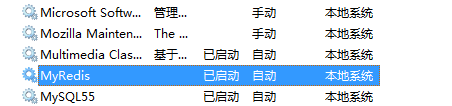
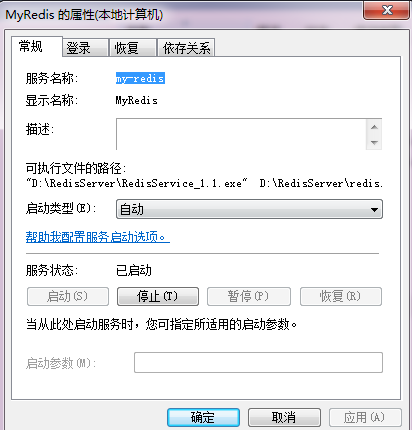
4) 基本配置
redis.conf
# requirepass foobared
去掉注释,重启服务
这样实例化一个Redis服务的时候,就需要密码
RedisClient client = new RedisClient(serverHost, port, redisPassword);
Redis server replication (master - slave配置)
# slaveof <masterip> <masterport>
eg:
slaveof 192.168.1.1 6379
三. 客户端编程
1) 安装Redis包

2) 简单例子
运行结果:

相关文章
-
C# Redis Server分布式缓存编程(一)(转)
C# Redis Server分布式缓存编程(一)(转)
- 互联网
- 2026年06月03日
-
C# restful框架
C# restful框架
- 互联网
- 2026年06月03日
-
c# SetRGB 创建GDI画笔
c# SetRGB 创建GDI画笔
- 互联网
- 2026年06月03日
-
c# Process cmd 执行完回调 Proc
c# Process cmd 执行完回调 Proc
- 互联网
- 2026年06月03日
-
C# npoi打开excel to datagridview
C# npoi打开excel to datagridview
- 互联网
- 2026年06月03日
-
c# list 引用对象深拷贝
c# list 引用对象深拷贝
- 互联网
- 2026年06月03日



