
Collection View Programming Guide for iOS
- 作者: 五速梦信息网
- 时间: 2026年06月03日 13:49
Collection View Basics
Collection View 基础
To present its content onscreen, a collection view cooperates with many different objects. Some objects are custom and must be provided by your app. For example, your app must provide a data source object that tells the collection view how many items there are to display. Other objects are provided by UIKit and are part of the basic collection view design.
为了让它的内容显示在屏幕上,collection view(集合视图)联合了多个不同了的对象。 一些对象是自定义并且必须是由应用程序提供的。 比如,你的应用程序必须提供一个数据源对象,它告诉collection view有多少内容需要显示。 其它对象则由UIKit提供,是基本collection view设计的一部分。
Like tables, collection views are data-oriented objects whose implementation involves a collaboration with your app’s objects. Understanding what you have to do in your code requires a little background information about how a collection view does what it does.
就像表格一样,collection views 是面向数据的对象,它们的实现都涉及到与应用程序对象的合作(collaboration)。理解你必须在你的代码里做什么,需要一点背景信息—关于一个collection view如何完成它想做的工作。
Collection View is a Collaboration of Objects
一、Collection View 是一些对象的合作
The design of collection views separates the data being presented from the way that data is arranged and presented onscreen. Your app is strictly responsible for managing the data to be presented but many different objects manage the visual presentation. Table 1-1 lists the collection view classes in UIKit and organizes them by the roles they play in implementing a collection view interface. Most of the classes are designed to be used as-is without any need for subclassing, so you can usually implement a collection view with very little code. And in situations where you want to go beyond the provided behavior, you can subclass and provide that behavior.
collection view的设计把要显示的内容从数据排列方式中分离,并显示到屏幕上。应用程序严格负责管理要显示的数据,但是多个不同对象管理数据的视觉呈现。 表1-1 列出了在UIKit里的collection view 类并根据它们在实现一个colletion view界面中所扮演的角色来组织它们。大多数类都被设计能直接使用,不需要子类化,所以你常常可以用很少的代码就可以实现一个collection view。 当在你想要实现超出所提供的行为时,你可以子类化并提供那个行为。
Figure 1-1 shows the relationship between the core objects associated with a collection view. The collection view gets information about the cells to display from its data source. The data source and delegate objects are custom objects provided by your app and used to manage the content, including the selection and highlighting of cells. The layout object is responsible for deciding where those cells belong and for sending that information to the collection view in the form of one or more layout attribute objects. The collection view then merges the layout information with the actual cells (and other views) to create the final visual presentation.
图1-1 显示了跟collection view与跟它相关联的内核对象之间的关系。 collection view从它的数据源获取将要显示的单元格(cells)信息. 数据源和委托对象是由应用程序提供的自定义对象,它们用来管理包含选区 和 突出显示的单元格等所有内容。布局对象负责决定那些单元格属于哪里,并把那信息以一个或多个布局属性对象的方式发送给collection view. 然后collection view 用实际单元格(以及其他视图)合并这些布局信息来创建最后的可视化呈现。
Figure 1-1 Merging content and layout to create the final presentation
图 1-1 合并内容和布局来创建最终呈现
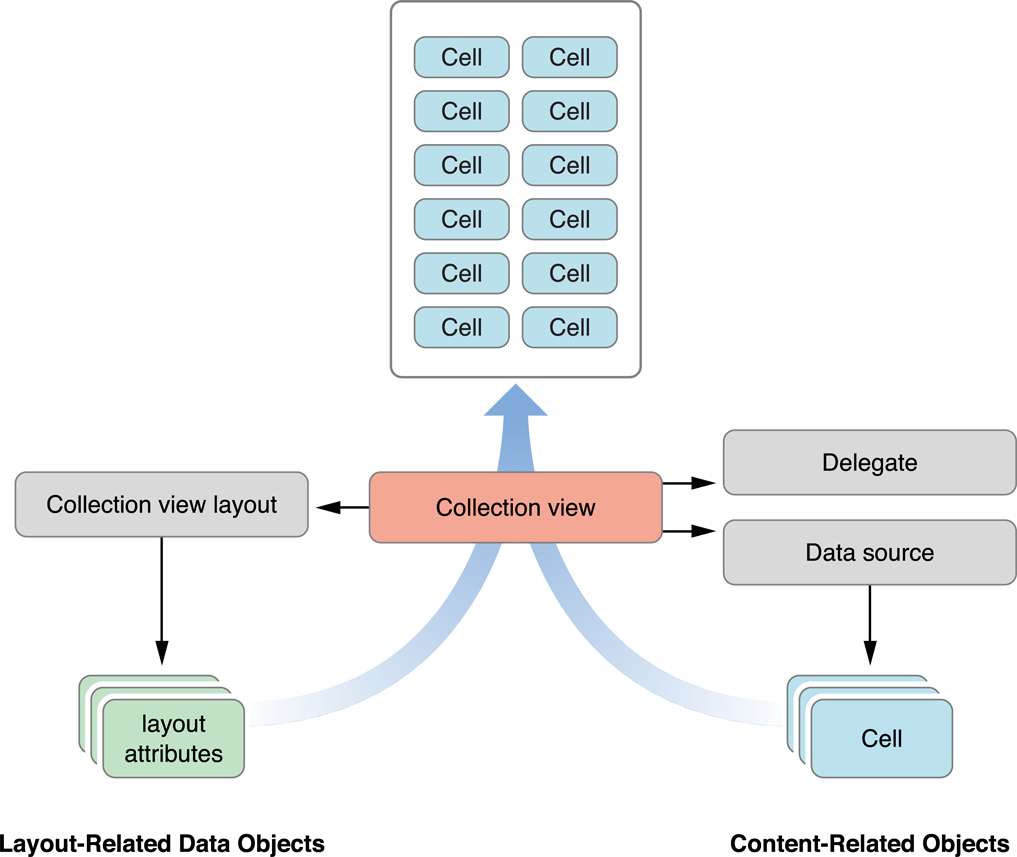
UICollectionView当你创建一个collection view界面时,第一件事是添加一个UICollectionView对象到你的故事板(storyboard)或nib文件。然后,你可以开始配置任何相关对象,比如数据源或委托。 但是所有的配置都是围绕collection view本身。你可以把collection view想象成中央枢纽(central hub),所有其它对象从这里出发。 比如,如果没有创建一个collection view 对象,你也决不会创建一个布局对象。
Reusable Views Improve Performance
二、能重复利用的视图可提高性能
Collection views employ a view recycling program to improve efficiency. As views move offscreen, they are removed from the collection view and placed in a reuse queue instead of being deleted. As new content is scrolled onscreen, views are removed from the queue and repurposed with new content. To facilitiate this recycling and reuse, all views displayed by the collection view must descend from the class.
Collection views 采用了一个视图回收程序来提高效率。 当视图离开屏幕时,它们实际上是从collection view移除并被放入了一个可重复使用的队列当中,而不是被删除。随着新内容在屏幕上被滚动,显示的视图被从队列中移除并重新添加新的内容。 为了促进该回收和重复利用,所有被collection view显示的视图都必须继承自UICollectionReusableView类。
Collection views support three distinct types of reusable views, each of which has a specific intended usage:
Collection views 支持3种不同类型的可重复利用的视图,每一种都有一个特定的使用目的:
UICollectionViewCell类的一个实例,你可能根据需要成为它的子类来呈现你的内容。单元格对象提供了管理它们自己的选区 和 高亮状态(highlight state)的内在支持,尽管必须写一些自定义代买才能真正给一个单元格提供一个高亮显示。Unlike table views, collection views do not impose a specific style on the cells and supplementary views provided by your data source. The basic reusable view classes are blank canvases for you to modify. You can use them to build small view hierarchies, display images, or even draw content dynamically if you want.
跟表格视图不同,collection views 不在数据源提供单元格和补充视图上强加一个特殊风格。基本的可重复利用视图类都是你可以修改的空白画布。你可以使用它们来建立小型视图层次结构,显示图像,或如果你想甚至可以动态绘制内容。
Your data source object is responsible for providing the cells and supplementary views used by its associated collection view. However, the data source never creates views directly. When asked for a view, your data source dequeues a view of the desired type using the methods of the collection view. The dequeueing process always returns a valid view, either by retrieving one from a reuse queue or by using a class, nib file, or storyboard you provide to create a new view.
你的数据源对象负责提供单元格和补充视图,以供相关的collection view使用。 然而,数据源绝不会直接创建视图。 当被请求一个视图时,你的数据源使用collection view提供的方法从队列中取出所需类型的一个视图。从队列取出过程永远返回一个有效的视图,不管是从一个可重复使用队列里检索一个或是通过一个类,nib 文件或你提供的故事板来创建一个新视图。
For information about how to create and configure views from your data source, see “Configuring Cells and Supplementary Views.”
关于如何从你的数据源创建和配置视图的信息,请看 “Configuring Cells and Supplementary Views.”
The Layout Object Controls the Visual Presentation
三、布局对象管理可视化外形
The layout object is solely responsible for determining the placement and visual styling of items within the collection view. Although your data source object provides the views and the actual content, the layout object determines the size, location, and other appearance-related attributes of those views. This separation of responsibilities makes it possible to change layouts dynamically without changing any of the data objects managed by your app.
布局对象独自负责决定collection view中的项目的位置和可视化风格。 尽管你的数据源对象提供了视图和实际内容,但是布局对象决定那些视图的尺寸,位置,以及其他跟外形相关的各种属性。 该责任的分离让动态改变布局而不改变应用程序管理的任何数据对象成为可能。
layoutSubviewscollection view使用的布局过程跟应用程序视图的其它部分使用的布局过程有关,但是又不同于应用程序其它部分使用的布局过程。换句话说,不要困惑一个布局对象用layoutSubviews方法做了什么,该方法在一个父视图里被用于重新定位子视图。一个布局对象绝不会操作它直接管理的那些视图,因为它实际上并不拥有那些视图。相反,它产生描述collection view中单元格,补充视图,以及装饰视图的位置,尺寸以及可视化外形的各种属性。然后,由collection view 来把这些属性应用到实际的视图对象中。
There are really no limits to how a layout object can affect the views in a collection view. A layout object can move some views but not others. It can move views only a little bit or it can move them randomly around the screen. It can even reposition views without any regard for the surrounding views. For example, it can stack views on top of each other if it wants. The only real limitation is how the layout object affects the visual style you want your app to have.
实际上没有限制布局对象如何影响collection view中的视图。一个布局对象可以移动一些视图,其它对象不可以。它只能移动视图一点点或它能随机的在屏幕上移动它们。它甚至不需要留意周围的视图就可以让视图重新定位。 比如,如果它想,它可以把视图一个接着一个把视图堆起来。唯一的限制是布局对象如何影响应用程序想要的视觉风格。
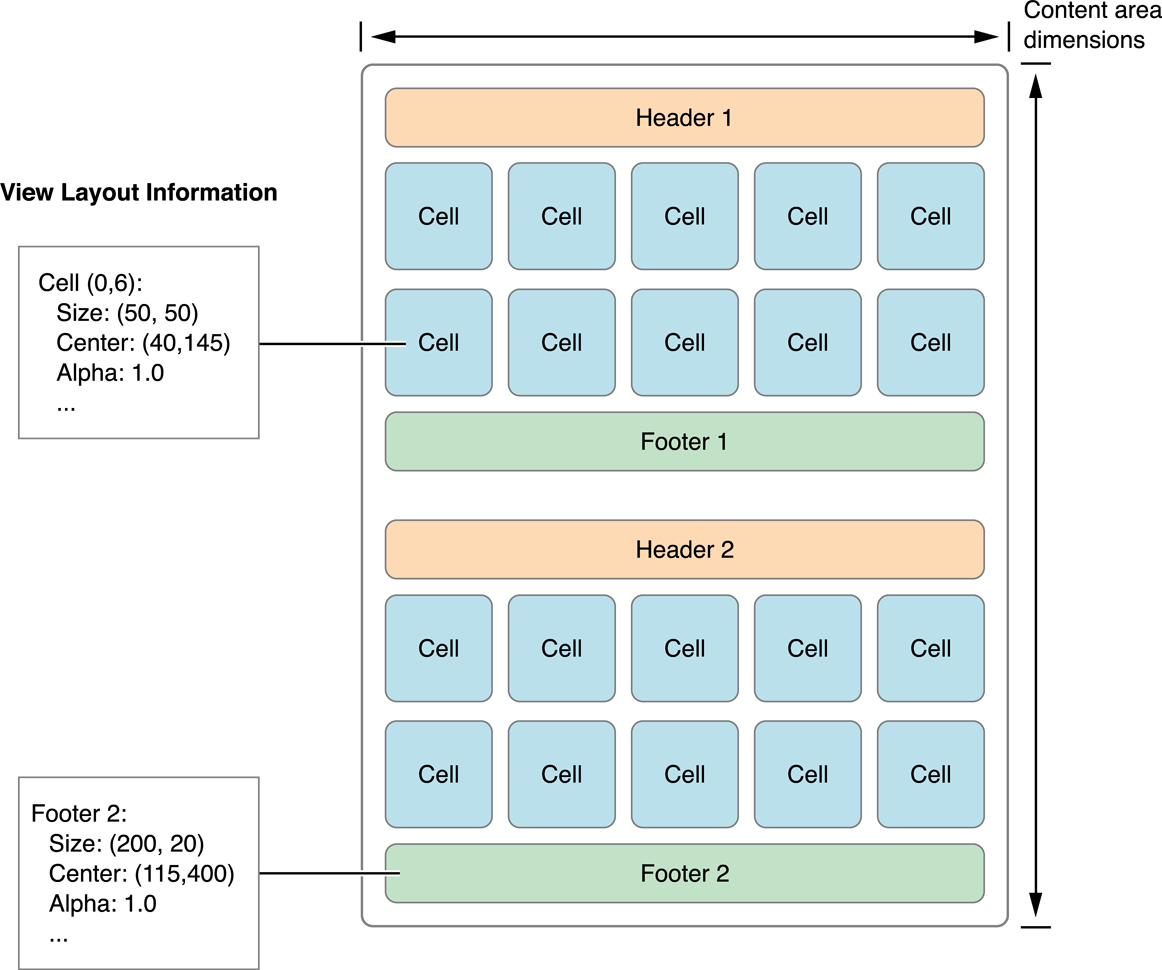
Figure 1-2 shows how a vertically scrolling flow layout arranges its cells and supplementary views. In a vertically scrolling flow layout, the width of the content area remains fixed and the height grows to accommodate the content. To compute the area, the layout object places views and cells one at a time, choosing the most appropriate location for each. In the case of the flow layout, the size of the cells and supplementary views are specified as properties on the layout object or using a delegate. Computing the layout is just a matter of using those properties to place each view.
图1-2 显示了一个垂直滚动的流布局如何安排它的单元格和补充视图。在一个垂直滚动流布局里,内容区的宽度固定,高度自由调整以容纳内容。 为了计算区域,布局对象一次只放置一个视图和单元格, 为每个视图和单元格选择最合适的位置。在流布局的情况中,单元格和补充视图的尺寸是在布局对象中或使用一个委托,把尺寸作为属性被指定。计算布局只是使用那些属性来放置每个视图的一个问题。
Figure 1-2 The layout object provides layout metrics
图1-2 布局对象提供布局标准
Layout objects control more than just the size and position of their views. The layout object can specify other view-related attributes, such as its transparency, its transform in 3D space, and whether it is visibly above or below other views. These attributes let layout objects create more interesting layouts. For example, you could create stacks of cells by placing the views on top of one another and changing their z-ordering or use a transform to rotate them on any axis.
布局对象控制不仅仅控制它们视图的尺寸和位置。 布局对象能指定其他视图相关的各种属性,比如它的透明度,它在3D空间里的变换,以及它是在其它视图的上面还是下面可见。这些属性让布局对象创建更多的有趣布局。 比如,你可以通过把视图一个接一个放在另一视图的上面形成单元格堆栈,改变它们的z顺序,或使用一个变换让它们在任何轴上旋转。
For detailed information about how a layout object fulfills its responsibilities to the collection view, see “Creating Custom Layouts.”
关于布局对象如何在collection view中履行其职责的详情,请看“Creating Custom Layouts.”
Collection Views Initiate Animations Automatically
四、Collection Views 自动启动动画
Collection views build in support for animations at a fundamental level. When you insert or delete items or sections, the collection view automatically animates any views impacted by the change. For example, when you insert an item, items after the insertion point are usually shifted to make room for the new item. The collection view knows how to create these animations because it knows the current position of items and can calculate their final positions after the insertion takes place. Thus, it can animate each item from its initial position to its final position.
Collection views 在基础层上建立了对动画的支持。 当你插入或删除数据项(items)或sections时,collection view 自动动画任何受变更影响的视图。比如,当你插入一个数据项,插入位置后面的所有数据项通常都得往后移动,给新数据项腾出位置。collection view知道如何创建这些动画,因为它知道数据项的当前位置,并能从插入点开始计算它们的最后位置。 因此,它能从它的开始位置到它的最后位置动画每个数据项。
In addition to animating insertions, deletions, and move operations, you can invalidate the layout at any time and force it to redraw its contents. Invalidating the layout does not animate items directly; when you invalidate the layout, the collection view displays the items in their newly calculated positions without animating. However, the act of invalidating the layout causes the layout object to move items explicitly. In a custom layout, you might use this behavior to position cells at regular intervals and create an animated effect.
除了动画插入,删除以及移动操作,你还可以在任何时候让布局无效并强制它重新绘制它的内容。无效化布局不能直接动画数据项;当你无效化布局时,collection view在它们已经计算好的新位置显示数据项,不需要动画。然而,无效化布局操作导致布局对象明确地移动数据项。 在一个自定义布局内,你可以使用该行为来定期定位单元格,并创建一个动画效果。
- 上一篇: command option l 格式化代码
- 下一篇: CODESYS中浮点数保留2个小数
相关文章
-
command option l 格式化代码
command option l 格式化代码
- 互联网
- 2026年06月03日
-
compass做雪碧图
compass做雪碧图
- 互联网
- 2026年06月03日
-
composer 查看某个组件的版本
composer 查看某个组件的版本
- 互联网
- 2026年06月03日
-
CODESYS中浮点数保留2个小数
CODESYS中浮点数保留2个小数
- 互联网
- 2026年06月03日
-
Codeforces Round #285 (Div. 2) A B C 模拟 stl 拓扑排序
Codeforces Round #285 (Div. 2) A B C 模拟 stl 拓扑排序
- 互联网
- 2026年06月03日
-
Codeforces 1326A Bad Ugly Numbers (思维)
Codeforces 1326A Bad Ugly Numbers (思维)
- 互联网
- 2026年06月03日



