
iOS学习——布局利器Masonry框架源码深度剖析
- 作者: 五速梦信息网
- 时间: 2026年06月03日 13:41
iOS开发过程中很大一部分内容就是界面布局和跳转,iOS的布局方式也经历了 显式坐标定位方式 --> autoresizingMask --> iOS 6.0推出的自动布局(Auto Layout)的逐步优化,至于为什么推出自动布局,肯定是因为之前的方法不好用(哈哈 简直是废话),具体如何不好用以及怎么变化大家可以瞅瞅。iOS6.0推出的自动布局实际上用布局约束(Layout Constraint)来实现,通过布局约束(Layout Constraint)可以确定两个视图之间精确的位置的相对距离,为此,iOS6.0推出了NSLayoutConstraint来定义约束,使用方法如下:
[NSLayoutConstraint constraintWithItem:view1

  attribute:NSLayoutAttributeLeft

  relatedBy:NSLayoutRelationEqual

  toItem:view2

  attribute:NSLayoutAttributeRight

  multiplier:

  constant:];
//翻译过来就是:view1的左侧,在,view2的右侧,再多10个点,的地方。
布局约束的添加规则:
(1)对于两个同层级 view 之间的约束关系,添加到它们的父 view 上(2)对于两个不同层级 view 之间的约束关系,添加到他们最近的共同父 view 上(3)对于有层次关系的两个 view 之间的约束关系,添加到层次较高的父 view 上(4)对于比如长宽之类的,只作用在该 view 自己身上的话,添加到该 view 自己上具体关于NSLayoutConstraint的详细使用方法参见:。今天我们文章的主角——Masonry框架实际上是在NSLayoutConstraint的基础上进行封装的,这一点在后面的源码分析中我们详细解释。
1 Masonry的布局教程MasonryNSLayoutConstraintUIView *sv1 = [UIView new];2 Masonry框架源码分析
//利用Masonry进行布局的前提条件之一是 布局视图必须先被添加到父视图中
[sv addSubview:sv1];
[sv1 mas_makeConstraints:^(MASConstraintMaker *make) {
make.edges.equalTo(sv).with.insets(UIEdgeInsetsMake(, , , )); /* 等价于
make.top.equalTo(sv).with.offset(10);
make.left.equalTo(sv).with.offset(10);
make.bottom.equalTo(sv).with.offset(-10);
make.right.equalTo(sv).with.offset(-10);
*/ /* 也等价于
make.top.left.bottom.and.right.equalTo(sv).with.insets(UIEdgeInsetsMake(10, 10, 10, 10));
*/
}];
Masonry框架是在NSLayoutConstraint的基础上进行封装的,其涉及到的内容也是非常繁多。在进行源码剖析时我们从我们经常用到的部分出发,一层一层进行解析和研究。
2.1 调用流程分析
首先,我们先大体了解一下调用 mas_makeConstraints 进行布局时的流程步骤,其实另外两个 mas_updateConstraints 和 mas_remakeConstraints 的流程也基本上是一样的。
@implementation MAS_VIEW (MASAdditions)
- (NSArray *)mas_makeConstraints:(void(^)(MASConstraintMaker *))block {

    //关闭AutoresizingMask的布局方法是我们进行Auto Layout布局的前提步骤

    self.translatesAutoresizingMaskIntoConstraints = NO;

    //创建一个约束创建器

    MASConstraintMaker *constraintMaker = [[MASConstraintMaker alloc] initWithView:self];

    //在block中配置constraintMaker对象,即将constraintMaker传入block中(其实就是我们在block中用来添加约束的make)进行约束配置

    block(constraintMaker);

    //约束安装并以数组形式返回

    return [constraintMaker install];

}
...
//install方法主要就是对下面这个约束数组进行维护
@property (nonatomic, strong) NSMutableArray *constraints; - (NSArray *)install {
//判断是否有要删除的约束,有则逐个删除
if (self.removeExisting) {
NSArray *installedConstraints = [MASViewConstraint installedConstraintsForView:self.view];
for (MASConstraint *constraint in installedConstraints) {
[constraint uninstall];
}
}
//更新约束
NSArray *constraints = self.constraints.copy;
for (MASConstraint *constraint in constraints) {
constraint.updateExisting = self.updateExisting;
//约束安装(这个才是真正的添加约束的方法)
[constraint install];
}
[self.constraints removeAllObjects];
return constraints;
}
- (void)install {

    if (self.hasBeenInstalled) {

        return;

    }
...
//MASLayoutConstraint其实就是在NSLayoutConstraint基础上添加了一个属性而已

    //@interface MASLayoutConstraint : NSLayoutConstraint
MASLayoutConstraint *layoutConstraint

        = [MASLayoutConstraint constraintWithItem:firstLayoutItem

                                        attribute:firstLayoutAttribute

                                        relatedBy:self.layoutRelation

                                           toItem:secondLayoutItem

                                        attribute:secondLayoutAttribute

                                       multiplier:self.layoutMultiplier

                                         constant:self.layoutConstant];

    layoutConstraint.priority = self.layoutPriority;

    layoutConstraint.mas_key = self.mas_key;
...
//添加约束

    if (existingConstraint) {

        // just update the constant

        existingConstraint.constant = layoutConstraint.constant;

        self.layoutConstraint = existingConstraint;

    } else {

        [self.installedView addConstraint:layoutConstraint];

        self.layoutConstraint = layoutConstraint;

        [firstLayoutItem.mas_installedConstraints addObject:self];

    }

}
通过上面的分析和研究,我们基本上已经把Masonry框架中主要布局方法的主流程了解清楚了。因为这是第一次学习iOS第三方框架的源码,在这个学习过程中也走了很多弯路,最开始是从最基本的类开始看,后来发现越看越不懂,不知道这个属性的定义在什么时候用到,是什么含义((ノへ ̄、)捂脸。。。)。后来通过摸索才知道源码学习应该直接从用到的方法着手,然后一步一步深入分析源码中每一步的目的和意义,顺藤摸瓜,逐个击破。
2.2 Masonry框架中的链式语法
下面的代码是比较常用的几种Masonry的布局格式,我们可以看到都是通过点语法的链式调用进行布局的。之前在学习Java和Android的过程中接触过链式语法,在Java中要实现这种链式语法很简单,无非就是每个方法的返回值就是其本身,因为Java的方法调用是通过点语法调用的,所以很容易实现。但是在OC中,方法调用都是通过 [clazz method:parm]; 的形式进行调用的,那么Masonry框架中是怎么实现的呢?
make.top.equalTo(sv).with.offset();
make.left.right.mas_equalTo(sv).mas_offset(0.0f);
make.top.left.bottom.and.right.equalTo(sv).with.insets(UIEdgeInsetsMake(, , , ));
同样的学习方法,我们来看一下源码中各个属性或方法是怎么实现的,最重要的原因就是getter方法和Objective-C 里面,调用方法是可以使用点语法的,但这仅限于没有参数的方法。
//MASConstraintMaker.h文件

@interface MASConstraintMaker : NSObject
@property (nonatomic, strong, readonly) MASConstraint *left;

@property (nonatomic, strong, readonly) MASConstraint *top;

@property (nonatomic, strong, readonly) MASConstraint *right;

@property (nonatomic, strong, readonly) MASConstraint *bottom;

@property (nonatomic, strong, readonly) MASConstraint *leading;

@property (nonatomic, strong, readonly) MASConstraint *trailing;

@property (nonatomic, strong, readonly) MASConstraint *width;

@property (nonatomic, strong, readonly) MASConstraint *height;

@property (nonatomic, strong, readonly) MASConstraint *centerX;

@property (nonatomic, strong, readonly) MASConstraint *centerY;

@property (nonatomic, strong, readonly) MASConstraint *baseline;
#if (__IPHONE_OS_VERSION_MIN_REQUIRED >= 80000) || (__TV_OS_VERSION_MIN_REQUIRED >= 9000) || (__MAC_OS_X_VERSION_MIN_REQUIRED >= 101100)
@property (nonatomic, strong, readonly) MASConstraint *firstBaseline;

@property (nonatomic, strong, readonly) MASConstraint *lastBaseline;
#endif
#if (__IPHONE_OS_VERSION_MIN_REQUIRED >= 80000) || (__TV_OS_VERSION_MIN_REQUIRED >= 9000)
@property (nonatomic, strong, readonly) MASConstraint *leftMargin;

@property (nonatomic, strong, readonly) MASConstraint *rightMargin;

@property (nonatomic, strong, readonly) MASConstraint *topMargin;

@property (nonatomic, strong, readonly) MASConstraint *bottomMargin;

@property (nonatomic, strong, readonly) MASConstraint *leadingMargin;

@property (nonatomic, strong, readonly) MASConstraint *trailingMargin;

@property (nonatomic, strong, readonly) MASConstraint *centerXWithinMargins;

@property (nonatomic, strong, readonly) MASConstraint *centerYWithinMargins;
#endif
@property (nonatomic, strong, readonly) MASConstraint *edges;

@property (nonatomic, strong, readonly) MASConstraint *size;

@property (nonatomic, strong, readonly) MASConstraint *center;

...
@end
//MASConstraintMaker.m文件

@implementation MASConstraintMaker
//每个方法返回的也是MASConstraint对象,实际上是MASViewConstraint、MASCompositeConstraint类型的对象,见最后的函数中标红的注释

- (MASConstraint *)top {

    //将对应的系统自带的约束布局的属性NSLayoutAttributeTop传入

    return [self addConstraintWithLayoutAttribute:NSLayoutAttributeTop];

}
//过渡方法

- (MASConstraint *)addConstraintWithLayoutAttribute:(NSLayoutAttribute)layoutAttribute {

    return [self constraint:nil addConstraintWithLayoutAttribute:layoutAttribute];

}
//最终的调用

- (MASConstraint *)constraint:(MASConstraint *)constraint addConstraintWithLayoutAttribute:(NSLayoutAttribute)layoutAttribute {

    MASViewAttribute *viewAttribute = [[MASViewAttribute alloc] initWithView:self.view layoutAttribute:layoutAttribute];

    MASViewConstraint *newConstraint = [[MASViewConstraint alloc] initWithFirstViewAttribute:viewAttribute];
  ...
//添加约束

    if (!constraint) {

        //设置约束的代理是self

        newConstraint.delegate = self;

        [self.constraints addObject:newConstraint];

    }

    //返回MASViewConstraint类型的对象

    return newConstraint;

}
...
@end
@interface MASViewConstraint : MASConstraint <NSCopying>
//MASConstraint.h文件
@interface MASConstraint : NSObject
/**

 *    Creates a new MASCompositeConstraint with the called attribute and reciever

 */

- (MASConstraint *)left;

- (MASConstraint *)top;

- (MASConstraint *)right;

- (MASConstraint *)bottom;

- (MASConstraint *)leading;

- (MASConstraint *)trailing;

- (MASConstraint *)width;

- (MASConstraint *)height;

- (MASConstraint *)centerX;

- (MASConstraint *)centerY;

- (MASConstraint *)baseline;
#if (__IPHONE_OS_VERSION_MIN_REQUIRED >= 80000) || (__TV_OS_VERSION_MIN_REQUIRED >= 9000) || (__MAC_OS_X_VERSION_MIN_REQUIRED >= 101100)
- (MASConstraint *)firstBaseline;

- (MASConstraint *)lastBaseline;
#endif
#if (__IPHONE_OS_VERSION_MIN_REQUIRED >= 80000) || (__TV_OS_VERSION_MIN_REQUIRED >= 9000)
- (MASConstraint *)leftMargin;

- (MASConstraint *)rightMargin;

- (MASConstraint *)topMargin;

- (MASConstraint *)bottomMargin;

- (MASConstraint *)leadingMargin;

- (MASConstraint *)trailingMargin;

- (MASConstraint *)centerXWithinMargins;

- (MASConstraint *)centerYWithinMargins;
#endif
...
@end
//MASConstraint.m文件

- (MASConstraint *)top {

    //这里会调用MASViewConstraint中的addConstraintWithLayoutAttribute:方法

    return [self addConstraintWithLayoutAttribute:NSLayoutAttributeTop];

}
//MASViewConstraint.m文件

- (MASConstraint *)addConstraintWithLayoutAttribute:(NSLayoutAttribute)layoutAttribute {

    NSAssert(!self.hasLayoutRelation, @"Attributes should be chained before defining the constraint relation");

    //调用代理的方法,之前我们说过设置的代理是MASConstraintMaker对象make,所以调用的实际上是MASConstraintMaker添加约束的方法,这就是我们再上面第一步讲到的方法

    return [self.delegate constraint:self addConstraintWithLayoutAttribute:layoutAttribute];

}
//MASConstraintMaker.m文件

- (MASConstraint *)constraint:(MASConstraint *)constraint addConstraintWithLayoutAttribute:(NSLayoutAttribute)layoutAttribute {

    MASViewAttribute *viewAttribute = [[MASViewAttribute alloc] initWithView:self.view layoutAttribute:layoutAttribute];

    MASViewConstraint *newConstraint = [[MASViewConstraint alloc] initWithFirstViewAttribute:viewAttribute];

    //当传入的constraint不为空时,即此调用不是第一个,make.toip.left在left时的调用

    if ([constraint isKindOfClass:MASViewConstraint.class]) {

        //则用MASCompositeConstraint作为返回值,即组约束

        NSArray *children = @[constraint, newConstraint];

        MASCompositeConstraint *compositeConstraint = [[MASCompositeConstraint alloc] initWithChildren:children];

        //设置代理

        compositeConstraint.delegate = self;

        //重新设置

        [self constraint:constraint shouldBeReplacedWithConstraint:compositeConstraint];

       //返回 MASCompositeConstraint对象return compositeConstraint;

    }
if (!constraint) {

        //设置代理

        newConstraint.delegate = self;

        //设置约束

        [self.constraints addObject:newConstraint];

    }
return newConstraint;

}
2.3 链式语法中传参方法的调用
在上一小节我们提到了链式语法的主要原因在于在Objective-C 里面,调用方法是可以使用点语法的,但这仅限于没有参数的方法,但是类似mas_equalTo、mas_offset等带参数传递的方法依旧可以用链式语法又是怎么一回事呢?最关键的一环就是 block。block就是一个代码块,但是它的神奇之处在于在内联(inline)执行的时候还可以传递参数。同时block本身也可以被作为参数在方法和函数间传递。block作为参数传递很常见,就是在我们的Masonry框架中添加约束的方法 - (NSArray *)mas_makeConstraints:(void(^)(MASConstraintMaker *))block 中就是讲一个block作为参数进行传递的。
同样在MASConstraint中,我们可以看到mas_equalTo、mas_offset等带参方法的定义如下,我们可以看到,方法的定义中并没有参数,但是返回值是一个带参的block,并且该block还返回一个MASConstraint对象(MASViewConstraint或者MASCompositeConstraint对象),所以方法的定义和使用都没有什么问题,和上一小节分析的内容差不多。最主要的区别就是这里返回值为带参数的block,并且该block的参数可以通过我们的方法进行传值。关于带参block作为返回值得用法可以参见 。
- (MASConstraint * (^)(MASEdgeInsets insets))insets;
- (MASConstraint * (^)(CGFloat inset))inset;
- (MASConstraint * (^)(CGSize offset))sizeOffset;
- (MASConstraint * (^)(CGPoint offset))centerOffset;
- (MASConstraint * (^)(CGFloat offset))offset;
- (MASConstraint * (^)(NSValue *value))valueOffset;
- (MASConstraint * (^)(CGFloat multiplier))multipliedBy;
- (MASConstraint * (^)(CGFloat divider))dividedBy;
- (MASConstraint * (^)(MASLayoutPriority priority))priority;
- (MASConstraint * (^)(void))priorityLow;
- (MASConstraint * (^)(void))priorityMedium;
- (MASConstraint * (^)(void))priorityHigh;
- (MASConstraint * (^)(id attr))equalTo;
- (MASConstraint * (^)(id attr))greaterThanOrEqualTo;
//MASConstraint.m文件3 Masonry框架的整体运用的理解
- (MASConstraint * (^)(id))mas_equalTo {
return ^id(id attribute) {
//多态调用子类MASViewConstraint或者MASCompositeConstraint的对应方法
return self.equalToWithRelation(attribute, NSLayoutRelationEqual);
};
} //MASViewConstraint.m中对应的方法,MASCompositeConstraint其实也类似,只是循环调用每一个子约束的该方法
- (MASConstraint * (^)(id, NSLayoutRelation))equalToWithRelation {
return ^id(id attribute, NSLayoutRelation relation) {
//如果传入的参数是一个数组 则逐个约束解析后以组形式添加约束
if ([attribute isKindOfClass:NSArray.class]) {
NSAssert(!self.hasLayoutRelation, @"Redefinition of constraint relation");
NSMutableArray *children = NSMutableArray.new;
for (id attr in attribute) {
MASViewConstraint *viewConstraint = [self copy];
viewConstraint.layoutRelation = relation;
viewConstraint.secondViewAttribute = attr;
[children addObject:viewConstraint];
}
MASCompositeConstraint *compositeConstraint = [[MASCompositeConstraint alloc] initWithChildren:children];
compositeConstraint.delegate = self.delegate;
[self.delegate constraint:self shouldBeReplacedWithConstraint:compositeConstraint];
return compositeConstraint;
} else {
//单一约束 则直接赋值
NSAssert(!self.hasLayoutRelation || self.layoutRelation == relation && [attribute isKindOfClass:NSValue.class], @"Redefinition of constraint relation");
self.layoutRelation = relation;
self.secondViewAttribute = attribute;
return self;
}
};
}
make.top.right.bottom.left.equalTo(superview)4 Masonry框架的整体架构
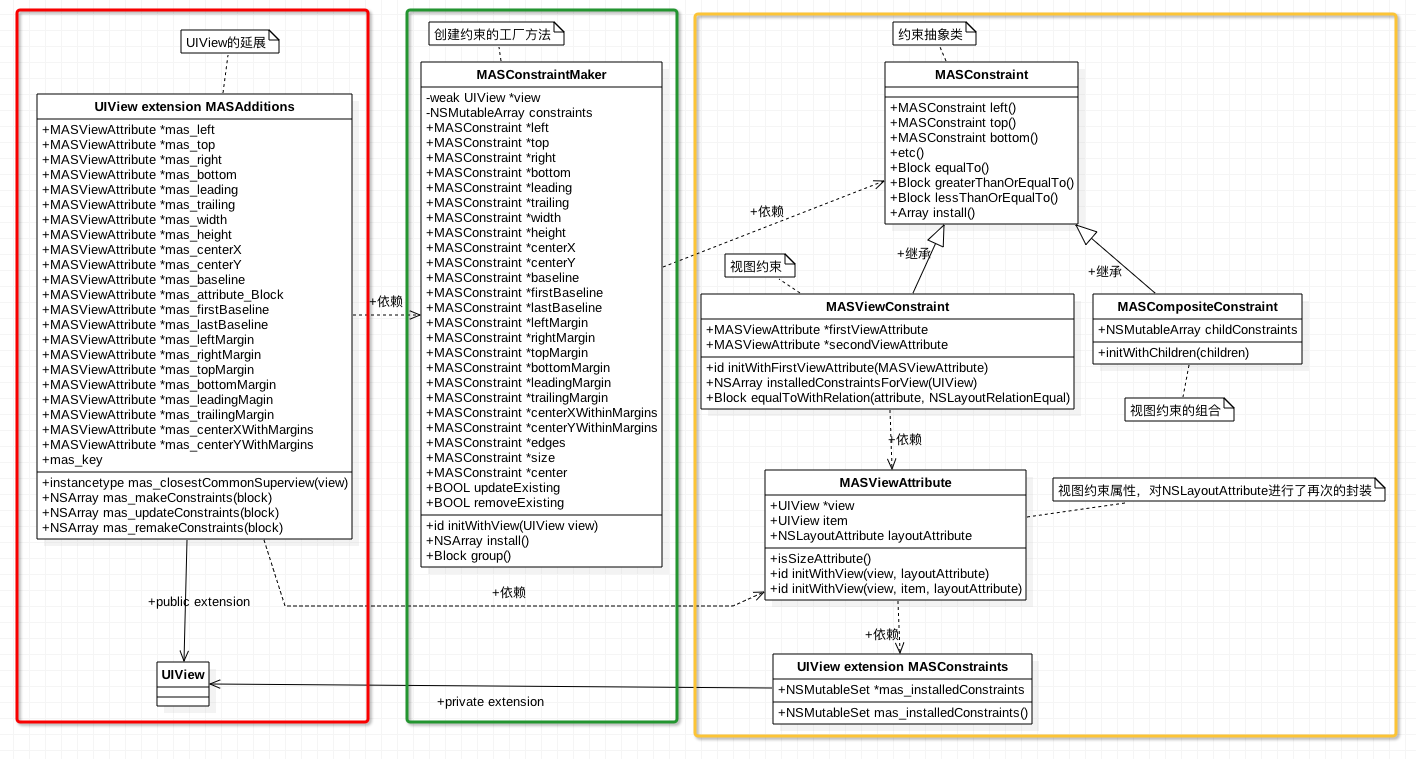
盗用中的一张图,这张图将Masonry框架的架构阐述的很清晰,Masonry框架主要分为4个部分:
MASConstraintMakerMASConstraintMASConstraint- 上一篇: iOS循环引用常见场景和解决办法
- 下一篇: ios修改hosts屏蔽更新




