
PHP之GD函数的使用
- 作者: 五速梦信息网
- 时间: 2026年06月03日 13:36
本文讲解常用GD函数的应用
1.一个简单的图像
我们先看一个例子:
<?php
$w = 200;

$h = 200;

$img = imagecreatetruecolor($w,$h);

$white = imagecolorallocate($img,255,255,255);

$blue = imagecolorallocate($img,0,0,64);

imagefill($img,0,0,$blue);

imageline($img,0,0,$w,$h,$white);

imagestring($img,4,50,150,'Sales',$white);

Header('Content-type: image/png');

imagepng($img);

imagedestroy($img);
?>
运行结果:

这段代码中我们用了一下几个函数:
imagecreatetruecolorresource imagecreatetruecolor ( int $width , int $height )imagecolorallocateint imagecolorallocate ( resource $image , int $red , int $green , int $blue )imagefillbool imagefill ( resource $image , int $x , int $y , int $color )imagestringbool imagestring ( resource $image , int $font , int $x , int $y , string $s , int $col )以 PNG 格式将图像输出到浏览器或文件bool imagepng ( resource $image [, string $filename ] )imagedestroybool imagedestroy ( resource $image )2.使用文本和字体创建图像
<?php
$button_text = $_REQUEST['button_text'];

$button_text_color = $_REQUEST['color'];

if (empty($button_text) || empty($button_text_color)) {

    echo 'Please input text';

    exit;

}
//创建画布

$img = imagecreatefrompng($button_text_color . '_button.png');
//设置按钮的宽和高

$width_image = imagesx($img);

$height_image = imagesy($img);

//没有边界的宽和高,边界设置定为18个像素

$margin = 18;

$width_image_without_margins = $width_image - 2 * $margin;

$height_image_without_margins = $height_image - 2 * $margin;
//字体

$font_size = 240;

//使用字体必须告诉GD2字体的位置

putenv('GDFONTPATH=/System/Library/Fonts');

$fontname = 'MarkerFelt.ttc';
//循环遍历边界,寻找合适的字体font

do {

    $font_size--;

    $bbox = imagettfbbox($font_size, 0, $fontname, $button_text);

    $left = $bbox[0];

    $right = $bbox[2];

    $width_text = $right - $left;

    $height_text = abs($bbox[7] - $bbox[1]);

}while ($font_size > 8 && ($width_text > $width_image_without_margins || $height_text > $height_image_without_margins)) ;
//检查文字边界问题

if ($width_text > $width_image_without_margins || $height_text > $height_image_without_margins) {

    echo 'Text given will not fit button. <br />';

}else {

    //计算文本坐标

    $text_x = $width_image / 2.0 - $width_text / 2.0;

    $text_y = $height_image / 2.0 - $height_text / 2.0;

    //矫正

    if ($left < 0) {

        $text_x = abs($left);

    }

    $above_line_text = abs($bbox[7]);

    $text_y += $above_line_text;

    $text_y -= 2;
//渲染文本

    $white = imagecolorallocate($img, 255, 255, 255);

    imagettftext($img, $font_size, 0, $text_x, $text_y, $white, $fontname, $button_text);
Header('Content-type: image/png');

    imagepng($img);
}
imagedestroy($img);
?>
演示页面为:
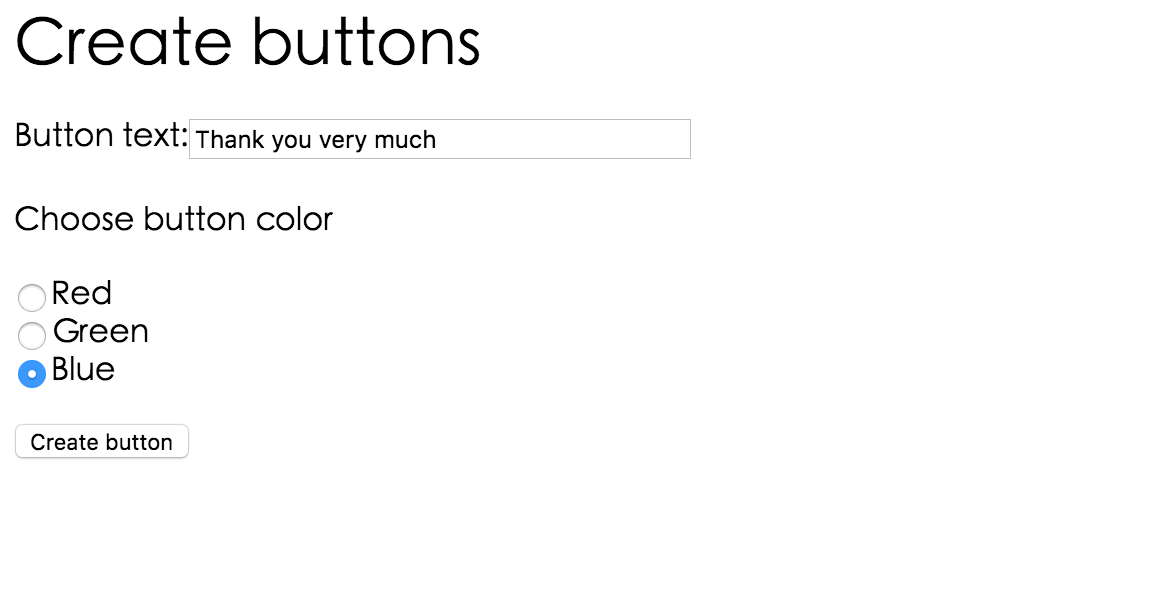



除了上边我们解释的函数外,又新增了一些新的函数,我们一一作出解释:
imagecreatefrompngresource imagecreatefrompng ( string $filename )imagesxint imagesx ( resource $image )imagesyint imagesy ( resource $image )imagettfbboxarray imagettfbbox ( float $size , float $angle , string $fontfile , string $text )sizeanglefontfiletextimagettftextarray imagettftext ( resource $image , float $size , float $angle , int $x , int $y , int $color , string $fontfile , string $text )text3.绘制图像与用图表描述数据
<?php

/********************************************************

          Database query to get poll info

********************************************************/
//get vote

$vote = $_REQUEST['vote'];
//login mysql

@ $db = new mysqli('127.0.0.1', 'poll', 'poll', 'poll');

if (mysqli_connect_errno()) {

  echo 'Could not connect to db <br />';

  exit;

}
if (!empty($vote)) {

  $vote = addslashes($vote);

  //update

  $query = 'update poll_results set num_votes = num_votes + 1 where candidate = \'' . $vote . '\'';

  $result = $db -> query($query);

  if (!$result) {

    echo 'Could not connect to db <br />';

    exit;

  }
//query

  $query = 'select * from poll_results';

  $result = $db -> query($query);

  if (!$result) {

    echo 'Could not connect to db <br />';

    exit;

  }
$num_candidates = $result -> num_rows;

  $total_votes = 0;

  while ($row = $result -> fetch_object()) {

    $total_votes += $row -> num_votes;

  }

  $result -> data_seek(0);
/********************************************************

          Initial calculations for graph

********************************************************/

//使用字体必须告诉GD2字体的位置

putenv('GDFONTPATH=/System/Library/Fonts');

$fontname = 'Times.dfont';

$width = 600;

$left_margin = 50;

$right_margin = 50;

$bar_height = 40;

$bar_spacing = $bar_height / 2;

$title_size = 16;

$main_size = 12;

$small_size = 12;

$text_indent = 10;
$x = $left_margin + 60;

$y = 50;

$bar_unit = ($width - ($x + $right_margin)) / 100;

$height = $num_candidates * ($bar_height + $bar_spacing) + 50;
/********************************************************

          Setup base image

********************************************************/

$img = imagecreatetruecolor($width, $height);
$white = imagecolorallocate($img, 255, 255, 255);

$blue = imagecolorallocate($img, 0, 64, 128);

$black = imagecolorallocate($img, 0, 0, 0);

$pink = imagecolorallocate($img, 255, 78, 243);
$text_color = $black;

$percent_color = $black;

$line_color = $black;

$bg_color = $white;

$bar_color = $blue;

$number_color = $pink;
imagefilledrectangle($img, 0, 0, $width, $height, $white);

imagerectangle($img, 0, 0, $width - 1, $height - 1, $line_color);
//Add title

$title = 'Poll Result';

$title_dimensions = imagettfbbox($title_size, 0, $fontname, $title);

$title_length = $title_dimensions[2] - $title_dimensions[0];

$title_height = abs($title_dimensions[7] - $title_dimensions[1]);

$title_above_line = abs($title_dimensions[7]);

$title_x = ($width - $title_length) / 2;

$title_y = ($y - $title_height) / 2;

imagettftext($img, $title_size, 0, $title_x, $title_y, $text_color, $fontname, $title);

imageline($img, $x, $y - 5, $x, $height - 15, $line_color);
/********************************************************

          Draw data into gragh

********************************************************/

while ($row = $result -> fetch_object()) {

  $percent = 0;

  if ($total_votes > 0) {

    $percent = intval($row -> num_votes / $total_votes * 100);

  }
$percent_cahr = eurofix('%');

  $percent_dimension = imagettfbbox($main_size, 0, $fontname, $percent . $percent_cahr);

  $percent_lenght = $percent_dimension[2] - $percent_dimension[0];

  imagettftext($img, $main_size, 0, $width - $percent_lenght - $text_indent, $y + $bar_height / 2,

   $percent_color, $fontname, $percent . $percent_cahr);
$bar_lenght = $x + $percent * $bar_unit;

imagefilledrectangle($img, $x, $y - 2, $bar_lenght, $y + $bar_height, $bar_color);

imagettftext($img, $main_size, 0, $text_indent, $y + $bar_height / 2,

   $text_color, $fontname, $row -> candidate);

imagerectangle($img, $bar_lenght, $y - 2, $x + (100 * $bar_unit), $y + $bar_height, $line_color);

imagettftext($img, $small_size, 0, $x + (100 * $bar_unit) - 50, $y + $bar_height / 2,

   $number_color, $fontname, $row -> num_votes . '/' . $total_votes);
$y = $y + $bar_height + $bar_spacing;
}
header('Content-type: image/png');

imagepng($img);

imagedestroy($img);
}
function eurofix($str) {

$euro=utf8_encode('€');

$str = preg_replace('/\x80/',$euro,$str);

return ($str);

}

?>
这上边的代码使用了我们上边没有介绍的函数有:
imagefilledrectanglebool imagefilledrectangle ( resource $image , int $x1 , int $y1 , int $x2 , int $y2 , int $color )imagerectanglebool imagerectangle ( resource $image , int $x1 , int $y1 , int $x2 , int $y2 , int $col )vote.html<html>
<head>
<title>
Pop Poll
</title>
</head>
<body>
<form method="post" action="show_poll.php">
<h1>Pop Poll</h1>
<p>Who will you vote for in the election?</p>
<input type="radio" name="vote" value="John Smith">John Smith <br />
<input type="radio" name="vote" value="Mary Jones" >Mary Jones <br />
<input type="radio" name="vote" value="Fred Bloggs" >Fred Bloggs <br /> <br />
<input type="submit" value="Show results">
</form>
</body>
</html>
运行后:
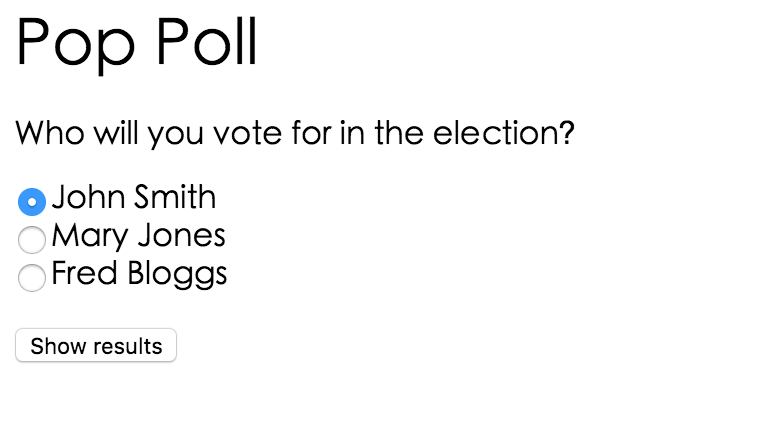
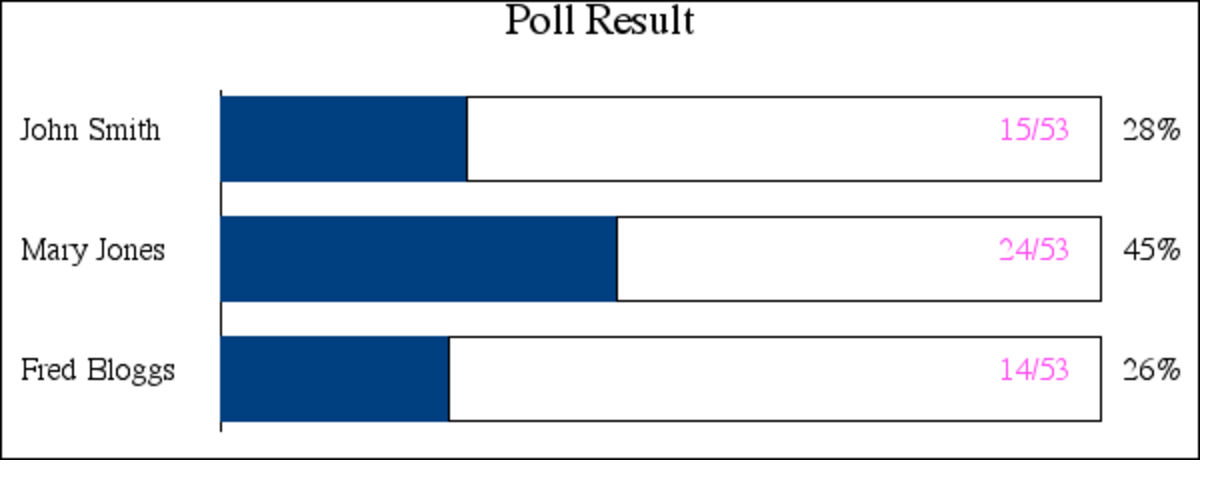
选择后,点击Show results 就成功绘制了表格
说明
本文只演示了GD的部分函数,查看全部函数和用法,点击这个网站http://php.net/manual/zh/ref.image.php
- 上一篇: PHP中 对象自动调用的方法:
- 下一篇: php页面的基本语法



