
pytest多进程多线程执行测试用例
- 作者: 五速梦信息网
- 时间: 2026年06月03日 13:35
前言:
单进程串行并行执行分布式场景分布式执行用例的原则:
- 用例之间是相互独立的,没有依赖关系,完全可以独立运行;
- 用例执行没有顺序要求,随机顺序都能正常执行;
- 每个用例都能重复运行,运行结果不会影响其他用例。
项目结构
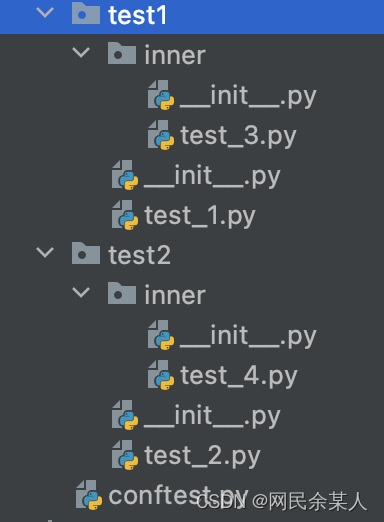
测试脚本
# test1/test_1.py

import time
def test1_test1():

	time.sleep(1)

	assert 1 == 1, "1==1"
def test1_test2():

	time.sleep(1)

	assert 1 == 1, "1==1"
class TestDemo1:

	def test_inner_1(self):

		time.sleep(1)

		assert 1 == 1, "1==1"
class TestDemo2:

	def test_inner_2(self):

		time.sleep(1)

		assert 1 == 1, "1==1"

# test1/inner/test_3.py

import time
def test3_test1():

	time.sleep(1)

	assert 1 == 1, "1==1"
def test3_test2():

	time.sleep(1)

	assert 1 == 1, "1==1"
# test2/test_2.py

import time
def test2_test1():

	time.sleep(1)

	assert 1 == 1, "1==1"
def test2_test2():

	time.sleep(1)

	assert 1 == 1, "1==1"
# test2/inner/test_3.py

import time
def test4_test1():

	time.sleep(1)

	assert 1 == 1, "1==1"
def test4_test2():

	time.sleep(1)

	assert 1 == 1, "1==1"
8.10s多进程执行用例之 pytest-xdist
多cpu并行执行用例,直接加个-n参数即可,后面num参数就是并行数量,比如num设置为3
pytest -v -n num
参数:
- -n auto : 自动侦测系统里的CPU数目
- -n num : 指定运行测试的处理器进程数
2.66spytest-xdist分布式测试的原理:
mini版pytest执行器pytest-xdist分布式测试的流程:
第一步:master创建worker
测试会话(test session)第二步:workers收集测试项用例
pytest执行器test collectionids第三步:master检测workers收集到的测试用例集
master接收到所有worker收集的测试用例集之后,master会进行一些完整性检查,以确保所有worker都收集到一样的测试用例集(包括顺序)。
如果检查通过,会将测试用例的ids列表转换成简单的索引列表,每个索引对应一个测试用例的在原来测试集中的位置。
这个方案可行的原因是:所有的节点都保存着相同的测试用例集。
并且使用这种方式可以节省带宽,因为master只需要告知workers需要执行的测试用例对应的索引,而不用告知完整的测试用例信息。
第四步:master分发测试用例
--dist=mode选项loadidspytest_xdist_make_schedulerfrom xdist.scheduler import LoadScopeScheduling
class CustomizeScheduler(LoadScopeScheduling):
def _split_scope(self, nodeid):
return nodeid.split("/", 1)[0]
def pytest_xdist_make_scheduler(config, log):
return CustomizeScheduler(config, log)
xdist.scheduler.LoadScopeScheduling_split_scopepytest_xdist_make_schedulerpytest -v -n 4 --dist=loadfile
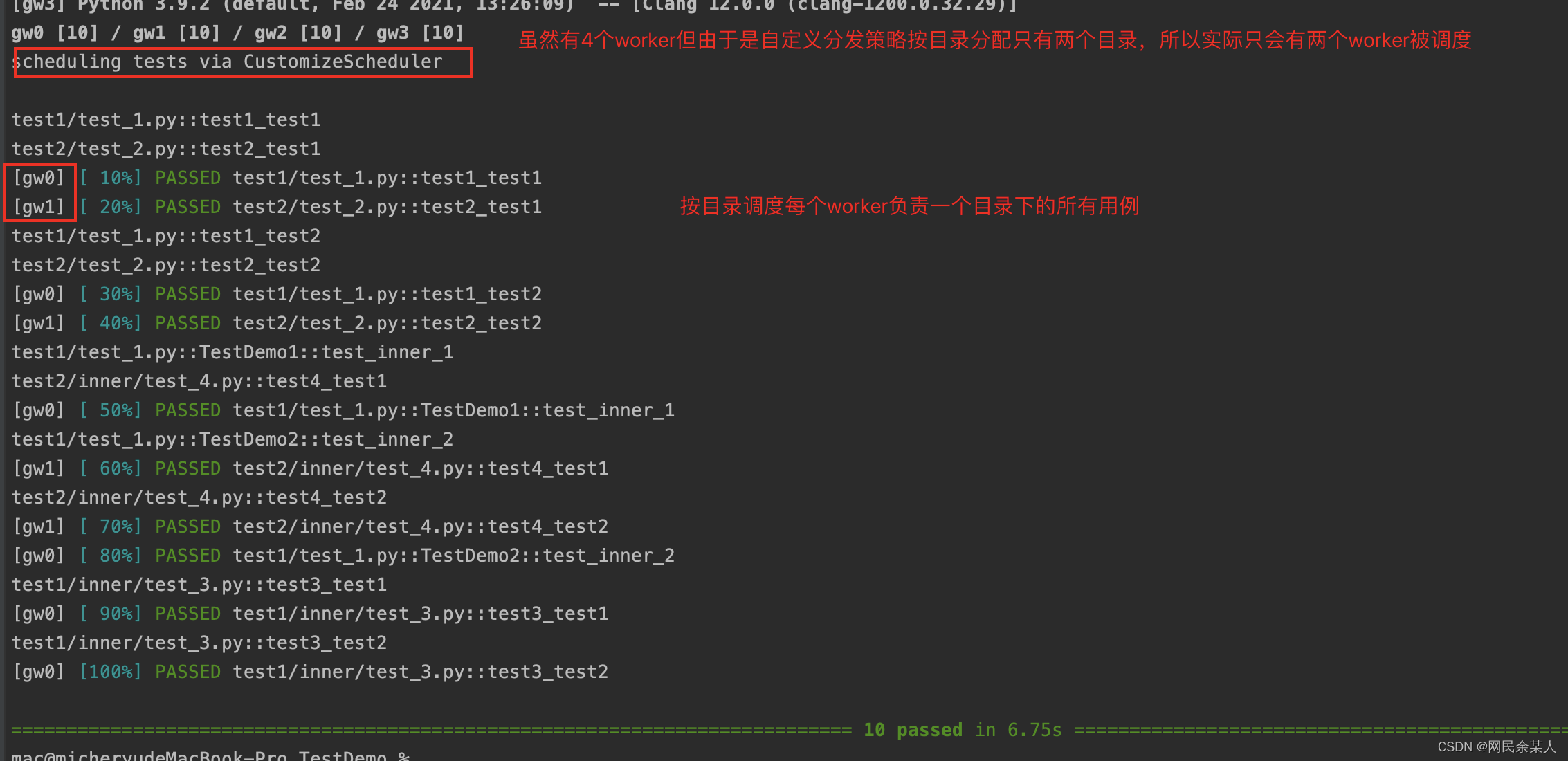
第五步:worker执行测试用例
pytest_runtestlooptest_sessionpytest_runtest_protocolpytest_runtest_protocol(item, nextitem)nextitempytest_runtest_protocolnextitemshutdownnextitemNonepytest_runtest_protocol第六步:测试结束
shutdownpytest hookspytest_runtest_logstartpytest_runtest_logreport注意:pytest-xdist 是让每个 worker 进程执行属于自己的测试用例集下的所有测试用例。这意味着在不同进程中,不同的测试用例可能会调用同一个 scope 范围级别较高(例如session)的 fixture,该 fixture 则会被执行多次,这不符合 scope=session 的预期。
pytest-xdist 没有内置的支持来确保会话范围的 fixture 仅执行一次,但是可以通过使用锁定文件进行进程间通信来实现;让scope=session 的 fixture 在 test session 中仅执行一次。
pip install filelockFileLockimport pytest
from filelock import FileLock
@pytest.fixture(scope="session")
def login(tmp_path_factory, worker_id):
# 代表是单机运行
if worker_id == "master":
token = str(random())
print("fixture:请求登录接口,获取token", token)
os.environ['token'] = token
return token
# 分布式运行
# 获取所有子节点共享的临时目录,无需修改【不可删除、修改】
root_tmp_dir = tmp_path_factory.getbasetemp().parent
fn = root_tmp_dir / "data.json"
with FileLock(str(fn) + ".lock"):
if fn.is_file(): # 代表已经有进程执行过该fixture
token = json.loads(fn.read_text())
else: # 代表该fixture第一次被执行
token = str(random())
fn.write_text(json.dumps(token))
# 最好将后续需要保留的数据存在某个地方,比如这里是os的环境变量
os.environ['token'] = token
return token
多线程执行用例之 pytest-parallel
并行并发pip install pytest-parallel
常用参数配置
--workers=n--tests-per-worker=n如果两个参数都配置了,就是进程并行;每个进程最多n个线程,总线程数:进程数*线程数
【注意】
if name == “main” :示例:
import pytest
def test_01():

    print('测试用例1操作')
def test_02():

    print('测试用例2操作')
def test_03():

    print('测试用例3操作')
def test_04():

    print('测试用例4操作')
def test_05():

    print('测试用例5操作')
def test_06():

    print('测试用例6操作')
def test_07():

    print('测试用例7操作')
def test_08():

    print('测试用例8操作')
if __name__ == "__main__":

    pytest.main(["-s", "test_b.py", '--workers=2', '--tests-per-worker=4'])
pytest-parallel与pytest-xdist对比说明:
- pytest-parallel 比 pytst-xdist 相对好用,功能支持多;
- pytst-xdist 不支持多线程;
- pytest-parallel 支持python3.6及以上版本,所以如果想做多进程并发在linux或者mac上做,在Windows上不起作用(Workers=1),如果做多线程linux/mac/windows平台都支持,进程数为workers的值。
- pytest-xdist适用场景为:
- 不是线程安全的
- 多线程时性能不佳的测试
- 需要状态隔离
- pytest-parallel对于某些用例(如 Selenium)更好:
- 可以是线程安全的
- 可以对 http 请求使用非阻塞 IO 来提高性能
pytest-xdistpytest-parallel- 上一篇: python + Pyglet
- 下一篇: pyspider 环境
相关文章
-
python + Pyglet
python + Pyglet
- 互联网
- 2026年06月03日
-
python · pytorch 丨 NN 训练常用代码存档
python · pytorch 丨 NN 训练常用代码存档
- 互联网
- 2026年06月03日
-
python 3 mysql sql逻辑查询语句执行顺序
python 3 mysql sql逻辑查询语句执行顺序
- 互联网
- 2026年06月03日
-
pyspider 环境
pyspider 环境
- 互联网
- 2026年06月03日
-
pyqt5实现自然语言处理模型
pyqt5实现自然语言处理模型
- 互联网
- 2026年06月03日
-
pyqt 子窗口x关闭代码
pyqt 子窗口x关闭代码
- 互联网
- 2026年06月03日



