
Redis容灾部署(哨兵Sentinel)
- 作者: 五速梦信息网
- 时间: 2026年06月03日 13:32
Redis容灾部署(哨兵Sentinel)
哨兵的作用
1. 监控:监控主从是否正常
2. 通知:出现问题时,可以通知相关人员
3. 故障迁移:自动主从切换
4. 统一的配置管理:连接者询问sentinel取得主从的地址
Raft分布式算法
a. CoreOS : 见下面
b. ectd : a distributed, consistent shared configuration
c. LogCabin : 分布式存储系统
d. redis sentinel : redis 的监控系统
Sentinel使用的Raft算法核心: 原则
1. 所有sentinel都有选举的领头羊的权利
2. 每个sentinel都会要求其他sentinel选举自己为领头羊(主要由发现redis客观下线的sentinel先发起选举)
3. 每个sentinel只有一次选举的机会
4. 采用先到先得的原则
5. 一旦加入到系统了,则不会自动清除(这一点很重要, why?)
6. 每个sentinel都有唯一的uid,不会因为重启而变更
7. 达到领头羊的条件是 N/2 + 1个sentinel选择了自己
8. 采用配置纪元,如果一次选举出现脑裂,则配置纪元会递增,进入下一次选举,所有sentinel都会处于统一配置纪元,以最新的为标准。
Raft算法核心: 可视图
Raft Visualization (算法演示)
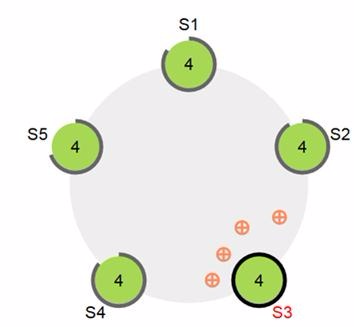
Raft分布式算法的应用
coreos:云计算新星 Docker 正在以火箭般的速度发展,与它相关的生态圈也渐入佳境,CoreOS 就是其中之一。CoreOS 是一个全新的、面向数据中心设计的 Linux 操作系统,在2014年7月发布了首个稳定版本,目前已经完成了800万美元的A轮融资。

Sentinel实现Redis容灾部署
三哨兵架构
[root@rocket sentinel]# tree
.
├── redis-cli
├── redis-sentinel
├── redis-server
├── sentinel1
│ ├── sentinel1.conf
│ └── sentinel1.log
├── sentinel2
│ ├── sentinel2.conf
│ └── sentinel2.log
└── sentinel3
├── sentinel3.conf
└── sentinel3.log
哨兵一配置sentinel1.conf
哨兵二配置sentinel2.conf
哨兵三配置sentinel3.conf
在sentinel中查看所监控的master和slave
[root@rocket sentinel]# ./redis-cli -p 26371
127.0.0.1:26371> SENTINEL masters
1) 1) "name"
2) "TestMaster"
3) "ip"
4) "127.0.0.1"
5) "port"
6) "7003"
7) "runid"
8) "de0896e3799706bda49cb92048776e233841e25d"
9) "flags"
10) "master"
127.0.0.1:26371> SENTINEL slaves TestMaster
1) 1) "name"
2) "127.0.0.1:8003"
3) "ip"
4) "127.0.0.1"
5) "port"
6) "8003"
7) "runid"
8) "9b2a75596c828d6d605cc8529e96edcf951de25d"
9) "flags"
10) "slave"
查看当前的master
127.0.0.1:26371> SENTINEL get-master-addr-by-name TestMaster
1) "127.0.0.1"
2) "7003"
停掉master,查看容灾切换情况
[root@rocket master]# ps axu|grep redis
root 24000 0.2 0.9 137356 9556 ? Ssl Jan12 0:30 ./redis-server *:7003
root 24240 0.2 0.7 137356 7504 ? Ssl Jan12 0:26 ./redis-server *:8003
root 24873 0.3 0.7 137356 7524 ? Ssl 01:31 0:25 ../redis-sentinel *:26371
root 24971 0.3 0.7 137356 7524 ? Ssl 01:33 0:25 ../redis-sentinel *:26372
root 24981 0.3 0.7 137356 7520 ? Ssl 01:33 0:25 ../redis-sentinel *:26373
root 24995 0.0 0.5 19404 5080 pts/2 S+ 01:34 0:00 ./redis-cli -p 26371
root 25969 0.0 0.0 103252 844 pts/0 S+ 03:33 0:00 grep redis
[root@rocket master]# kill -QUIT 24000
再查看master,发现已经master已经切换为原来的slave
127.0.0.1:26371> SENTINEL get-master-addr-by-name TestMaster
1) "127.0.0.1"
2) "8003"
查看sentinel日志
启动原来的master,发现变成了slave
[root@rocket master]# ./redis-server ./redis.conf
127.0.0.1:26371> SENTINEL slaves TestMaster
1) 1) "name"
2) "127.0.0.1:7003"
3) "ip"
4) "127.0.0.1"
5) "port"
6) "7003"
发现主从发生了对调。
sentinel自动发现
每个Sentinel 都订阅了被它监视的所有主服务器和从服务器的__sentinel__:hello 频道,查找之前未出现过的sentinel(looking for unknown sentinels)。当一个Sentinel 发现一个新的Sentinel 时,它会将新的Sentinel 添加到一个列表中,这个列表保存了Sentinel 已知的,监视同一个主服务器的所有其他Sentinel。
127.0.0.1:7003[1]> SUBSCRIBE __sentinel__:hello
Reading messages... (press Ctrl-C to quit)
1) "subscribe"
2) "__sentinel__:hello"
3) (integer) 1
1) "message"
2) "__sentinel__:hello"
3) "127.0.0.1,26373,7d919ccfb5752caf6812da2d0dba4ed0a528ceda,8436,TestMaster,127.0.0.1,7003,8436"
1) "message"
2) "__sentinel__:hello"
3) "127.0.0.1,26372,9eda79e93e6d1aa4541564ac28e3dc899d39e43b,8436,TestMaster,127.0.0.1,7003,8436"
1) "message"
2) "__sentinel__:hello"
3) "127.0.0.1,26371,8d63bebfbca9e1205a43bc13b52079de6015758e,8436,TestMaster,127.0.0.1,7003,8436"
- 上一篇: Redis入门 – Jedis存储Java对象
- 下一篇: redis配置认证密码



