TP5使用Composer安装phpofficephpspreadsheet,导出Excel文件
- 作者: 五速梦信息网
- 时间: 2026年06月03日 13:27
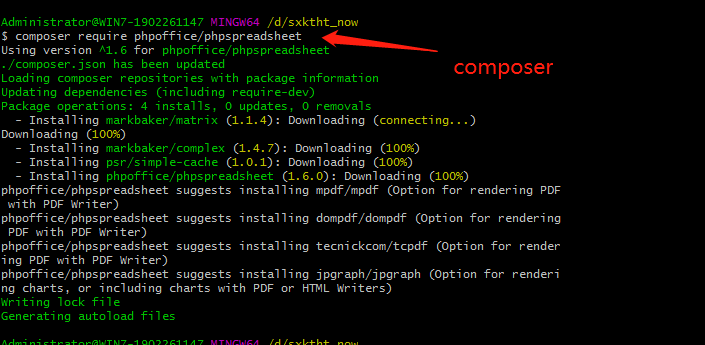
1、composer安装:
composer require phpoffice/phpspreadsheet
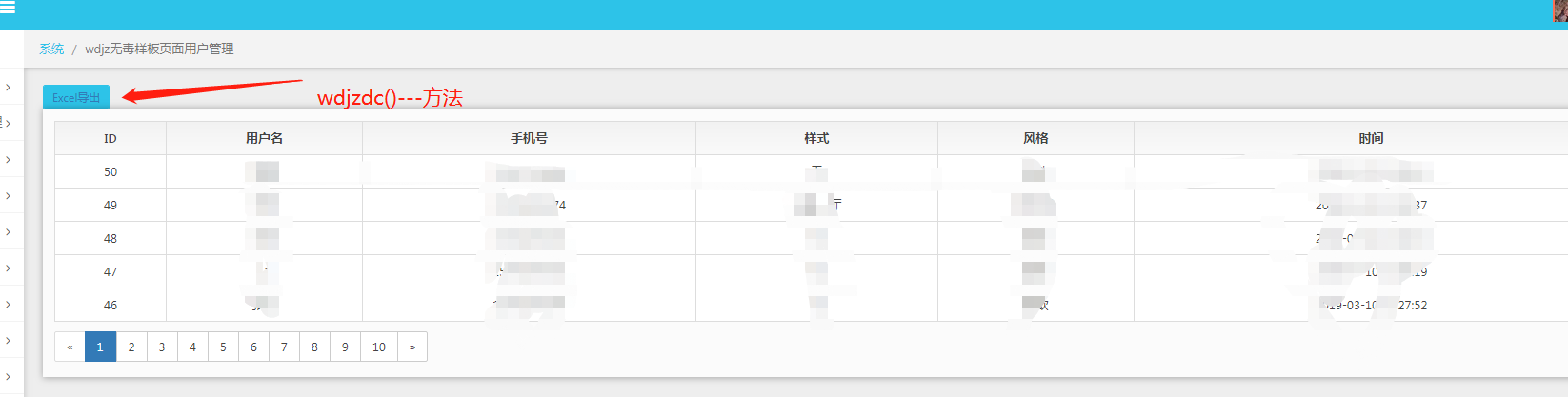
2.点击导出按钮,触发控制器里面的方法 wdjzdc()
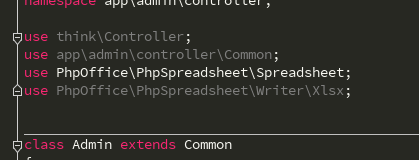
3. 在控制中引入
use PhpOffice\PhpSpreadsheet\Spreadsheet;

use PhpOffice\PhpSpreadsheet\Writer\Xlsx;
//wdjzdc数据导出

    public function wdjzdc()

    {

        $spreadsheet = new Spreadsheet();

        $worksheet = $spreadsheet->getActiveSheet();

//设置工作表标题名称

        $worksheet->setTitle('wdjz客户表');
//表头

//设置单元格内容

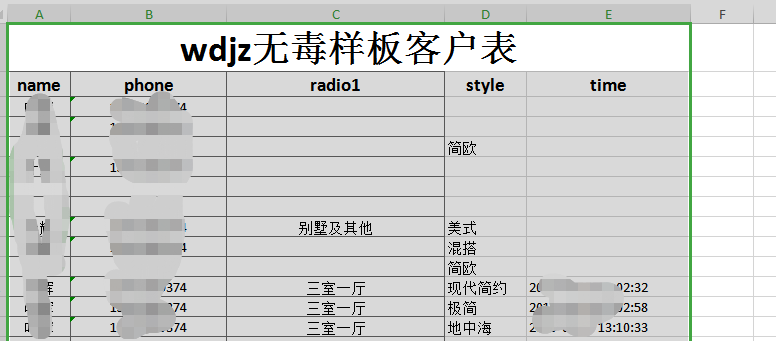
        $worksheet->setCellValueByColumnAndRow(1, 1, 'wdjz无毒样板客户表');

        $worksheet->setCellValueByColumnAndRow(1, 2, 'name');

        $worksheet->setCellValueByColumnAndRow(2, 2, 'phone');

        $worksheet->setCellValueByColumnAndRow(3, 2, 'radio1');

        $worksheet->setCellValueByColumnAndRow(4, 2, 'style');

        $worksheet->setCellValueByColumnAndRow(5, 2, 'time');
//合并单元格

        $worksheet->mergeCells('A1:E1');
$styleArray = [

            'font' => [

                'bold' => true

            ],

            'alignment' => [

                'horizontal' => \PhpOffice\PhpSpreadsheet\Style\Alignment::HORIZONTAL_CENTER,

            ],

        ];

//设置单元格样式

        $worksheet->getStyle('A1')->applyFromArray($styleArray)->getFont()->setSize(28);
$worksheet->getStyle('A2:E2')->applyFromArray($styleArray)->getFont()->setSize(14);

        ;

        $jzInfo = db('wdjz')->select();

        $len = count($jzInfo);

        $j = 0;

        for ($i=0; $i < $len; $i++) {

            $j = $i + 3; //从表格第3行开始
$worksheet->setCellValueByColumnAndRow(1, $j, $jzInfo[$i]['name']);

            $worksheet->setCellValueByColumnAndRow(2, $j, $jzInfo[$i]['phone']);

            $worksheet->setCellValueByColumnAndRow(3, $j, $jzInfo[$i]['radio1']);

            $worksheet->setCellValueByColumnAndRow(4, $j, $jzInfo[$i]['style']);

            $worksheet->setCellValueByColumnAndRow(5, $j, $jzInfo[$i]['time']);

        }
$styleArrayBody = [

            'borders' => [

                'allBorders' => [

                    'borderStyle' => \PhpOffice\PhpSpreadsheet\Style\Border::BORDER_THIN,

                    'color' => ['argb' => '666666'],

                ],

            ],

            'alignment' => [

                'horizontal' => \PhpOffice\PhpSpreadsheet\Style\Alignment::HORIZONTAL_CENTER,

            ],

        ];

        $total_jzInfo = $len + 2;

//添加所有边框/居中

        $worksheet->getStyle('A1:C'.$total_jzInfo)->applyFromArray($styleArrayBody);
$filename = 'wdjz无毒样板客户表.xlsx';

        header('Content-Type: application/vnd.openxmlformats-officedocument.spreadsheetml.sheet');

        header('Content-Disposition: attachment;filename="'.$filename.'"');

        header('Cache-Control: max-age=0');
$writer = \PhpOffice\PhpSpreadsheet\IOFactory::createWriter($spreadsheet, 'Xlsx');

        $writer->save('php://output');

    }
-----------------------------------摘取大神文档---------------------------------------------------------------------
1.设置表头
首先我们引入自动加载PhpSpreadsheet库,然后实例化,设置工作表标题名称为:学生成绩表,接着设置表头内容。表头分为两行,第一行是表格的名称,第二行数表格列名称。最后我们将第一行单元格进行合并,并设置表头内容样式:字体、对齐方式等。
require 'vendor/autoload.php';
use PhpOffice\PhpSpreadsheet\Spreadsheet;

use PhpOffice\PhpSpreadsheet\Writer\Xlsx;
include('conn.php'); //连接数据库
$spreadsheet = new Spreadsheet();

$worksheet = $spreadsheet->getActiveSheet();

//设置工作表标题名称

$worksheet->setTitle('学生成绩表');
//表头

//设置单元格内容

$worksheet->setCellValueByColumnAndRow(1, 1, '学生成绩表');

$worksheet->setCellValueByColumnAndRow(1, 2, '姓名');

$worksheet->setCellValueByColumnAndRow(2, 2, '语文');

$worksheet->setCellValueByColumnAndRow(3, 2, '数学');

$worksheet->setCellValueByColumnAndRow(4, 2, '外语');

$worksheet->setCellValueByColumnAndRow(5, 2, '总分');
//合并单元格

$worksheet->mergeCells('A1:E1');
$styleArray = [

    'font' => [

        'bold' => true

    ],

    'alignment' => [

        'horizontal' => \PhpOffice\PhpSpreadsheet\Style\Alignment::HORIZONTAL_CENTER,

    ],

];

//设置单元格样式

$worksheet->getStyle('A1')->applyFromArray($styleArray)->getFont()->setSize(28);
$worksheet->getStyle('A2:E2')->applyFromArray($styleArray)->getFont()->setSize(14);
2.读取数据
for然后,我们设置整个表格样式,给表格加上边框,并且居中对齐。
$sql = "SELECT id,name,chinese,maths,english FROM `t_student`";

$stmt = $db->query($sql);

$rows = $stmt->fetchAll(PDO::FETCH_ASSOC);

$len = count($rows);

$j = 0;

for ($i=0; $i < $len; $i++) {

    $j = $i + 3; //从表格第3行开始

    $worksheet->setCellValueByColumnAndRow(1, $j, $rows[$i]['name']);

    $worksheet->setCellValueByColumnAndRow(2, $j, $rows[$i]['chinese']);

    $worksheet->setCellValueByColumnAndRow(3, $j, $rows[$i]['maths']);

    $worksheet->setCellValueByColumnAndRow(4, $j, $rows[$i]['english']);

    $worksheet->setCellValueByColumnAndRow(5, $j, $rows[$i]['chinese'] + $rows[$i]['maths'] + $rows[$i]['english']);

}
$styleArrayBody = [

    'borders' => [

        'allBorders' => [

            'borderStyle' => \PhpOffice\PhpSpreadsheet\Style\Border::BORDER_THIN,

            'color' => ['argb' => '666666'],

        ],

    ],

    'alignment' => [

        'horizontal' => \PhpOffice\PhpSpreadsheet\Style\Alignment::HORIZONTAL_CENTER,

    ],

];

$total_rows = $len + 2;

//添加所有边框/居中

$worksheet->getStyle('A1:E'.$total_rows)->applyFromArray($styleArrayBody);
如果仅是为了满足文章开头说的老板的需求,我们这个时候就可以将数据保存为Excel文件,当然这个Excel文件只保存在服务器上,然后再使用邮件等方式将Excel发送给老板就结了。
但是我们更多的应用场景是用户直接将数据下载导出为Excel表格文件,请接着看:
3.下载保存
最后,我们强制浏览器下载数据并保存为Excel文件。
$filename = '成绩表.xlsx';

header('Content-Type: application/vnd.openxmlformats-officedocument.spreadsheetml.sheet');

header('Content-Disposition: attachment;filename="'.$filename.'"');

header('Cache-Control: max-age=0');
$writer = \PhpOffice\PhpSpreadsheet\IOFactory::createWriter($spreadsheet, 'Xlsx');

$writer->save('php://output');
.xls$filename = '成绩表.xlsx';
header('Content-Type: application/vnd.ms-excel');
header('Content-Disposition: attachment;filename="'.$filename.'"');
header('Cache-Control: max-age=0'); $writer = \PhpOffice\PhpSpreadsheet\IOFactory::createWriter($spreadsheet, 'xls');
$writer->save('php://output');
PhpSpreadsheet提供了很多选项设置,接下来的文章我会专门介绍有关生成Excel的设置,如样式:字体、对齐、颜色、行高于列宽,合并与拆分、图片、日期时间、换行、函数使用等等。敬请关注。
- 上一篇: tp6 ueditor编辑器
- 下一篇: tp5命令行基础介绍
相关文章
-
tp6 ueditor编辑器
tp6 ueditor编辑器
- 互联网
- 2026年06月03日
-

TreeView树形控件递归绑定数据库里的数据
TreeView树形控件递归绑定数据库里的数据
- 互联网
- 2026年06月03日
-
trim()函数 mysql中的强大字符串过滤函数
trim()函数 mysql中的强大字符串过滤函数
- 互联网
- 2026年06月03日
-

tp5命令行基础介绍
tp5命令行基础介绍
- 互联网
- 2026年06月03日
-

Tosca 添加 modules,添加Library,引用重复步骤
Tosca 添加 modules,添加Library,引用重复步骤
- 互联网
- 2026年06月03日
-

TortoiseGit与github实现项目的上传
TortoiseGit与github实现项目的上传
- 互联网
- 2026年06月03日