macOS和Windows下MySQLRedis数据库安装与启动
- 作者: 五速梦信息网
- 时间: 2026年06月19日 04:40
macOS
如果你使用的是 macOS 操作系统,安装 MySQL 和 Redis 数据库将变得非常简单,只需要一行命令即可。
MySQL
安装 MySQL:
$ brew install mysql
查看是否安装成功:
$ mysql --version
mysql  Ver 9.2.0 for macos13.7 on x86_64 (Homebrew)
启动 MySQL:
$ brew services start mysql
==> Successfully started `mysql` (label: homebrew.mxcl.mysql)
连接 MySQL 数据库:
$ mysql -u root -p
退出 MySQL 终端:
mysql> exit
Bye
停止数据库:
$ brew services stop mysql
Stopping `mysql`... (might take a while)
==> Successfully stopped `mysql` (label: homebrew.mxcl.mysql)
Redis
得益于 macOS 的 Homebrew 软件包管理器,Redis 数据库的安装和启动和 MySQL 一样简单。 安装 Redis:
$ brew install redis
查看 Redis 是否安装成功:
$ redis-cli --version
redis-cli 7.2.7
启动 Redis:
$ brew services start redis
==> Successfully started `redis` (label: homebrew.mxcl.redis)
验证是否启动成功:
$ redis-cli
127.0.0.1:6379> ping
PONG
127.0.0.1:6379>
退出 Redis 终端:
127.0.0.1:6379> exit
停止 Redis:
$ brew services stop redis
Stopping `redis`... (might take a while)
==> Successfully stopped `redis` (label: homebrew.mxcl.redis)
Windows
如果你使用的是 Windows 操作系统,你需要先下载 MySQL 和 Redis 对应的软件包。
MySQL
下载软件包:https://downloads.mysql.com/archives/installer/
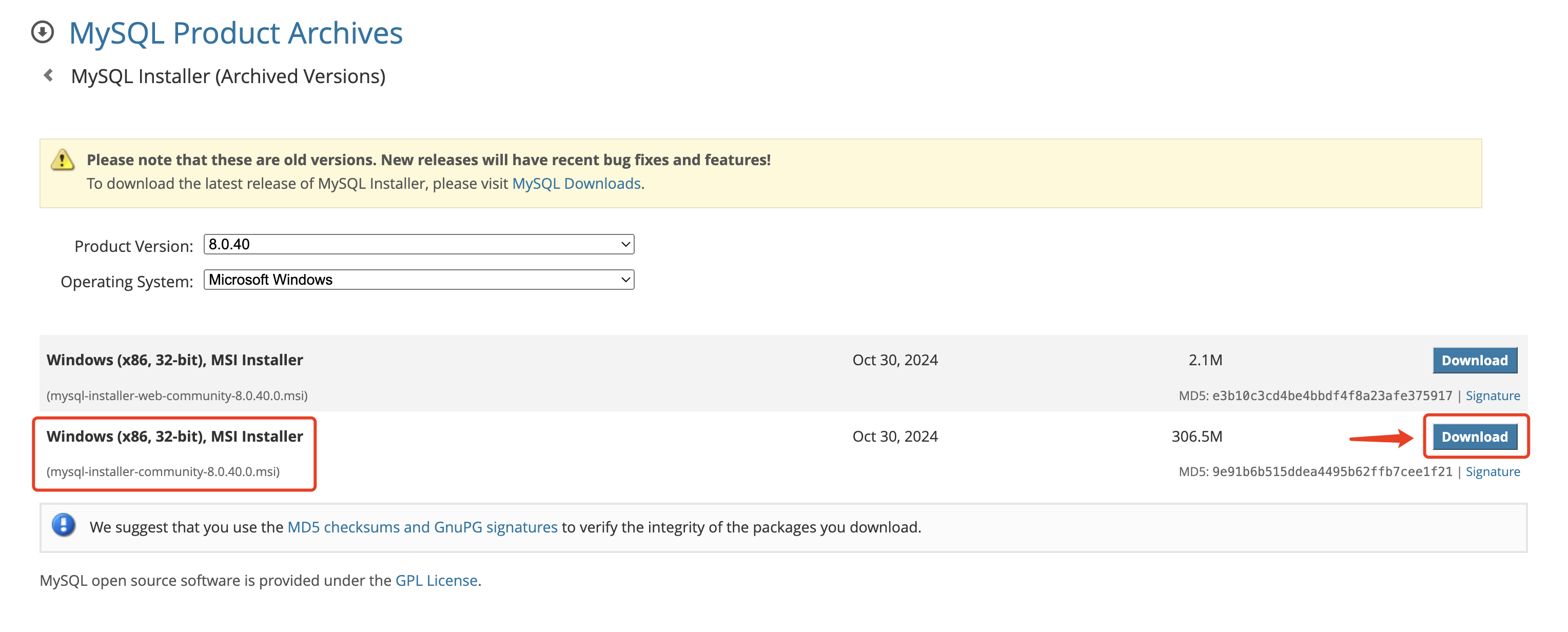 点击文件:
点击文件:mysql-installer-community-8.0.40.0.msi 进行安装。
安装完成之后,在终端中执行以下命令连接数据库。
$ mysql -u root -p
Redis
下载软件包:https://github.com/redis-windows/redis-windows/releases
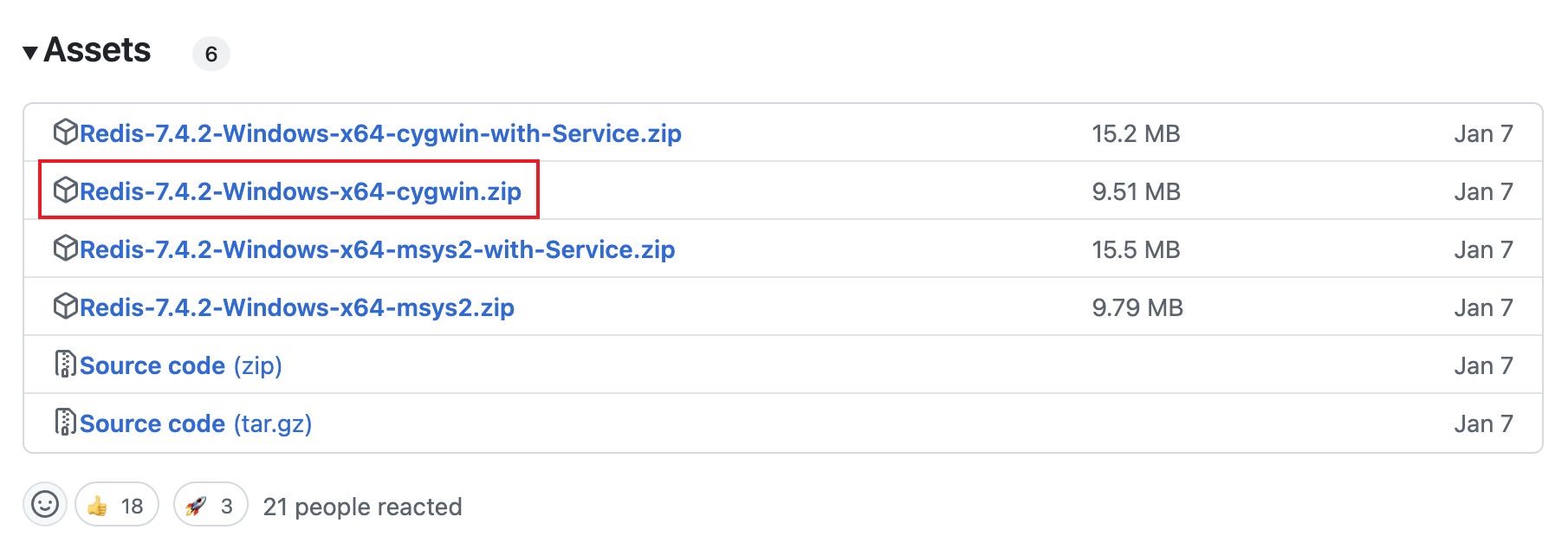 将文件:
将文件:Redis-7.4.2-Windows-x64-cygwin.zip 进行解压。
点击文件:redis-server.exe 即可启动 Redis,不需要安装。
往期文章
TinyPro Vue v1.1.0 正式发布:增加细粒度权限管理、页签模式、多级菜单,支持 Webpack/Vite/Rspack/Farm 多种构建工具
TinyEditor v3.25.0 正式发布!2025年第一个版本,增加标题列表导航、分隔线、多图多文件上传等实用特性
附录:MySQL 数据库基本操作
显示所有数据库:
mysql> show databases;
+--------------------+
| Database           |
+--------------------+
| demo_tiny_pro      |
| information_schema |
| mysql              |
| order_sys          |
| performance_schema |
| sys                |
+--------------------+
6 rows in set (0.09 sec)
创建数据库:
mysql> create database order_sys;
Query OK, 1 row affected (0.01 sec)
删除数据库:
mysql> drop database order_sys;
Query OK, 0 rows affected (0.01 sec)
使用数据库:
mysql> use order_sys;
Reading table information for completion of table and column names
You can turn off this feature to get a quicker startup with -A
Database changed
显示当前数据库下的所有数据表:
mysql> show tables;
+---------------------+
| Tables_in_order_sys |
+---------------------+
| lang                |
| menu                |
| order               |
| permission          |
| role                |
| role_menu           |
| role_permission     |
| user                |
| user_role           |
+---------------------+
9 rows in set (0.00 sec)
从数据表中查询数据:
mysql> select id,name from menu;
+----+---------------+
| id | name          |
+----+---------------+
|  1 | Board         |
|  2 | Home          |
|  3 | Work          |
|  4 | List          |
|  5 | Table         |
|  6 | Form          |
|  7 | Base          |
|  8 | Step          |
|  9 | Profile       |
| 10 | Detail        |
+----+---------------+
10 rows in set (0.00 sec)
相关文章
-
lol怎么升级快(lol小号怎么升级快)
lol怎么升级快(lol小号怎么升级快)
- 互联网
- 2026年06月19日
-
LM Studio:本地开发和实验 LLM 的桌面应用使用指南
LM Studio:本地开发和实验 LLM 的桌面应用使用指南
- 互联网
- 2026年06月19日
-
Linux系统中的软件管理:工具、仓库与安装方式
Linux系统中的软件管理:工具、仓库与安装方式
- 互联网
- 2026年06月19日
-
mac恢复文件!(Mac电脑怎么恢复电脑里删除的文件?)
mac恢复文件!(Mac电脑怎么恢复电脑里删除的文件?)
- 互联网
- 2026年06月19日
-
Magick.NET 支持100多种格式的强大 .NET 图片处理库
Magick.NET 支持100多种格式的强大 .NET 图片处理库
- 互联网
- 2026年06月19日
-
manim 动画效果总结
manim 动画效果总结
- 互联网
- 2026年06月19日